

Associate III
January 25, 2024
Solved

Include files help.

  • January 25, 2024
  • 1 reply
  • 2701 views

I have a source folder named components where each subfolder has a .c and a .h file, see screenshot below.

I am trying to include these files, but they cannot be found. So far, I know that I should add the relative path and so I did. (I also tried to replace the ../ with the ./ in the #include). 

How to solve? 
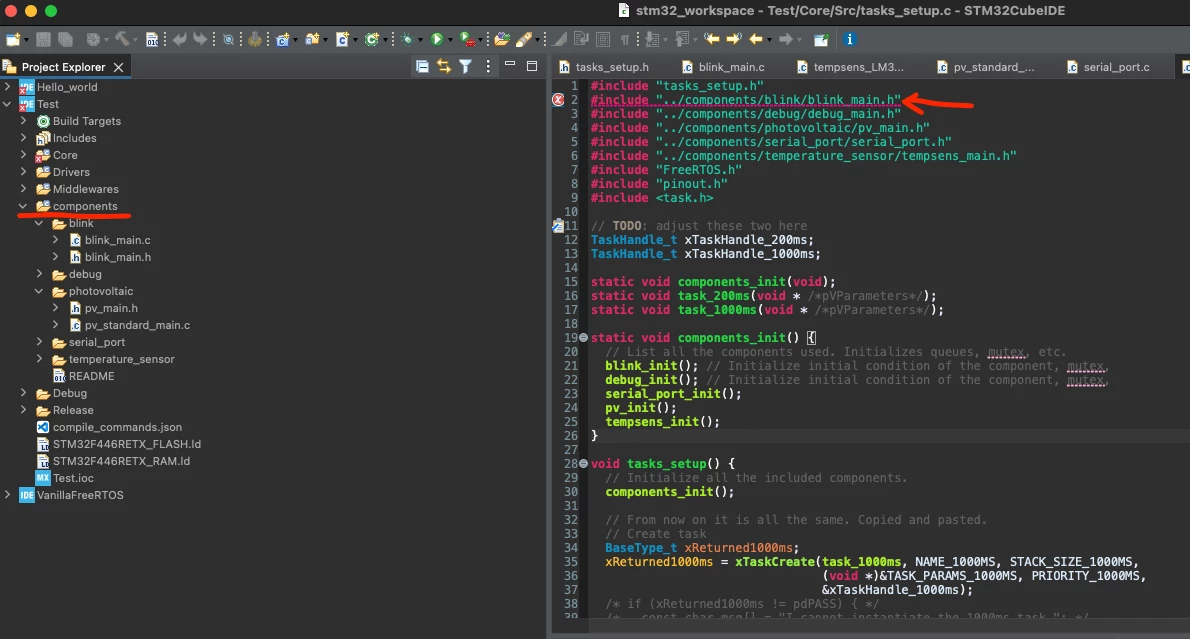
ubaldot_0-1706174213811.png


    This topic has been closed for replies.
    Best answer by ubaldot

    Solution:


    Project -> Properties -> C/C++ Build -> Settings -> MCU GCC Compiler -> Include paths and I added ../components

    At this point, I can include the headers inside the components folder with e.g.


    #include "blink/blink_main.h" 


    1 reply

    ubaldotAuthorBest answer
    Associate III
    January 25, 2024

    Solution:


    Project -> Properties -> C/C++ Build -> Settings -> MCU GCC Compiler -> Include paths and I added ../components

    At this point, I can include the headers inside the components folder with e.g.


    #include "blink/blink_main.h" 


    Andrew Neil
    Super User
    January 25, 2024

    Note that you can also specify a folder as an Include Path by right-clicking in the Project Explorer:

    https://community.st.com/t5/stm32cubeide-mcus/cmsis-dsp-and-stm32cubeide/m-p/630989/highlight/true#M23664

    AndrewNeil_0-1706179013652.png


    A complex system that works is invariably found to have evolved from a simple system that worked.A complex system designed from scratch never works and cannot be patched up to make it work.