

SSeo.17
Associate III
August 19, 2021
Question

In STM32CubeIDE, There are ? mark on left side of line number.
  • August 19, 2021
  • 4 replies
  • 2678 views

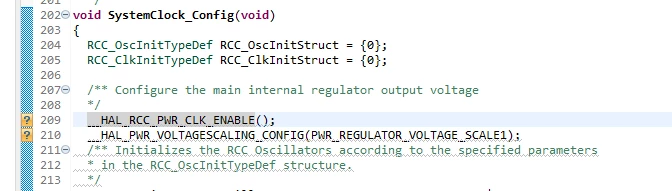
0693W00000Dpl9OQAR.pngThere are ? mark on source file.

and when mouse placed there, they say "bad character sequence encounter : \" .

How can i clear ? mark and error message?

(MCU type is STM32F427)

This topic has been closed for replies.

4 replies

Peter BENSCH
Technical Moderator
August 19, 2021

Both statements are macros that are likely to cause this problem.

Please check whether you can access their definitions, e.g. with F3. The macros should be located in stm32f4xx_hal_rcc.h or stm32f4xx_hal_pwr_ex.h.

Regards

/Peter

In order to give better visibility on the answered topics, please click on Accept as Solution on the reply which solved your issue or answered your question.
SSeo.17
SSeo.17Author
Associate III
August 19, 2021

Thank you for your reply.

um...

I can access those 2 lines macro with F3 key.

By the way,

'?' are cleared by changing following option.

preference >> general >> editors >> text editors >> Annotations

Vertical Ruler ---> unchecked

Overview Ruler ---> unchecked.

thank you again.

Best regards.

Peter BENSCH
Technical Moderator
August 19, 2021

Interesting because it's just the text editor whose options you changed there.

With which annotation type did you switch that: Bookmark, Breakpoints, ... Warnings?

Regards

/Peter

In order to give better visibility on the answered topics, please click on Accept as Solution on the reply which solved your issue or answered your question.
SSeo.17
SSeo.17Author
Associate III
August 20, 2021

Hi, Peter.

When I press F2 key , a message window appears with a ICON; 

If click the icon, the Annotation window is displayed. 

I have lifted the check points mentioned yesterday there.

I don't understand what you meant by Breakpoint and Bookmark you mentioned. However, as shown in the attached picture, the message 'Add a breakpoint' was displayed.

Please refer to the 3 picture below.

0693W00000DpsikQAB.png 

0693W00000DpsiuQAB.png 

0693W00000DpsizQAB.png 

Regards.

Peter BENSCH
Technical Moderator
August 20, 2021

I meant exactly this menu Annotations, to which you indicated the path. It is also reachable from the Eclipse main screen by

Window > Preferences > General > Editors > Text Editors > Annotations

However, you forgot to mention the Annotation Type, where you changed some settings, which can also be seen on your screenshot: C/C++ Index Markers.

Anyway, this setting was most likely not the cause of the question marks, but rather the lack of or incomplete indexing.

Regards

/Peter

In order to give better visibility on the answered topics, please click on Accept as Solution on the reply which solved your issue or answered your question.