


wb0gaz
Associate III
Oct 27, 2026 7:25 PM UTC
Solved

In STM32CubeIDE, how do I specify a linked folder target that is relative to the current project, not absolute?

I’ve split my project (called MONITOR-2025-A) in my workspace to two folders, the second folder containing files that will be common among multiple projects (both folders share the same parent, which is the workspace).

I’ve used Linked Folder mechanism in STM32CubeIDE to set this up, and the project builds successfully, however, the default method of specifying the shared folder location is an absolute path.

I wish the shared folder’s path to be relative to the referring project folder - this posting seeks help for how to specify a relative path in the “Edit Link Location” dialog box.

Screen grab “edit link location” using the default method of navigating to the shared folder (project builds but is not portable):
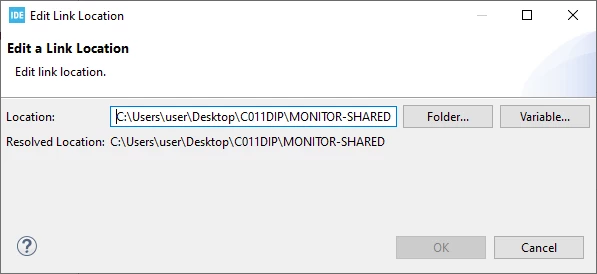
Absolute path to shared folder (not portable when copying workspace to other computer)

Screen grab of the same dialog except I am trying to specify a path that is relative to the current (referring) project (if successful, the pair of folders could be moved to other root path without editing this field each time):
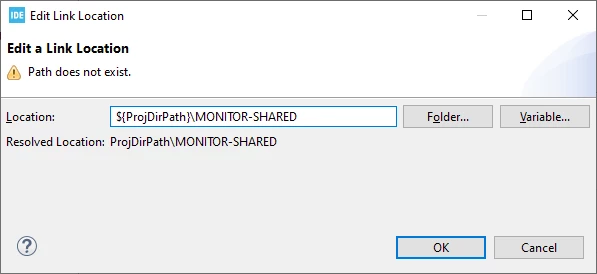
Attempt to create relative path (with shared folder as a “peer” to the referring project folder)

Is there a correct syntax for the Location: input field that avoids use of an absolute path?

Thanks for any advice,and happy to provide any requested clarifying information!

Dave

Pavel A.
Pavel A.Best answer
Oct 27, 2026 9:04 PM UTC

Yep. Sadly, Eclipse has different syntax for “linked resources” in .project file and CDT-specific path macros in .cproject file. So annoying.


2 replies

wb0gaz
wb0gazAuthor
Associate III
Oct 27, 2026 7:45 PM UTC

Found the solution to this shortly after the initial posting:

The location I had specified as

$(ProjDirPath)\MONITOR-SHARED

should correctly (in this case) be written as:

${PARENT-1-PROJECT_LOC}\MONITOR-SHARED

I didn’t realize until I tried further that the “Edit a Link Location” dialog box rendersthe input path as “Resolved Location” just below, so I was able to experiment until I found a syntax that generated a working path (that bit of detail in the dialog box code is much appreciated!)

At this point I’ll try to mark this inqury as closed.


Pavel A.
Pavel A.Best answer
Oct 27, 2026 9:04 PM UTC

Yep. Sadly, Eclipse has different syntax for “linked resources” in .project file and CDT-specific path macros in .cproject file. So annoying.