


DS.4
Senior
May 9, 2021
Question

IDE different view to BLE files, no .h files
0693W00000ANmG8QAL.png 

Using FreeRTOS heart rate example VS Custom sequencer example

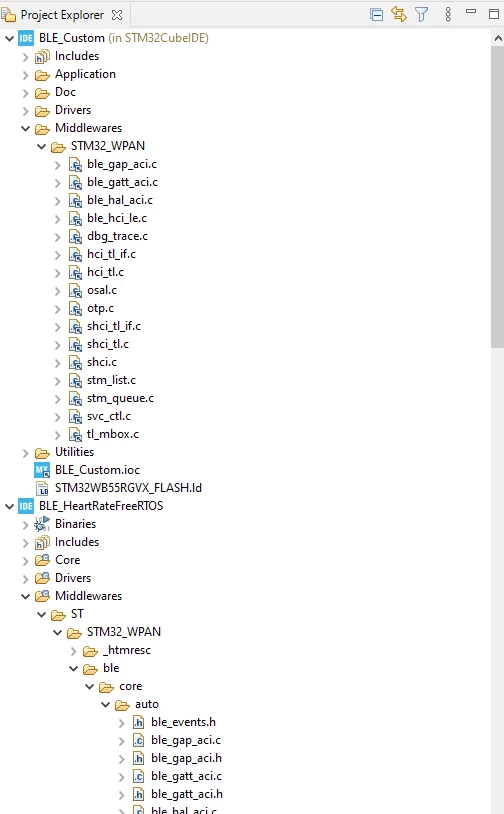
Difference in middleware BLEfiles structure in CubeIDE .

Image attached.

The NO RTOS project shows all BLE files 'togehter' , without .h files

The RTOS project keeps them in the original file structure.

How can I see the .h files in IDE? 

Is there a way to sync then to same view?

This topic has been closed for replies.

3 replies

mattias norlander
ST Technical Moderator
May 10, 2021

Hi @Community member​,

Some questions:

  • Which board?
  • Which exact firmware version?
  • How exactly did you import the project? Did you go: File > New > STM32 Project > Example browser > ... select the project and import?...

If I try the same with the STM32Cube_FW_WB_V1.11.1 and the board: P-NUCLEO-WB55.Nucleo, then I do not get the same result for the BLE_HeartRateFreeRTOS example. For me I do not get any h-files. And all files are linked as indicated by the small "arrow decorator" in the bottom-right corner of each file icon.

In general h-files are not listed as part of the example project in the .project-files. Therefore they are not visible in the project tree structure. h-file directories are typically only setup as include directories to the compiler. So, to me, this is "almost" working as expected...

In order to give better visibility on the answered topics, please click on 'Best answer' on the reply which solved your issue or answered your question.
DS.4
DS.4Author
Senior
May 24, 2021

I started the process in the CubeMx exmaple, later, generating code for IDE.

It will produce a different view in the IDE.

Cartu38 OpenDev
Graduate II
May 24, 2021

Most probably you have to take care to project root mode you're relying on.

STM32Cube example are so called 'non under root' (because sources are shared across multiple IDEs (IAR, Keil, STM32CubeIDE, ..))

If creating a project from scratch relying on STM32CubeMX you can select between 'non under root' or 'under root' mode

0693W00000APQOTQA5.jpg 

If creating a project from scratch relying on STM32CubeIDE no choice your project will be 'under root'

As 'under root' and 'non under root' structure are not same you cannot mix them. Initiating a project relying on one mode is final choice.

If example, 'non under root' mode so .h files are not part of project root so not "visible" by default if IDE project tree. You can access them thru include shortcuts

0693W00000APQPvQAP.jpg