STork.1
Associate III
October 23, 2020
Solved

I have installed STM32 IDE on windows 10 , I wanna build a very simple code, LED blink but I can not build the project and run it ... can you please help me ?

  • October 23, 2020
  • 11 replies
  • 2696 views

..

This topic has been closed for replies.
Best answer by Cartu38 OpenDev

Ok. Not sure to fully understand all your description but some guess based on.

High level summary I would reply: no bug here but maybe confusing ST material related a bit to such complex devices (multi cpus so multi projects).

Let me add some explanations then.

1) My guess is you're facing this kind of project view:
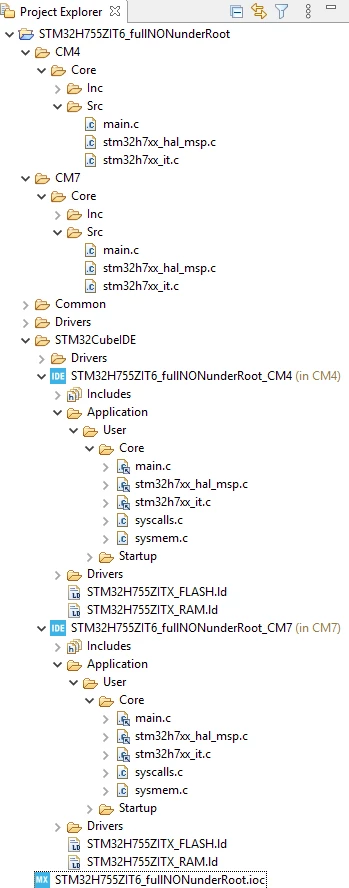
0693W000005AVJnQAO.png2) Assuming my guess is right here is same snapshot but adding some annotations to:
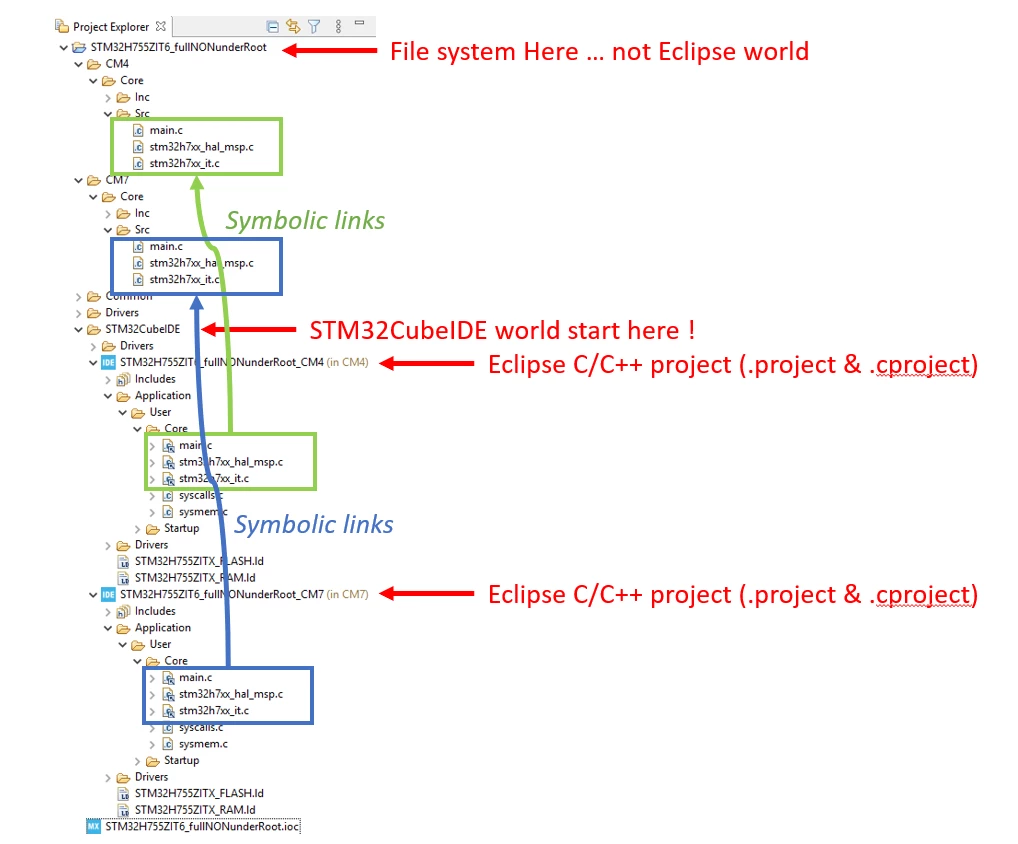
0693W000005AVKRQA4.pngHere we are able to see main.c duplication you're refering to. Duplication is from UI point of view but looking at file system you may get only one main.c per cpu what's sounds reasonable. Dupes are related to symoblic links usage ... takes care to small back arrows which are overlaid on some file with your project tree ...

Based on such behavior you're reporting about some directories allowing compile process trigger, some others not is fully explained and common / expected behavior:

+ Directories not allowing to trigger compile process are in fact pure file system folders not being managed / understood by Eclipse at all (because no Eclipse metadata inside)

 + Directories allowing to trigger compile process are in fact not only pure file system folders but Eclipse projects (some Eclipse metadata inside like .project & .cproject files)

3) Then you may say all such is quiet weird but hopefully some way to get better look'n feel. You've to take care importing your project.
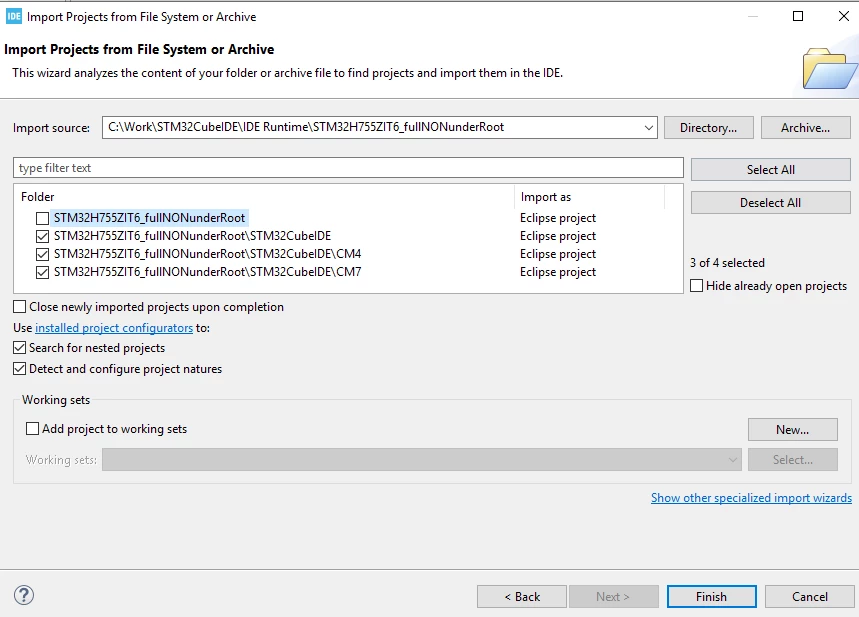
0693W000005AVZqQAO.pngTaking care to not import first element (i.e. file system project root) you're already getting a more user friendly view preventing dupes:
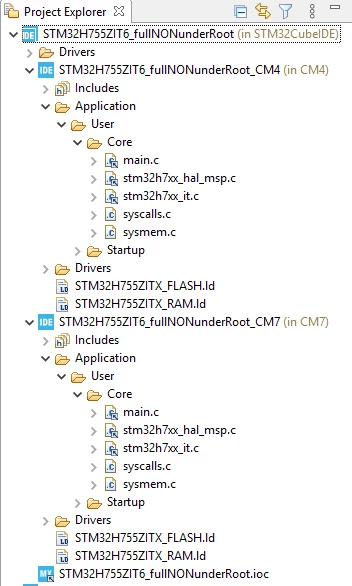
0693W000005AVbIQAW.png 

4) My latest guess is you're facing all such either because relying on one of following workflow

+ Having imported project from a STM32CubeMX stand alone tool project creation process unchecking "Generate Under Root" option.

+ Having imported an STM32Cube example project from a firmware pack

+ Having taken as reference doing q copy or ... for your own dev. one of 2 previous proposals

To confirm let's open your .ioc file you may see:
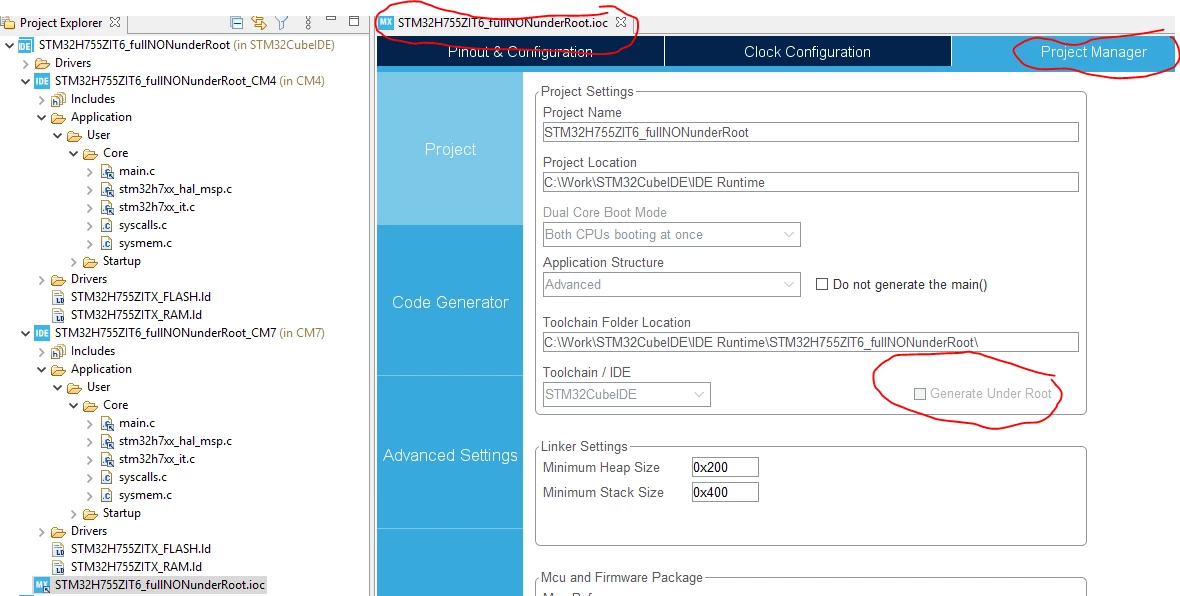
0693W000005AVfUQAW.png 

STM32Cube examples are all generated having such "Generate Under Root" option unchecked.

5) As conlusion:

According to me I would adivice you to always rely on Generate Under Root" option checked. It will make your life easier I think.

Such is by the way STM32CubeIDE default setting creating a project from its context.

Let me know if helpful to you (are my guesses right ?). If helpful please tag as answered ... will help community.


11 replies

TDK
October 23, 2020

You need to give us something to work with. Why can't you build the project an run it? Can you load the project okay? Does it build? Does it download? Does it run? Where in the process are you getting stuck and what is the error message? Screenshots help.

"If you feel a post has answered your question, please click ""Accept as Solution""."
STork.1
STork.1Author
Associate III
October 23, 2020

Sorry If my question is not included all details I am just a beginner. well, I wrote a simple code according to available examples on the Digi key's channel on Youtube. when I click on the project, build project is not activated.... the compiler doesn't build the project and consequently I can not debug or run the project..... . that is very strange that I can not even run and debug a very simple code!!

STork.1
STork.1Author
Associate III
October 23, 2020

since build the project is unbaled, I clicked on build all, and then this error was shown:

An internal error occurred during: "Launching ADXL355_SPI_Timer".

java.lang.NullPointerException

MM..1
Super User
October 24, 2020

How you create project in workspace? Recommended is in empty workspace use right click in project explorer and click NEW-STM32 Project

then choice mcu .... maybe download firmware ...

In generated use ioc file and generate code

then add to main

At this point you can right click on project explorer and build project

Next step is create debug configuration and load to board

STork.1
STork.1Author
Associate III
October 27, 2020

I created the project exactly the same.... but I can not build the project. when I click on the project, then, I wanna choose build project , when I click on it, nothing happens, the project is not built. When I also write click on the project and select debug or run, nothing happens.

I am sure that the way I created the project is correct because I was able to build the previous projects, run and debug them before. Recently, when I create a new project, I can not build it .... very strange

Cartu38 OpenDev
Graduate II
October 28, 2020

@STork.1​  any console log to share ? If build is not initiated either some messages as part of console or even not able to trigger a build (selecting your project from Project Explorer Tree view is toolbar hammer icon enable ?) ?

STork.1
STork.1Author
Associate III
November 5, 2020

thank you for your reply and sorry if I reply late. the problem is solved. I work with STM32H755ZIT6, a dual core MCU. main.c can be open from 2 directory. when I open it from the root directory of the project, it can not be built but, when I open main.c from the CM7 directory, it can be built. another reason was that when numerous projects are open at the same time, the corresponding main.c file of the project can not be build... it seems that is a bug of the IDE.

Cartu38 OpenDev
Cartu38 OpenDevBest answer
Graduate II
November 5, 2020

Ok. Not sure to fully understand all your description but some guess based on.

High level summary I would reply: no bug here but maybe confusing ST material related a bit to such complex devices (multi cpus so multi projects).

Let me add some explanations then.

1) My guess is you're facing this kind of project view:

0693W000005AVJnQAO.png2) Assuming my guess is right here is same snapshot but adding some annotations to:

0693W000005AVKRQA4.pngHere we are able to see main.c duplication you're refering to. Duplication is from UI point of view but looking at file system you may get only one main.c per cpu what's sounds reasonable. Dupes are related to symoblic links usage ... takes care to small back arrows which are overlaid on some file with your project tree ...

Based on such behavior you're reporting about some directories allowing compile process trigger, some others not is fully explained and common / expected behavior:

+ Directories not allowing to trigger compile process are in fact pure file system folders not being managed / understood by Eclipse at all (because no Eclipse metadata inside)

 + Directories allowing to trigger compile process are in fact not only pure file system folders but Eclipse projects (some Eclipse metadata inside like .project & .cproject files)

3) Then you may say all such is quiet weird but hopefully some way to get better look'n feel. You've to take care importing your project.

0693W000005AVZqQAO.pngTaking care to not import first element (i.e. file system project root) you're already getting a more user friendly view preventing dupes:

0693W000005AVbIQAW.png 

4) My latest guess is you're facing all such either because relying on one of following workflow

+ Having imported project from a STM32CubeMX stand alone tool project creation process unchecking "Generate Under Root" option.

+ Having imported an STM32Cube example project from a firmware pack

+ Having taken as reference doing q copy or ... for your own dev. one of 2 previous proposals

To confirm let's open your .ioc file you may see:

0693W000005AVfUQAW.png 

STM32Cube examples are all generated having such "Generate Under Root" option unchecked.

5) As conlusion:

According to me I would adivice you to always rely on Generate Under Root" option checked. It will make your life easier I think.

Such is by the way STM32CubeIDE default setting creating a project from its context.

Let me know if helpful to you (are my guesses right ?). If helpful please tag as answered ... will help community.

STork.1
STork.1Author
Associate III
November 15, 2020

Sorry for my late reply, Thank you very much for such a complete and detailed explanations. what you assumed is exactly what I faced and as you explained in the second and third part of your explanations, my problem is now solved .

Best Regards!

TDK
November 5, 2020

You should close other projects when you're only working on a particular on. Right click the active project and "Close unrelated projects" to do this easily.

"If you feel a post has answered your question, please click ""Accept as Solution""."