


marsupilami
Associate
January 26, 2022
Question

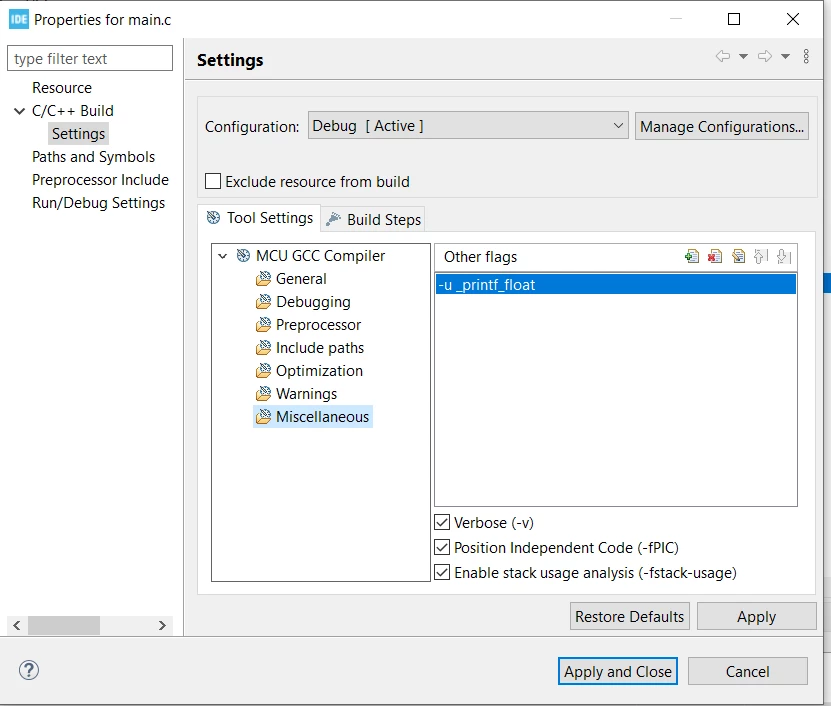
I get an error saying "The float formatting support is not enabled, check your MCU Settings from..." and i add "-u _printf_float" in linker flags but i still get this error.
  • January 26, 2022
  • 4 replies
  • 13794 views

0693W00000JNM7pQAH.png I updated my IDE and i am using the latest version (1.6.1) now. I cannot solve it.

This topic has been closed for replies.

4 replies

KnarfB
Super User
January 26, 2022

latest version is 1.8. But it shouldn't matter. What you are showing is a compiler flag, not a linker flag. Select the whole project first, then there should be a linker section in the Tool settings tree.

hth

KnarfB

marsupilami
Associate
January 26, 2022

Thanks. I solved it.

Associate
January 17, 2024

For Version 1.14.0 you can solve it like this:
-Click on you Project (The Blue Icon with the Project name behind it)

- File --> Propoerties --> C/C++ Build --> Settings --> Tool Settings --> MCU GCC Linker -->

Other flags --> add --> Insert "-u _scanf_float" without the "...".

- Rebuild your project


Visitor II
March 4, 2024

Thanks Noob, I was also lost, but now I am found