Associate II
August 13, 2026
Solved

I can't debug my project

  • August 13, 2026
  • 4 replies
  • 52 views

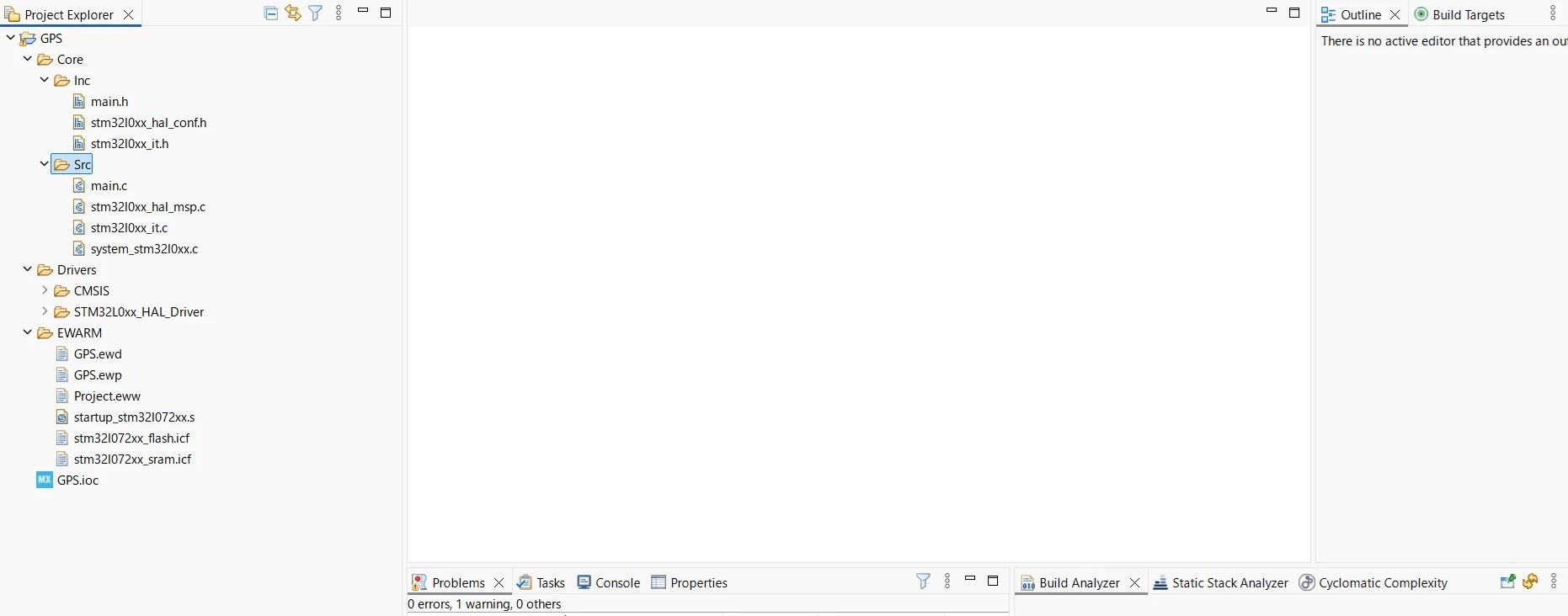
I made a project using CubeMX and imported it to CubeIDE. When I clicked Run → Debug, following message appeared, “The selection cannot be launched, and there are no recent launches.” I used CubeIDE version 1 before, and I could debug a program. What is wrong? 

Best answer by martian_first

The problem was solved. I chose STMCubeIDE for “Toolchain/IDE”, generated code and imported to CubeIDE. Thank you very much.

4 replies

TDK
August 13, 2026

Looks like it was not imported properly and/or wasn’t created for STM32CubeIDE. Opening the “.project” file is typically the best way. Ensure you are generating code for STM32CubeIDE in the code generation settings.

"If you feel a post has answered your question, please click ""Accept as Solution""."
David Littell
Senior II
August 13, 2026

As ​@TDK noted, maybe the “EWARM” folder is a clue that the code wasn’t generated for CubeIDE.

martian_firstAuthorBest answer
Associate II
August 13, 2026

The problem was solved. I chose STMCubeIDE for “Toolchain/IDE”, generated code and imported to CubeIDE. Thank you very much.

David Littell
Senior II
August 14, 2026

You should have marked @TDK’s reply as the solution rather than your own.