


Miles1
Associate III
August 30, 2020
Solved

How to update STM32CubeIDE on Linux?

  • August 30, 2020
  • 8 replies
  • 10480 views

If I open "Help > Check for Updates", I encounter an "Insufficient access privileges to apply this update" error.
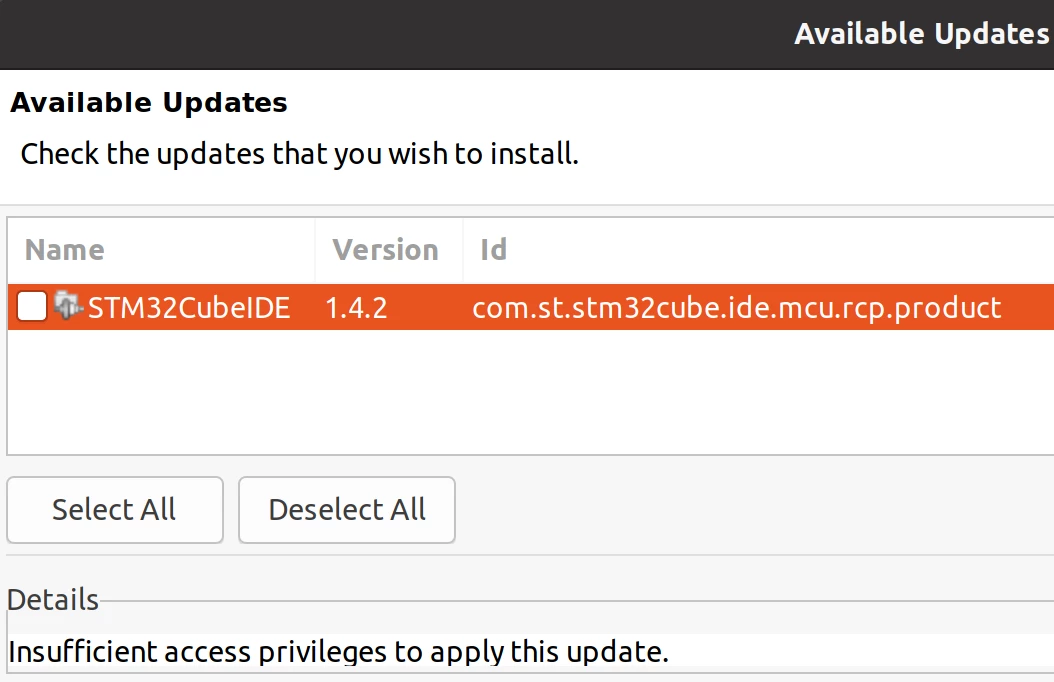
0693W000002lil8QAA.png

I installed by following this guide:

https://www.st.com/resource/en/user_manual/dm00603964-stm32cubeide-installation-guide-stmicroelectronics.pdf

And running the following command:

sudo sh st-stm32cubeide_1.4.0_7511_20200720_0928_amd64.deb_bundle.sh

I'm then able to launch the IDE from the OS GUI, just like any other app.

To update, do I need to launch STM32CubeIDE as root from CLI and then navigate to the update dialog?

sudo /opt/st/stm32cubeide_1.4.0/stm32cubeide

Or will that mess things up more?

If there are special update instructions for Linux, the guide should include those. A workaround is to re-download and re-install the IDE, but doing that for every update is not ideal. And in this case, there's no way to download 1.4.2. The latest available is still 1.4.0. https://www.st.com/en/development-tools/stm32cubeide.html

This topic has been closed for replies.
Best answer by Julien D

Hello Mf.1,

Unfortunately this is expected.

Since you've installed STM32CubeIDE using the Debian package, hence as root, you must have to run the application as root to unblock updates. Thing which is usually not advised in Linux world. Only installation of third-party features is supported by this kind of installation.

I'd suggest you to install it using the generic installer script st-stm32cubeide_1.4.0_7511_20200720_0928_amd64.sh. With this, the installation location will be owned by your uid, and updates will be possible.

8 replies

Julien D
Julien DBest answer
ST Employee
September 1, 2020

Hello Mf.1,

Unfortunately this is expected.

Since you've installed STM32CubeIDE using the Debian package, hence as root, you must have to run the application as root to unblock updates. Thing which is usually not advised in Linux world. Only installation of third-party features is supported by this kind of installation.

I'd suggest you to install it using the generic installer script st-stm32cubeide_1.4.0_7511_20200720_0928_amd64.sh. With this, the installation location will be owned by your uid, and updates will be possible.

To give better visibility on the answered topics, please click on Accept as Solution on the reply which solved your issue or answered your question.
Miles1
Miles1Author
Associate III
September 1, 2020

A note about being able to install the generic version as non-root would be great to include in the installation guide (linked above).

The guide currently claims that all installation methods require root.

"The installation is done through a product installer. Linux® root privileges are required to complete the installation."

"Enter the following command in the console window:"

sudo sh ./st-stm32cubeide_VERSION_ARCHITECHURE.PACKAGE

Julien D
ST Employee
September 2, 2020

Installation guide is probably the is lacking some convenience feature, but fact is admin rights are required to install components used by Debug features.

From what I can say, if I launch the script without sudo, even if I get the following message the installation path is owned by my uid.

Do you want to install STLinkServer and Udev rules for STLink and Jlink? Without these packages, you will not be able to use debugging feature.
Install them? (you need sudo permission to do that) [Y/n]

This question is expected since STLinkServer and udev rules for STLink and Jlink needs to be placed in /usr/bin and /etc/udev/rules.d.

To give better visibility on the answered topics, please click on Accept as Solution on the reply which solved your issue or answered your question.
PHryn
Associate III
October 7, 2020

Doing things hard way is the story of my life...

I should read what you wrote in your answer more carefully.

Regards,

JMeij.1
Visitor II
August 3, 2021

Facing the same issue here. Again very disappointed that ST's official installation doesn't work as it should.

The workaround I followed was to change the /opt/st directory's owner to my user.

```

cd /opt

chown -R $USER:$USER st

```

debugging
Lead
August 14, 2021

Excellent, that worked for me updating a version not since 8 months ago. After restart it crashed Restart it again, it worked. It .did not go back the to original workspace. Also had to recreate the C/C++ perspective