frankfrank956
Associate
April 30, 2019
Solved

How to run without debug

  • April 30, 2019
  • 12 replies
  • 6847 views

Trying out the new STM32CubeIDE. Mostly, I like it. There are some rough edges and dialogues that do not behave properly (at least on the Mac) but the thing I cannot make work is to add a 'Run' configuration to the toolbar.

I want to just build the code and flash it without having to open the Debug Perspective.

The preferences indicate that he options should be there but hey do not show in the toolbar.

Any ideas?

This topic has been closed for replies.
Best answer by Cartu38 OpenDev

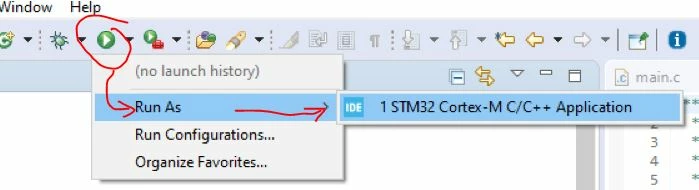
Since 1.3.0 run mode is supported. Just select your project within project explorer then:

0693W000003BdD8QAK.jpg

12 replies

Markus GIRDLAND
ST Employee
April 30, 2019

This wasn't implemented in 1.0 as we didn't have time, but it's planned to get implemented at a later point.

For now you can go to the debug configuration to the "Startup" tab and put "quit" in the Run Commands box.

It's the closest thing to a workaround for now.

frankfrank956
Associate
April 30, 2019

Ah - OK. Thanks for getting back with that.

At the risk of pushing my luck, what does your release schedule look like?

Markus GIRDLAND
ST Employee
May 6, 2019

I can't share that, I'm afraid. The schedule also changes quite frequently depending on new demands/requests and I don't want to disappoint people by saying a date which we then don't release at.

Schmid.M.
Associate III
May 8, 2019

for me, only adding "quit" did not work out with Segger GDB tool. here is what I needed to add:

0690X000008BQcuQAG.png

MattKefford
Associate III
July 29, 2020

I am on v1.4, is there any update on whether this feature has been added yet?

Cartu38 OpenDev
Cartu38 OpenDevBest answer
Graduate II
July 29, 2020

Since 1.3.0 run mode is supported. Just select your project within project explorer then:

0693W000003BdD8QAK.jpg

MattKefford
Associate III
July 29, 2020

Ah I see, thanks. That wasn't very clear to me as usually it is called "flash" or "download" but I guess eclipse is designed more for C++ PC applications rather than a dedicated embedded IDE.

S.Ma
Principal
July 29, 2020

Well maybe you can try the mbed way: STLink behave as USB memory stick, so if you can generate the BIN file, you might be able to simply drag and flash using any file explorer... until the CubeIDE has one click provision to do so.