

AHou.2
Associate
November 16, 2021
Solved

How to run the example in STM32cubeIDE with STM32F429-discovery?

  • November 16, 2021
  • 2 replies
  • 5639 views

Hi Sir

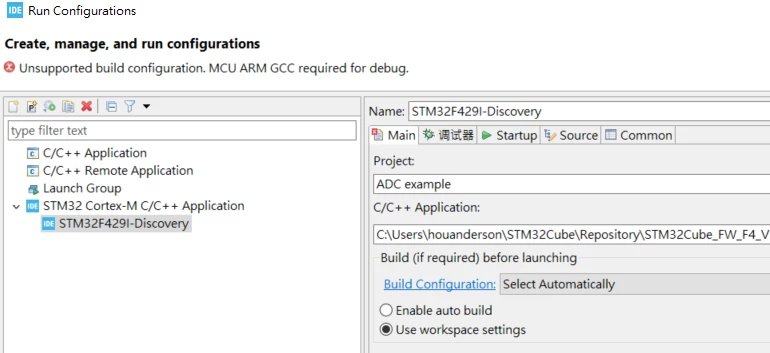
I'm a beginner of STM32. I get a STM32F429-Discovery and try to use STM32CubeIDE to start my journey. But I have a problem to import the example. I follow other people's question and import the example by "Projects from Folder or Archive. But in the Run configurations page I still can't start the running because "Unsupported build configuration. MCU ARM GCC required for debug". Do you know how to make it work?
0693W00000GXgGBQA1.png

I guess your examples are programmed by other IDE tool. It is hard to get the GPIO setting for new people. Do you have real STM32CubeIDE example database. I try to enable LTDC feature. Even I copy the code from example but i still don't know how to setup .ioc file.

If you can give me a favor it will help me a lot.

​Thanks

This topic has been closed for replies.
Best answer by AHou.2

Hi TDK

Thanks for your help. in the beginning it follow your step to get the example. It can't work and tool say " fail copy to the file". After I download a new STM32Cube_FW_F4 it work.

Thank you.

2 replies

TDK
November 16, 2021

To load an example, use the Example Selector.

File -> New -> STM32 Project -> Example Selector -> select your example -> Next -> Finish

"If you feel a post has answered your question, please click ""Accept as Solution""."
AHou.2
AHou.2AuthorBest answer
Associate
November 17, 2021

Hi TDK

Thanks for your help. in the beginning it follow your step to get the example. It can't work and tool say " fail copy to the file". After I download a new STM32Cube_FW_F4 it work.

Thank you.
