
DYann.1
Senior II
Jun 18, 2022 11:15 PM UTC
Solved

How to open an existing project

Hello,

I would like to open an existing project :
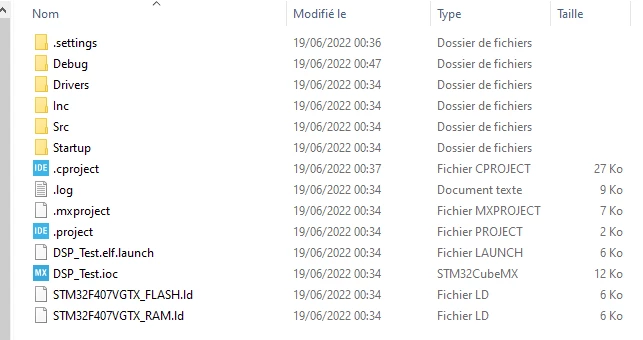
0693W00000NsEjyQAF.pngBut when I select .'project' I have this picture and I can't see the code :
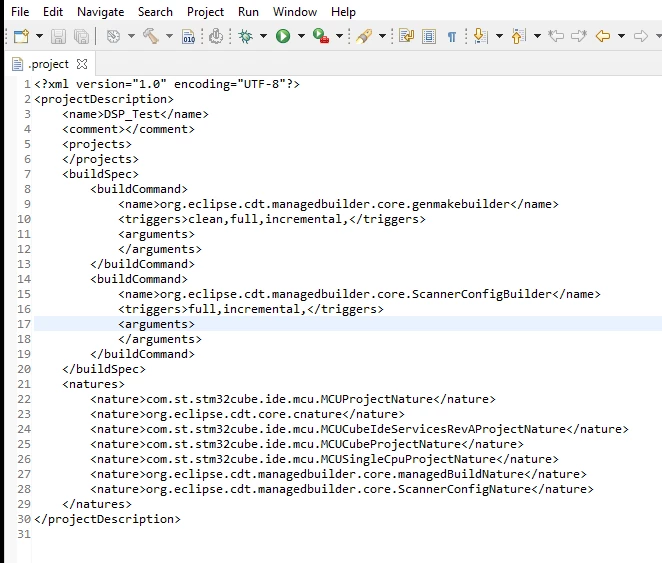
0693W00000NsEk3QAF.pngDo you know how to do ?

Thank you for your helps

Regards

This topic has been closed for replies.
Pavel A.
Pavel A.Best answer
Jun 19, 2022 1:29 AM UTC
  1. Start CubeIDE. If it prompts for workspace, point it to some workspace or create new
  2. File -> Import-> Existing projects into workspace

or File-> Open projects from file system

6 replies

Pavel A.
Pavel A.Best answer
Jun 19, 2022 1:29 AM UTC
  1. Start CubeIDE. If it prompts for workspace, point it to some workspace or create new
  2. File -> Import-> Existing projects into workspace

or File-> Open projects from file system

DYann.1
DYann.1Author
Senior II
Jun 19, 2022 9:29 AM UTC

After Start CubeIDE\point it to some workspace\ File ->Import -> Existing projects into workspace I have this picture : 0693W00000NsFEmQAN.png It's  already exist in the workspace but I don't see anywhere. I have always the same windows as my previous message.

DYann.1
DYann.1Author
Senior II
Jun 19, 2022 9:52 AM UTC

After activating the tab

0693W00000NsFG4QAN.pngNow I can see the file

0693W00000NsFG9QAN.pngBut How I can close the 'SGTL_5000' and 'SAI_AudioPlay' because this is not the project that I would like to open. I only work with the project 'STM32_DSP_IIR-master'. Unless it's not important and I can leave it that way ?  

DYann.1
DYann.1Author
Senior II
Jun 19, 2022 9:58 AM UTC

I think it's with this option : 0693W00000NsFGEQA3.pngNow it's look like correct after me :

0693W00000NsFGJQA3.png

Pavel A.
Jun 19, 2022 1:14 PM UTC

> But How I can close the 'SGTL_5000' and 'SAI_AudioPlay' because this is not the project that I would like

Right click on your project in the left pane -> Close unrelated projects

DYann.1
DYann.1Author
Senior II
Jun 20, 2022 2:10 PM UTC

Hi Pavel A,

Now It's good.

Thank you