

이정훈.1
Associate
March 16, 2022
Solved

How to Install STM32CubeIDE Without Internet?

  • March 16, 2022
  • 7 replies
  • 12348 views

Hello

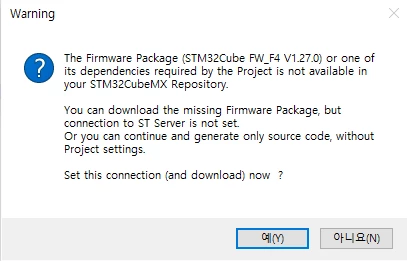
I am a STM32CubeIDE user. After installing STM32CubeIDE for the first time, run it to create a project, you will be prompted to connect to the Internet to download the package as shown in the picture below.

However, I need to participate in the competition with STM32CubeIDE, but I cannot use the Internet due to competition rules. So, you need to get the installation file of STM32CubeIDE to USB and download it. Is there any way to avoid the error in the picture below and download the package and STM32CubeIDE without internet??

0693W00000KcqEpQAJ.png

This topic has been closed for replies.
Best answer by Peter BENSCH

It is rather rare to install STM32CubeIDE without the Internet, if only because a number of sub-packages may have been updated between release and installation.

Nevertheless, you can install the STM32CubeIDE without the internet, the error message only informs you that the required firmware package cannot be found. You can also provide it offline (e.g. download it on another computer and transfer it as a ZIP to the offline computer) and integrate it manually in the CubeIDE. You can find a few URLs to the websites for download here, the other ones are following the same structure:

If you manually unpack the firmware into the repository path before starting STM32CubeIDE, it can then also use this package as if it had been installed.

The default path to the repository, which you can change as you like, can be found under

Window > Preferences > STM32Cube > Firmware Updater

Does it help?

Regards

/Peter

7 replies

Peter BENSCH
Peter BENSCHBest answer
ST Technical Moderator
March 16, 2022

It is rather rare to install STM32CubeIDE without the Internet, if only because a number of sub-packages may have been updated between release and installation.

Nevertheless, you can install the STM32CubeIDE without the internet, the error message only informs you that the required firmware package cannot be found. You can also provide it offline (e.g. download it on another computer and transfer it as a ZIP to the offline computer) and integrate it manually in the CubeIDE. You can find a few URLs to the websites for download here, the other ones are following the same structure:

If you manually unpack the firmware into the repository path before starting STM32CubeIDE, it can then also use this package as if it had been installed.

The default path to the repository, which you can change as you like, can be found under

Window > Preferences > STM32Cube > Firmware Updater

Does it help?

Regards

/Peter

In order to give better visibility on the answered topics, please click on Accept as Solution on the reply which solved your issue or answered your question.
이정훈.1
Associate
March 16, 2022

Thank you.  Installation complete without internet. Thank you again.

Bob S
Super User
March 16, 2022

May be rare, but happens :) My company's dev environment is on a (mostly) isolated intranet - only very limited/restricted access to the outside world. So we have to sneaker-net the files from our public internet accessible computers to our dev machines with USB drives, and manually install all Cube packages from ZIP files. It works, mostly. The F4 and F7 patch files do not install in CubeMX using "install from local file" (for example, F4 patch 1.26.2). I need to manually un-zip the files and hand edit some file (I forget which) to make CubeMX recognize it. Or installing from the github version seems to work.

Visitor II
December 6, 2023

I face the same problem but with F4 patch 1.27.1, may u remember what file u edit ?

Peter BENSCH
ST Technical Moderator
March 16, 2022

The respective firmware version is not determined from the folder name, but from package.xml. However, you should not have to change any files in the archive, all information is already contained in the Main Pack and the Patch Packs. 

If you are working offline, the patch files can usually be extracted manually as they contain the same folder name as the main firmware, e.g. for F4_V1.26:

  • main pack
    • stm32cube_fw_f4_v1260.zip --> STM32Cube_FW_F4_V1.26.0
  • patch
    • stm32cube_fw_f4_v1262.zip --> STM32Cube_FW_F4_V1.26.0

The patch only contains the differences and can simply be pushed into the main pack, where it overwrites old files if necessary.

Good luck!

If the problem is resolved, please mark this topic as answered by selecting Select as best. This will help other users find that answer faster.

/Peter

In order to give better visibility on the answered topics, please click on Accept as Solution on the reply which solved your issue or answered your question.
Bob S
Super User
December 6, 2023

If you do not need the plain 1.27.0 install, then un-zip the patch into a temp directory.  Then copy the contents of that temp dir into the existing 1.27.0 tree.  This will overwrite some of the 1.27.0 files.  Then start CubeMX and it should report 1.27.1.  But be ware that not all versions of CubeMX will recognize F4 ver 1.27.1.  Version 6.9.2 does, but if I remember correctly, 6.9.1 did not.  As Peter says above, the directory name does not matter.  CubeMX looks at files inside to determine the version.

BarryWhit
Lead
April 11, 2024

As Peter says above, the directory name does not matter.  CubeMX looks at files inside to determine the version.

Friendly caution: when manually installing from zip files generated from github tags, the directory name created does not match what the package manager creates. You're able to compile projects, but I've had problems with "File/import example", with it complaining that it "Failed to perform local copy".

I recommended you use the official zip files from the ST website instead of github, or remember to rename the directory to match the expected format. Example directory names:

STM32Cube_FW_F1_V1.8.0

STM32Cube_FW_G4_V1.5.0


Patch files also present their own issues. You can't download and install them locally, since the package manager doesn't recognize them (they contain only changed files, not a complete snapshot). To install them, you simply unpack them over the same directory in which the base version of the package was installed, overwriting files when asked (for example, you unpack 1.11.5 over the install directory of the 1.11.0 version).  AFAICT, patches are cumulative. You can directly install just the base version+the latest patch, without intermediate patch releases.


Also, the IDE version sometimes won't recognize newer firmware versions but this is not necessarily (though it could be)  due to a compatibility issue, sometimes it's simply because the online updater is also in charge of updates to metadata about available packages. AFAICT, metadata about available releases is kept in 

C:\Users\<USERNAME>\.stm32cubemx\plugins\updater\STMUpdaterDefinitions.xml


Sometimes. new MCU releases are tied to newer CubeIDE release. Meaning that if even you update the metadata online for an older version, the new firmware version will still not show up. My guess (and it's only a guess) is that this because the newer versions are tied to changed in the code templates, since those are shipped with CubeIDE, not the MCU package file.

"- If someone's post helped resolve your issue, please thank them by clicking ""Accept as Solution"".- Please post an update with details once you've solved your issue. Your experience may help others."
