RhSilicon
Lead
June 24, 2023
Question

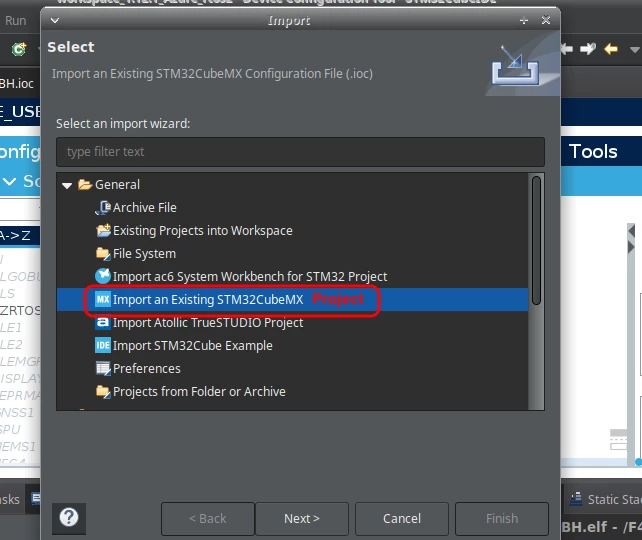
How to import or add the project generated in CubeMX to STM32CubeIDE?

  • June 24, 2023
  • 11 replies
  • 8108 views

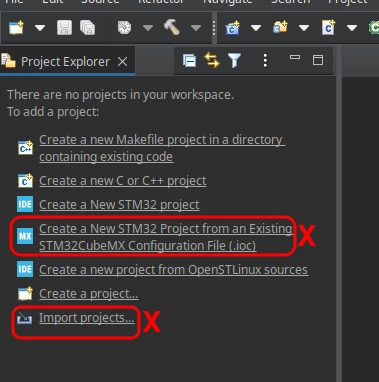
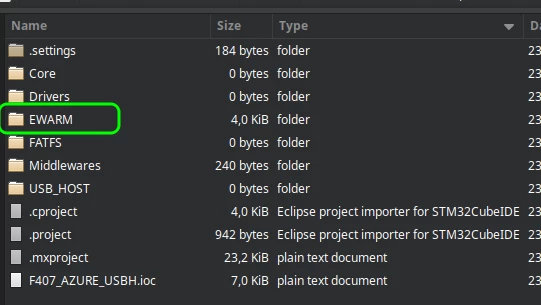
Hi, I tried to create and import through the *.ioc file, but it didn't work. The EWARM folder does not appear along with the other project folders. I tried to generate again with the Device Configuration Tool Code Generator, but it didn't work, even with the RTOS Azure appearing on the screen, the EWARM folder is not created in the project.

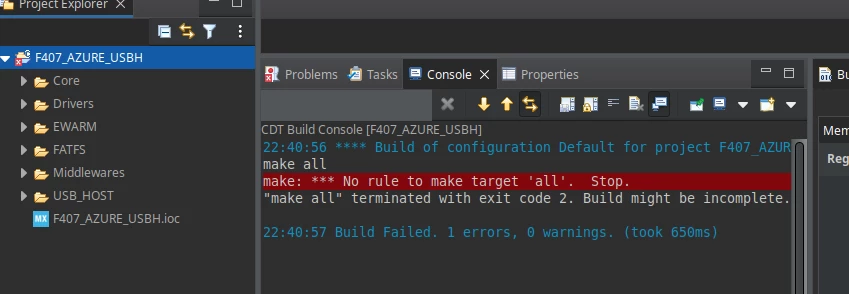
It also failed to compile if added as C project, seems to be importing as project with Makefile. I tried to clean the project, but it didn't work.

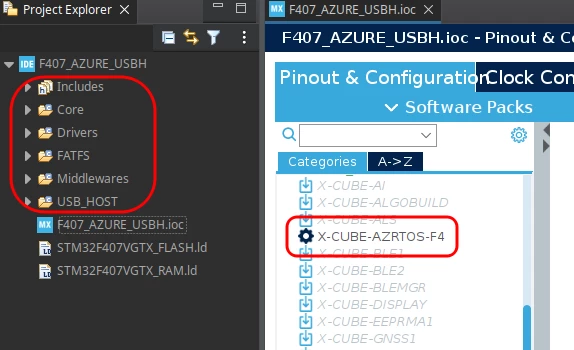
Project generated in CubeMX:
CubeMX_Azure.png

STM32CubeIDE:

CubeIDE_Azure_fail.png

CubeIDE_Azure_Import_Fail.png

CubeIDE_Azure_fail2.png


Would it be possible to add a way to add the projects generated by CubeMX without having to rework anything, since they use the same database (FW_F4)?
CubeIDE_Azure_fail3.png

    This topic has been closed for replies.

    11 replies

    KnarfB
    Super User
    June 24, 2023

    EWARM is another IDE, not STM32CubeIDE. Did you set STM32CubeIDE in the STM32CubeMX Project Manager tab before exporting?

    hth

    KnarfB

    RhSilicon
    RhSiliconAuthor
    Lead
    June 24, 2023

    So it could be a bug, apparently STM32CubeIDE is pre-selected,

    CubeMX_Toolchain.png

    But since it's the first time I'm generating a STM32CubeIDE project through STM32CubeMX, which I consider a step backwards, so I hadn't paid attention to that.

    I'll try to generate new project codes for these different toolchain options to see how they turn out.

    RhSilicon
    RhSiliconAuthor
    Lead
    June 24, 2023

    After having selected another toolchain different from the STM32CubeIDE, the next times the STM32CubeIDE toolchain was selected, the STM32CubeMX generated the project codes without the EWARM folder.

    But I couldn't redo the initial steps of STM32CubeMX, because the uninstaller didn't remove all the data, and the new installation found the user settings again.

    I opened a notification about the uninstaller problem, if I manage to perform a new clean installation of STM32CubeMX and this problem occurs again from the EWARM folder, I will open a notification. For now, if anyone else has this problem, please open a notification.

    https://community.st.com/t5/stm32cubemx-mcu/on-linux-the-stm32cubemx-uninstaller-did-not-remove-all-files/m-p/569863#M25301

    Pavel A.
    June 24, 2023

    As @KnarfB wrote, the EWARM folder is for a different IDE (which you probably don't have, else you would know). So there's no any problem, except some user forget to choose correct options.

    RhSilicon
    RhSiliconAuthor
    Lead
    June 24, 2023

    I remembered that I had tried to install STM32CubeMX from a version that gave an error in Java recognition, if I'm not mistaken it asked for Java version 11.

    I deleted some hidden folders in the user directory, and reinstalled STM32CubeMX, I noticed that apparently there were changes in CubeMX behavior. For example, the first time the project was generated it was possible to reopen the project in CubeMX and change the name and location, but now I can no longer make these changes.

    I believe there was some data from the previous installation, but as I only remembered now this case of the Java error, I had already deleted the folders so I won't try to find out what was in them.

    MM..1
    Super User
    June 24, 2023

    Maybe simpler is use only IDE. MX plugin is inside and is compatible with IDE version.

    If you use standalone MX you need right versions for both IDE and MX combination , and ofcourse instalation must be ok.

    RhSilicon
    RhSiliconAuthor
    Lead
    June 24, 2023

    I'm trying to use rtos Azure, I couldn't make the "Device Configuration Tool Code Generator" from STM32CubeIDE generate the code with rtos, if using the Generator it removes the RTOS.

    When I search for Azure rtos, I get an example of using the H7, and in a video it says that the Azure package is compatible with STM32CubeMX, that's why this madness.

    RhSilicon
    RhSiliconAuthor
    Lead
    June 24, 2023

    Regarding project import, I recommend that whoever is going to create the project leave the "Generate Under Root" option checked, although CubeMX warns about possible conflicts.

    CubeMX_Under_Root2.png

    This causes the project not to be created nested in the project folder. If this option is not checked, STM32CubeIDE will import the files from the Root folder as a reference, even the Inc folders are not in the accessible file tree, only the *.c (Src) files are available.

    CubeMX_Under_Root.png

    Pavel A.
    June 24, 2023

    IMHO CubeMX gives more freedom and flexibility than the IDE integrated version (but also, as you have seen, more ammo to shoot yourself in the leg).

    After the project has been generated by any recent CubeMX, it can be opened and built by a range of compatible CubeIDE versions (compatible by both ARM toolchain options and .cproject XML format). Besides of this, Eclipse is just an editor and builder. The update schedule of Cube(MX) and its template library is driven by new MCU models added and bugs fixed. These changes usually do not involve the Eclipse part.

    So I can experiment with latest CubeMX updates freely without requesting customers and team members to update their IDE (which they hate to do). Of course, CubeMX and CubeIDE should share same installed libraries and additional packages (normally they do).

    What does this mean for you? If a certain CubeMX video shows something that works for you, do it in CubeMX and use your familiar IDE installation to build. If it does not work, rinse and repeat (a-la West World .... but less drama :))

    AScha.3
    Super User
    June 24, 2023

    download and tried for F4 :

    - F303 : not possible (grey)

    -F407 : possible, can check

    AScha3_0-1687626776535.png

    so - depends on chip... on F407 discovery - ok.

    AScha3_1-1687627041097.pngAScha3_2-1687627685913.png


    If you feel a post has answered your question, please click on " Best Answer ".