


AWe.1
Associate II
January 6, 2022
Question

How to display data in the console from the array? Console returns strange signs

  • January 6, 2022
  • 5 replies
  • 1864 views

Hello :)

I was trying to send some data to the console using USART1 (STM32F7508-DK).

With the following simple data there was no problem:

uint8_t data[] = "HELLO! \r\n";

HAL_UART_Transmit(&huart1, data, sizeof(data), 1000);

But when I try to display values using that code:

uint8_t pData = 0x80;
uint16_t tempData[64];
uint8_t convtempData[128];
 
while (1)
 {
 /* USER CODE END WHILE */
 
 /* USER CODE BEGIN 3 */
	 HAL_StatusTypeDef ret = HAL_ERROR;
	 uint8_t ACCEL_ADDR;
	 ACCEL_ADDR = 0xD0;
	
 ret = HAL_I2C_IsDeviceReady(&hi2c1, ACCEL_ADDR, 1, 100);
 
	 ret = HAL_I2C_Master_Transmit(&hi2c1, ACCEL_ADDR, &pData, 2, 50);
 
	 ret = HAL_I2C_Master_Receive(&hi2c1, ACCEL_ADDR | 0x01, convtempData, 128, 150);
 
	 print_to_console(convtempData);
 }

And print _to_console() function look in that way:

void print_to_console(uint8_t* convtempData)
{
	uint8_t space[] = " ";
	for(int i = 0; i < sizeof(convtempData); i++)
	{
		HAL_UART_Transmit(&huart1, convtempData[i], sizeof(convtempData[i]), 1000);
		HAL_UART_Transmit(&huart1, space, sizeof(space), 1000);
	}
}

From console:

0693W00000HqiTsQAJ.png 

Also, it looks like program exits print _to_console() after 4th iteration (i=3) and goes to the int main () to while(1).

Does anyone knows how to solve it?

USART1 configuration (same configuration in the console):
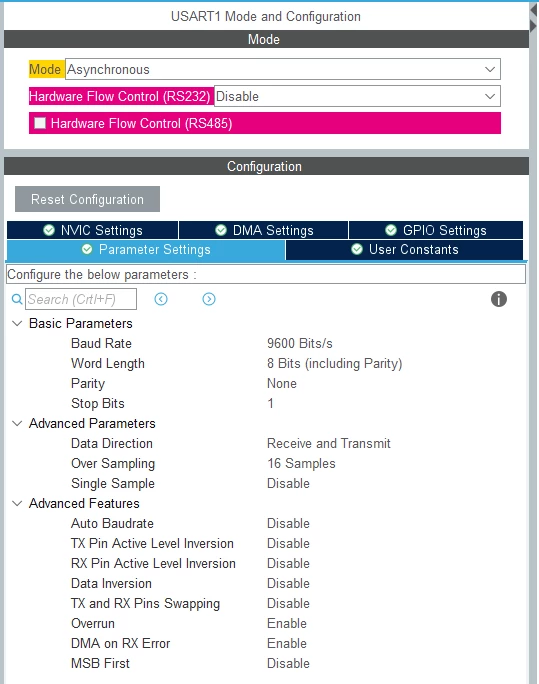
0693W00000HqiUbQAJ.png

This topic has been closed for replies.

5 replies

Tesla DeLorean
Guru
January 6, 2022

Data Representation 101

The data in the array is in binary form used by the computer, if you want human readable ASCII decimal characters use sprintf(str,"%d". ..) or itoa()

Tips, Buy me a coffee, or three.. PayPal Venmo (See Profile) Up vote any posts that you find helpful, it shows what's working..
TDK
January 6, 2022

In addition, use strlen instead of sizeof to avoid sending a null character (or more), at the end of each transmission.

"If you feel a post has answered your question, please click ""Accept as Solution""."
AWe.1
AWe.1Author
Associate II
January 6, 2022

@Community member​ @TDK​ Thank you for your answers :) Indeed, I want to have human readable elements in the console.

Could you tell me how the correct syntax looks like?

I tried those 2 options:

void print_to_console(uint8_t* convtempData)
{
	uint8_t space[] = " ";
	for(int i = 0; i < 128; i++)
	{
		HAL_UART_Transmit(&huart1, itoa(convtempData[i]), strlen(convtempData[i]), 1000);
		HAL_UART_Transmit(&huart1, space, sizeof(space), 1000);
	}
}

And:

void print_to_console(uint8_t* convtempData)
{
	char buffer[3] ;
	for(int i = 0; i < 128; i++)
	{
		sprintf(buffer , "%u ",convtempData[i]);
		printf("%s", buffer);
	}
}

And unfortunately it didn't work :(

Andrew Neil
Super User
January 6, 2022

It looks like you need to spend some time studying the standard C string handling functions - this is standard C stuff, nothing specifically to do with STM32.

It is far easier to learn basic C skills on a PC or similar "conventional" computer - away from all the added complexities of embedded microcontrollers.

Here are some C learning & reference materials - including a free online textbook:

https://blog.antronics.co.uk/2011/08/08/so-youre-thinking-of-starting-with-c/

HAL_UART_Transmit( &huart1, itoa(convtempData[i]), strlen(convtempData[i]), 1000 );

Check the definition of itoa: eg, https://www.cplusplus.com/reference/cstdlib/itoa/ - you have to tell it where to store the string.

It's the length of that string that you need to tell HAL_UART_Transmit

strlen(convtempData[i]) won't work because convtempData[i] is not a string.

A complex system that works is invariably found to have evolved from a simple system that worked.A complex system designed from scratch never works and cannot be patched up to make it work.