

JG_it
Associate II
November 8, 2021
Solved

how to customize debug perspective in stm32cubeide?
  • November 8, 2021
  • 6 replies
  • 7068 views

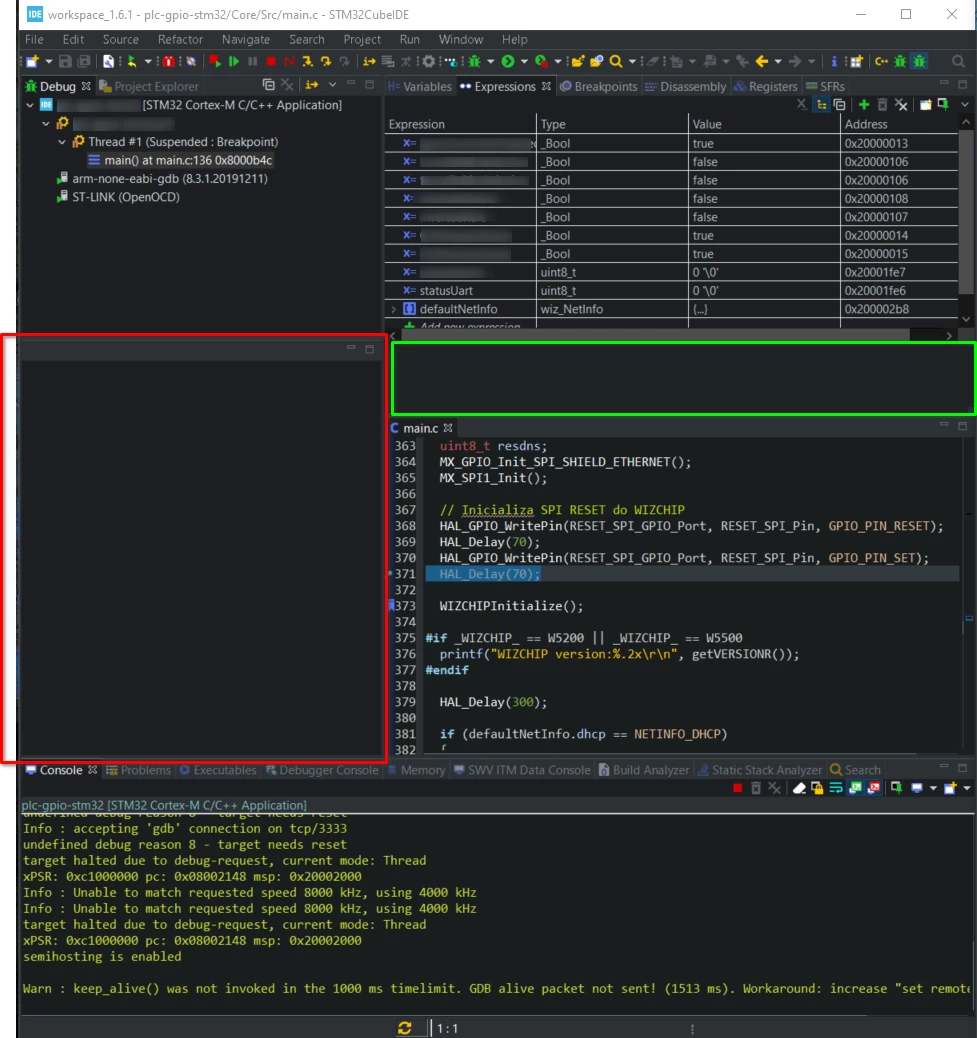
0693W00000GWowIQAT.pngHi, I would like to customize the debug perspective but I can't remove the selected windows. I want to remove the window with the red box to leave the main.c file in the entire horizontal space, but it is associated with the editor in C ++ perspective. I also want to remove the green box window which is practically useless. I welcome suggestions in this regard.


This topic has been closed for replies.
Best answer by Julien D

Hi @Juan Gómez​ 

Seems to be possible with the following steps.

Hope this helps

6 replies

Chloe Meunier
ST Employee
November 8, 2021

Hello,

did you try to manage these view in Window -- > Show View ?

JG_it
JG_itAuthor
Associate II
November 8, 2021

Hi, I did but they are not windows with specific functionalities. They are something like modules/windows of the Debug perspective.

I tried too with Window -> Properties -> Run Debug -> Perspectives ,but when switch of run to debug, the window in the red box load again the .c file

Julien D
Julien DBest answer
ST Employee
November 8, 2021

Hi @Juan Gómez​ 

Seems to be possible with the following steps.

Hope this helps

To give better visibility on the answered topics, please click on Accept as Solution on the reply which solved your issue or answered your question.
JG_it
JG_itAuthor
Associate II
November 8, 2021

It works, thanks a lot @Julien D_OEHAUDT​ !!

Julien D
ST Employee
November 9, 2021

Great! Don't hesitate to flag this topic as "Answered" ;)

To give better visibility on the answered topics, please click on Accept as Solution on the reply which solved your issue or answered your question.
JG_it
JG_itAuthor
Associate II
November 9, 2021

Ok, sure :thumbs_up: !!

JG_it
JG_itAuthor
Associate II
November 9, 2021

I think it is done, I appreciate if it's possible to verify.

Julien D
ST Employee
November 9, 2021

You did it perfectly, thanks :thumbs_up:

To give better visibility on the answered topics, please click on Accept as Solution on the reply which solved your issue or answered your question.