Associate
July 4, 2024
Solved

How to add external files .c and .h files in STM32CubeIDE project

  • July 4, 2024
  • 2 replies
  • 2113 views

How to add external files .c and .h files in STM32CubeIDE project ,can you please explain steps to add .c and .h files in STM32CUBEIDE project

This topic has been closed for replies.
Best answer by mƎALLEm

Hello,

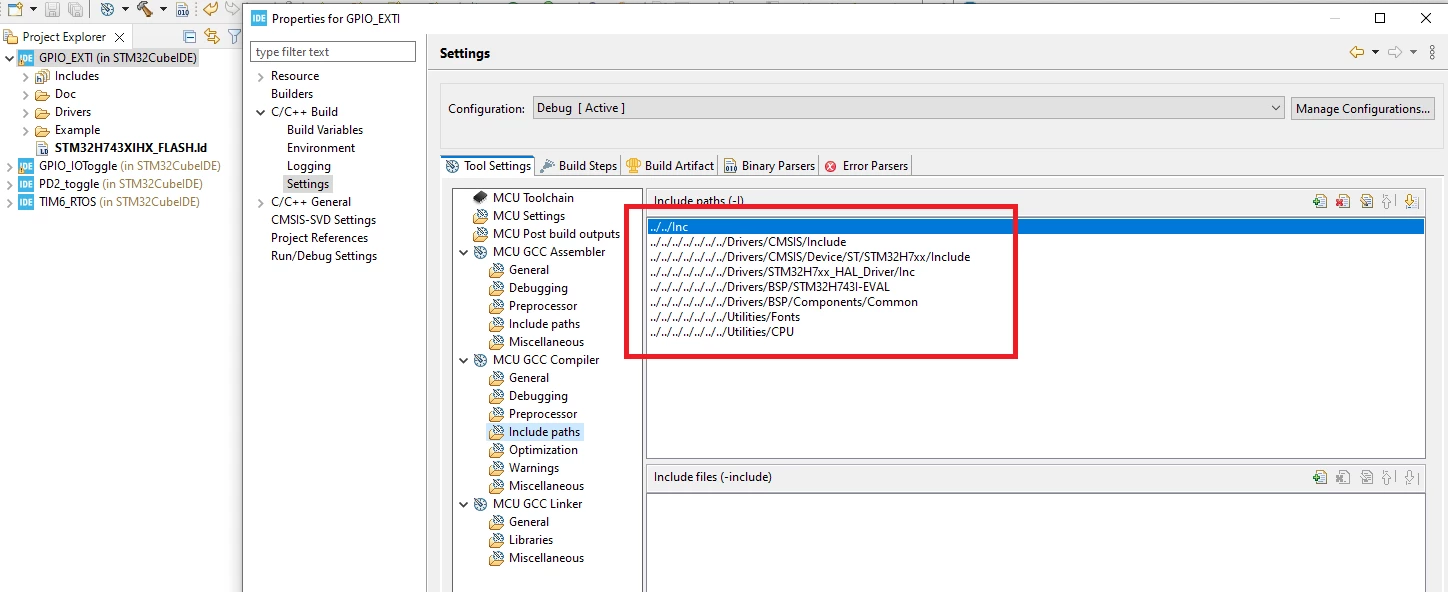
For .h files, you need to give the path(s) to that files as include paths:

Proprieties -> Settings -> MCC GCC compiler -> Include Paths:

SofLit_0-1720092773799.png

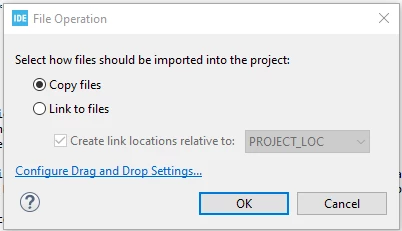
For .c file you need to drag and drop the file to the Project explorer at the level you want. You will get this message:

SofLit_1-1720093004615.png

Click OK. The file will be added to you project.


2 replies

mƎALLEm
mƎALLEmBest answer
ST Technical Moderator
July 4, 2024

Hello,

For .h files, you need to give the path(s) to that files as include paths:

Proprieties -> Settings -> MCC GCC compiler -> Include Paths:

SofLit_0-1720092773799.png

For .c file you need to drag and drop the file to the Project explorer at the level you want. You will get this message:

SofLit_1-1720093004615.png

Click OK. The file will be added to you project.


To give better visibility on the answered topics, please click "Best answer" on the reply which solved your issue or answered your question.
Andrew Neil
Super User
July 4, 2024
A complex system that works is invariably found to have evolved from a simple system that worked.A complex system designed from scratch never works and cannot be patched up to make it work.