Hello @AAgra.5
I would like to share with you an answer from our partner Mathworks about your issue.
There are multiple ways to add DAC driver in Simulink model to leverage DAC peripheral.
- You can create driver blocks following “DriverGuide�? from https://mathworks.com/matlabcentral/fileexchange/39354-device-drivers?s_tid=srchtitle_driver%20blocks_3
- Using Custom code blocks. For example, you can refer DC-DC Buck Converter Simulink Model using STM32 BG474EDPOW1 for detailed explanation.
Attached is an example model to use DAC and ADC with Embedded Coder Support Package for STMicroelectronics STM32 Processors that uses second way. Model is created with MATLAB version R2022b.
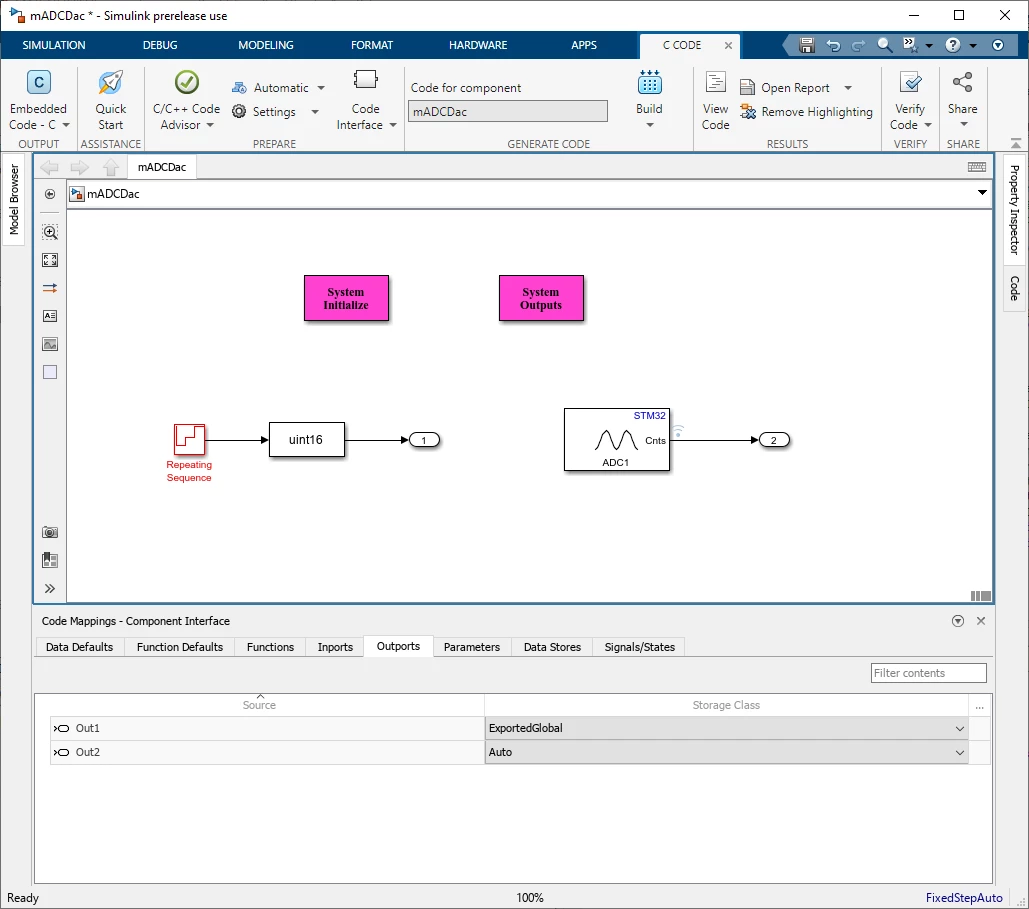
The attached example uses custom code way to trigger DAC and the voltage is read by ADC. The output port 1 in the model is mapped/configured to generate “DAC_Output�? global variable as shown below:
- Select in “Apps -> Embedded Coder -> C Code -> Code Interface -> Default Code Mappings�? to open “Code Mapping – Component Interface�? window at the bottom of model. Go to “Outputs�? tab and map output port 1 to generate “DAC_Output�? global variable.
- In the STM32CubeMX project, “DAC�? peripheral is enabled and configured. During the code generation of Simulink model, the code for STM32CubeMX project is also generated. STM32CubeMX generates DAC peripheral initialization function to configure DAC. This initialization function is automatically populated in “main()�? in generated code for model.
- Add “System Initialize�? and “System Outputs�? custom code blocks to enable DAC channels at init and trigger DAC to convert “DAC_Output�? respectively.
- You can run the model with “Monitor and Tune�? to view the results in Simulink in real-time following the example “Monitoring and Tuning Using STMicroelectronics STM32 Processor Based Boards�?.
 Special thanks dedicated to Mathworks Team for the support.
Firas
To give better visibility on the answered topics, please click on "Best answer" on the reply which solved your issue or answered your question.Best regards,FBL