JHule.1
Associate II
March 25, 2020
Solved

how do i change code optimization

  • March 25, 2020
  • 5 replies
  • 22095 views

I am using a nucleo-f401re board.

This topic has been closed for replies.
Best answer by TOlli

Hi,

To change the code optimization level (in a general sense) do the following:

Right-click the project under Project Explorer

Select properties

Go to C/C++ Build->Settings

On the right hand side of the window, select "Tool Settings"

There, under corresponding compiler, you have the options for debugging and optimisation. Under these two menus, you should be able to change debuggin and optimization level for the compiler.

I have attached a picture of one of my example projects to show what you are looking for.0693W000000UmsGQAS.jpg
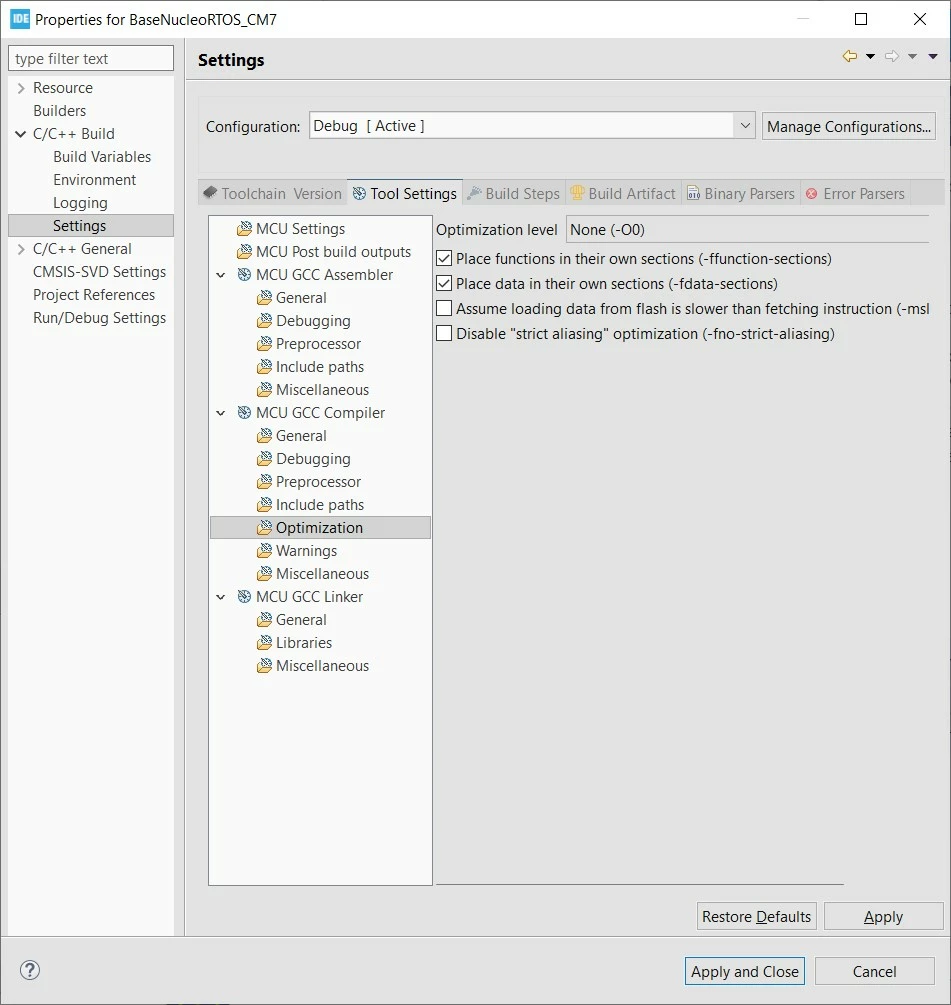
Best regards.

5 replies

hs2
Visitor II
March 25, 2020

Do you really expect a helpful answer to this (non-)question ?

You missed any necessary context of your problem, right ;)

Javier1
Principal
May 3, 2022

i have the same question and this post helped me

hit me up in https://www.linkedin.com/in/javiermuñoz/
Javier1
Principal
November 17, 2022

aaaaand it helped me again

hit me up in https://www.linkedin.com/in/javiermuñoz/
TOlli
TOlliBest answer
Senior
March 26, 2020

Hi,

To change the code optimization level (in a general sense) do the following:

Right-click the project under Project Explorer

Select properties

Go to C/C++ Build->Settings

On the right hand side of the window, select "Tool Settings"

There, under corresponding compiler, you have the options for debugging and optimisation. Under these two menus, you should be able to change debuggin and optimization level for the compiler.

I have attached a picture of one of my example projects to show what you are looking for.0693W000000UmsGQAS.jpg

Best regards.

JHule.1
JHule.1Author
Associate II
March 26, 2020

Thank You, that worked, while watching the how to videos the guy says change the optimization level, but he was using Keil, that didn't do me any good when I was using STM32 Cube IDE, I looked for a user manual but ST didn't seem to have much.

JElli.1
Visitor II
October 4, 2020

I found that, if you have a specific function that must be optimized for speed, it works better to do it in your code like this:

#pragma GCC push_options
#pragma GCC optimize ("-Ofast")
void MyFunction()
{
 // The code for your function goes here...
}
#pragma GCC pop_options

The "#pragma" statements instructs the GCC compiler to optimize your function for speed.

hs2
Visitor II
October 4, 2020

Or alternatively and when using GCC attribute feature for a dedicated function:

void MyFunction() __attribute__((optimize("-Ofast")))

just for completeness

JElli.1
Visitor II
October 4, 2020

Thanks for the alternative hs2.

However in STM32CubeIDE that format gives the error: "attributes should be specified before the declarator in a function definition".

So I tried it like this >>

__attribute__((optimize("-Ofast"))) void MyFunction()
{
 // Code here
}
 

That worked perfectly. :)

Associate II
September 6, 2023

As stated in solution,

  • Go to Project/Properties/ C-C++ Build/Settings/Tool Settings tab
  • Under MCU/GCC Compiler select Optimization
  • Optimization Level drop down is on top right.

Note that there are 2 build configurations, Debug and Release. You select the configurations under Project/Build Configuration/Set Active.

Levels are apparently universal to all GCC compilers. From https://stackoverflow.com/questions/1778538/how-many-gcc-optimization-levels-are-there

DaveElectron_0-1694012015860.png

For debugging, I have been using the default (none) and have had no trouble with debugging. But if I do, I'll try -Og.