

Associate III
December 23, 2023
Question

How are you suposed to replicate a project???

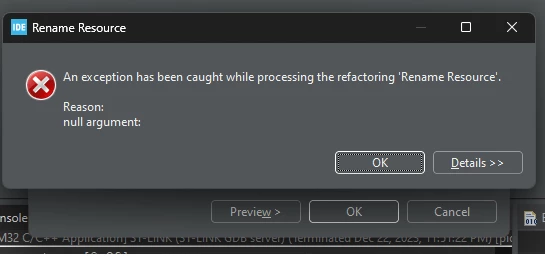
It's a pretty common need in an IDE to be able to branch or "fork" a project. Normall, I'd make a copy of the projet at the file level, then rename the original and continue development on that. However, Ranaming a project not only crashes, but also leaves the project broken: I don't see any "Save Project As" Option either.
I could make a copy and find every refeferenc to the project's name and change it, but this is tedious and error prone. Is there some way to do this I'm not seeing??
 
Error message I got when I Right-click project and "Rename"
sgordon777_0-1703350703203.png


Motor control workbench Version: 6.2.0
STM32CubeMX Version: 6.10.0
STM32CubeIDE Version: 1.14.0
Board: NUCLEO-G431-RB
 
 
    This topic has been closed for replies.

    2 replies

    AScha.3
    Super User
    December 23, 2023

    Just try :  in IDE , left side, click on a project (selected = blue) , right click on it and select > copy< .

    AScha3_0-1703352549263.png

    then (on empty space i did) : right click and select > paste < .  -> give mod. name for new copy ->

    AScha3_1-1703352694249.png

    open here,  right click on xx.ioc and select > rename < .  -> give matching new mod. name for new copy 

    AScha3_2-1703352837532.png

    also rename xx debug + xx.launch

    AScha3_1-1703354964514.png

    + in debug configurations ..main page for new debug->

    AScha3_0-1703354894448.png

    rename Name , Project, xx.elf


    Then mod new xx.ioc , gen code, compile.... and TEST debug. :)

    If you feel a post has answered your question, please click on " Best Answer ".
    xisco
    Senior
    January 7, 2024

    Hi,

    I do it in the following way in CubeIDE:

    1. File -> New ->STM32 project from an existing STM32CubeMX configuration file (ioc)

    CubeIDE ask for ioc file and New Project name.

    2. Copy includeFiles.c and main.c from OldProject/core/src to NewProject/core/src (overwriting main.c)

    3. Copy includeFiles.h and main.h from OldProject/core/inc to NewProject/core/inc (overwriting main.h)