

Associate II
July 8, 2024
Solved

Hex file: adding dummy bytes - STM32 Cube IDE - GNU/LD

  • July 8, 2024
  • 2 replies
  • 7665 views

within the STM32 Cube IDE After creating a hex file, I noticed that some lines had less data than others due to linker separation. How can I use the STM32 Cube IDE to add dummy bytes to the memory?
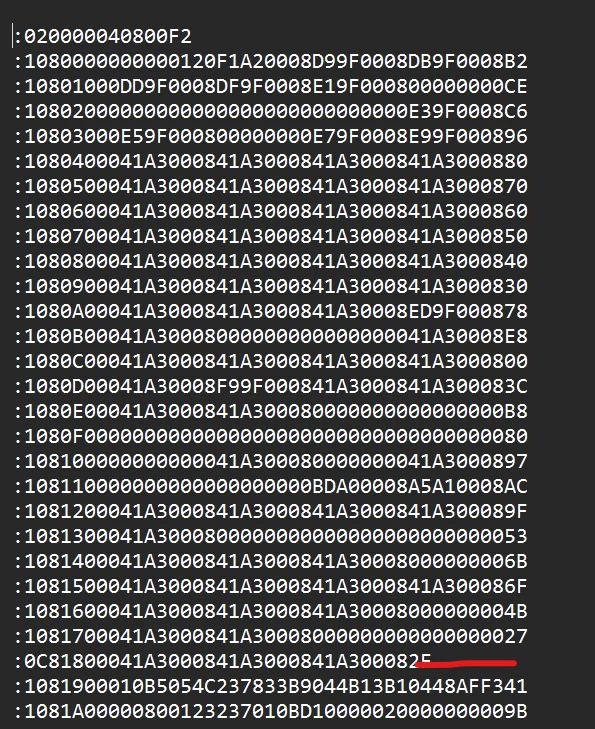

Sanjay8344_0-1720420608647.png


Best answer by Tesla DeLorean

ALIGN(8) instead of ALIGN(4) at the end of each section ?

2 replies

AScha.3
Super User
July 8, 2024

> that some lines had less data than others

Thats "normal" in a (Intel-)HEX file.

see:

https://developer.arm.com/documentation/ka003292/latest/


>to add dummy bytes to the memory

Why ?

"If you feel a post has answered your question, please click ""Accept as Solution""."
Associate II
July 8, 2024

In order to extract data from a hex file and write it into memory while working on the bootloader, I must do a remote update. In order to accomplish this, I must write 0xffff in a location where there is less data on the specific lines. I now know that the linker script can be used to change it but not How to do that.

Associate II
July 9, 2024

Other (better) hex generators will add fill bytes for you but I could not see a way to do that here.

Instead you can use fill statements in your linker script as you already understood. There is a nice summary here about how to proceed:

FILLing unused Memory with the GNU Linker | MCU on Eclipse

Ayoub Cheggari
Senior
July 9, 2024

You can do that without postbuild in the linker script and fill the sections by using Align command!

Associate II
July 9, 2024

Sanjay8344_0-1720543631547.png

When I flashed the .hex file with the STM 32 utility, it automatically divided into two halves and was written appropriately. And I need to write 0xFFFFFFFF at that specific spot if I want to write it manually using the bootloader.


Ayoub Cheggari
Senior
July 10, 2024

There is no way that a file is changed by a tool! As I said before, you need to check which section ends at 0x800017C and use ALIGN to make sure it fits there!