


RCooke88
Associate III
October 6, 2023
Solved

Help explain why this #include isn't working

  • October 6, 2023
  • 6 replies
  • 3674 views

Hi Folks,

I'm trying to build a LVGL project and I'm running into a problem that I can't resolve. I get 25 errors all saying the same thing - "stm32f7xx.h" - no such file or directory.

Here are my include settings:

:error_msg.JPG
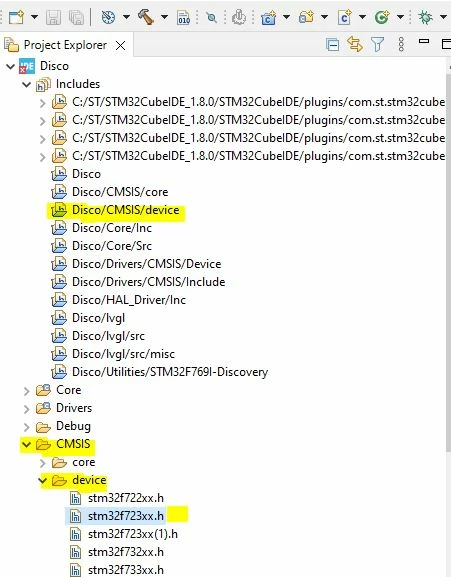
Here's the first of the 25 errors:

C:/Users/Richard/iCloudDrive/ABC_Consulting/Controls/Kcompany_7000/Disco/HAL_Driver/Inc/stm32f7xx_hal_def.h:46:10: fatal error: stm32f7xx.h: No such file or directory
46 | #include "stm32f7xx.h"


In my file stm32f7xx_hal_def.h:

/* Includes ------------------------------------------------------------------*/

#include "stm32f7xx.h"

#include "Legacy/stm32_hal_legacy.h"

#include <stdio.h>

What can I change to get the code to compile?

Thanks,

Richard

 

This topic has been closed for replies.
Best answer by TDK

The compiler needs to know where to find the include file, so it will need to be added to the include paths directories within the project properties.

6 replies

Tesla DeLorean
Guru
October 6, 2023

The way the tree displays, does this relate to a specific "Build" selection, perhaps not the one being used?

Tips, Buy me a coffee, or three.. PayPal Venmo (See Profile) Up vote any posts that you find helpful, it shows what's working..
TDK
October 6, 2023

The error says "stm32f7xx.h" is missing. Your screenshot is showing "stm32f723xx.h". These are different files.

You have a non-standard directory structure. Usually the file is in "/Drivers/CMSIS/Device/ST/STM32F7xx/Include"

"If you feel a post has answered your question, please click ""Accept as Solution""."
RCooke88
RCooke88Author
Associate III
October 6, 2023

TDK,

Actually the "stm32f7xx.h" is in the subdirectory you showed. I guess I made a mistake in the screen captures I inserted.  Does that mean I need to add that directory to the path? Or should that be built-in after the CubeIDE makes the project?


Thanks,

Richard

TDK
TDKBest answer
October 8, 2023

The compiler needs to know where to find the include file, so it will need to be added to the include paths directories within the project properties.

"If you feel a post has answered your question, please click ""Accept as Solution""."
RCooke88
RCooke88Author
Associate III
October 10, 2023

TDK,

What should I do if I continue to get the errors even after I add the include path to the include path directories?

Thanks,

Richard

TDK
October 10, 2023

Keep searching until you find the error.

Generate a CubeMX project and copy the directory structure there.

If you are stuck, perhaps show all the evidence that you have done things correctly. Provide screenshots, full logs with error messages, etc. You did some of that in the opening post, but as already mentioned, you aren't showing the file it can't find.

"If you feel a post has answered your question, please click ""Accept as Solution""."