Associate II
April 9, 2026
Solved

HAL drivers with STM32C5 and STMCubeIDE

  • April 9, 2026
  • 3 replies
  • 687 views

Hello guys, 

I started a project using STM32C552RET6 and STM32CubeIDE. 

When I use the autocomplete feature to select a HAL function, I can’t find it. I have to type the function manually.

Does anyone know how I can fix this problem?

Thanks for your help.

Best answer by Karl Yamashita


It could be the GPIO driver is not enabled. I've ran into the same problem.


I would check to see if the stm32c5xx_hal_gpio.c file is grayed out (not enabled).

I'm not sure if CubeMX2 is supposed to add defines/symbols automatically or if it's a bug, but I have to enable each peripheral even though i enabled them in CubeMX2.


For instance, stm32c5xx_hal_gpio.c HAL driver, it's all grayed out. The right column shows all the functions have a slash.
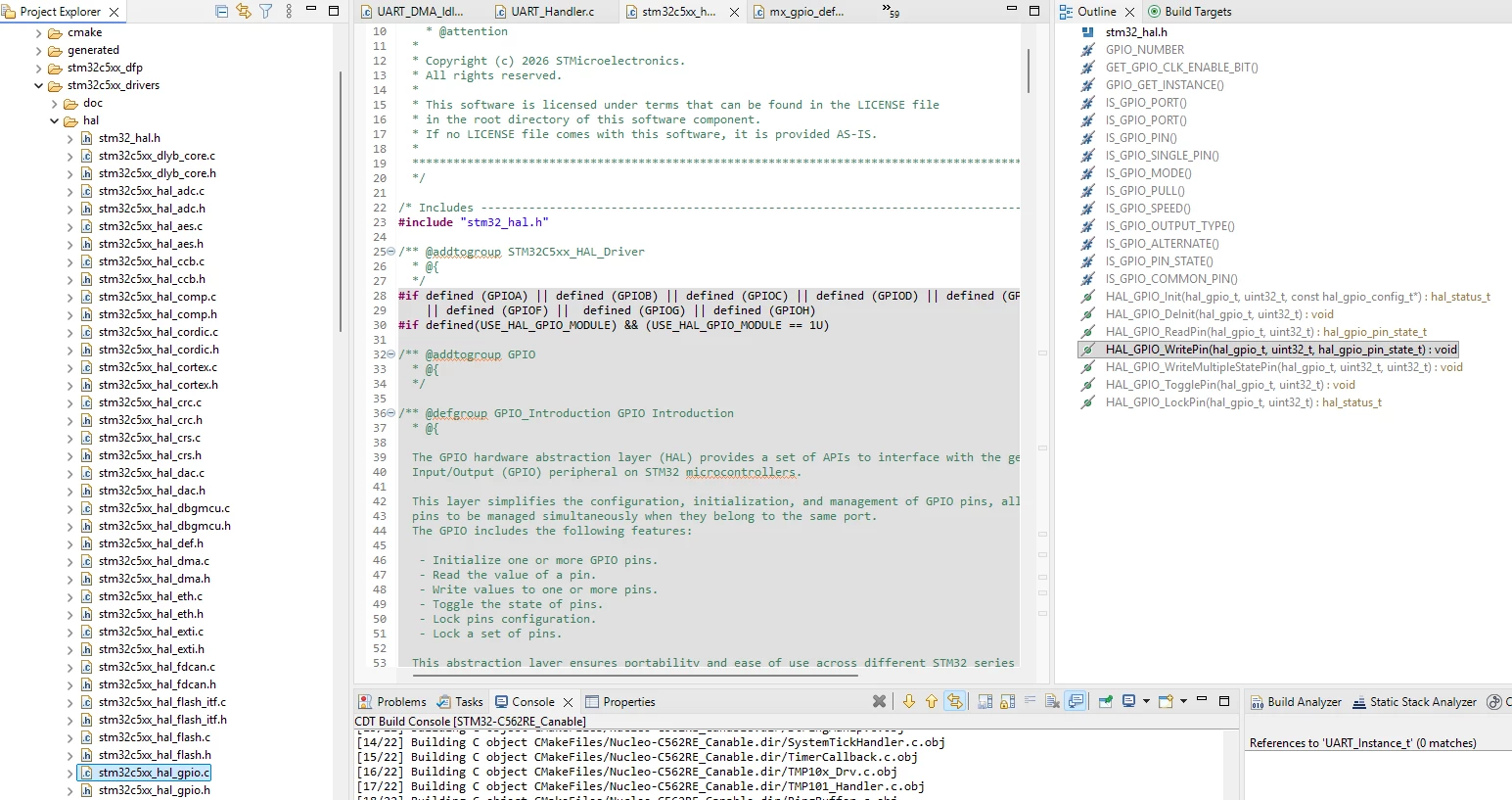
 

Screenshot 2026-04-09 114348.png

When I add "GPIOC" which is a one of the symbols, it enables the whole file. I have to add symbols for other peripherals as well.
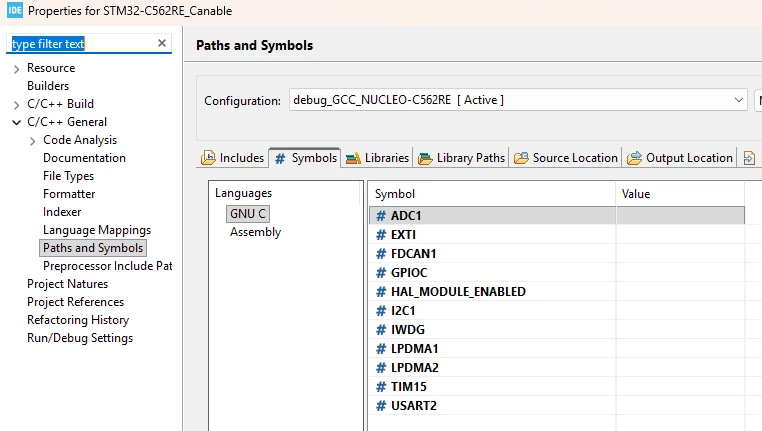
Screenshot 2026-04-09 115059.png

You can see it's not grayed out and in the right column, the slashes are gone.
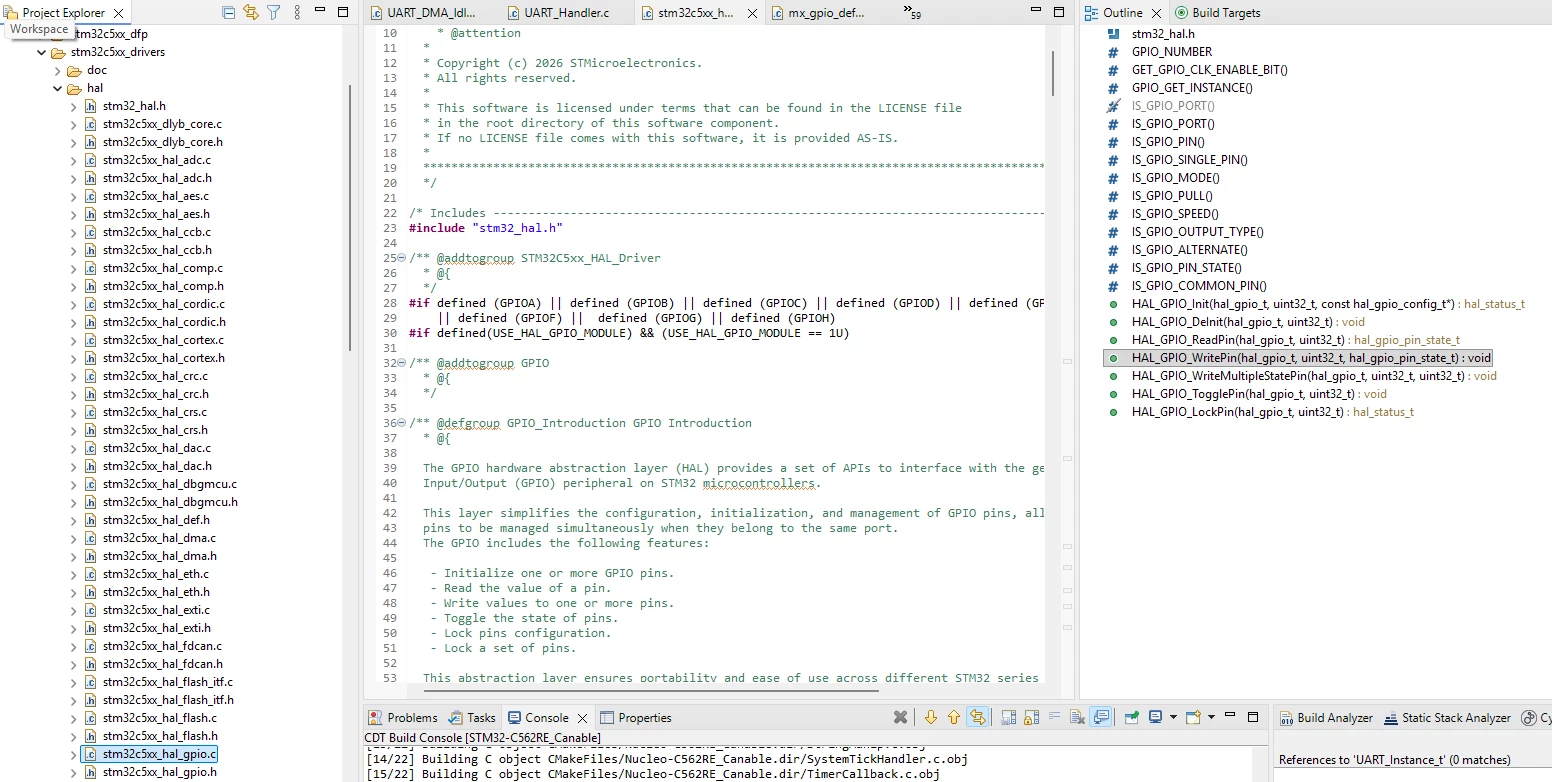
Screenshot 2026-04-09 114829.png

Now I am able to type a few characters and hit CTRL + Space to bring up a list of available functions.


3 replies

Andrew Neil
Super User
April 9, 2026

Welcome to the forum.

Please see How to write your question to maximize your chances to find a solution for best results.

In particular, what version of CubeIDE are you using?


@MatheusNifocci77 wrote:

I started a project using STM32C552RET6 and STM32CubeIDE. 


How, exactly, did you start this project?

For C5, you need to use STM32CubeMX2


PS:

Note that C5 uses HAL2

How to create a new project with STM32CubeMX2

How to get started with STM32C5 microcontrollers

How to use the HAL2 structure and project format

More Knowledge Base articles related to STM32CubeMX2

A complex system that works is invariably found to have evolved from a simple system that worked.A complex system designed from scratch never works and cannot be patched up to make it work.
Associate II
April 9, 2026

Hi Andrew


Yes, i use Stm32CubeMX2 to generate this project, using a Cmake format. 


After that, i import this projet on stm32cubeIDE as a STM32CubeMX2 Project. I'm using stm32CubeIDE 

Version: 2.1.1.

TDK
April 9, 2026

Autocomplete is clearly working in your screenshot.

Screenshot 2026-04-09 085157.png

What function are you looking for?


"If you feel a post has answered your question, please click ""Accept as Solution""."
Associate II
April 9, 2026

HAL_GPIO_ReadPin for example.

ST Technical Moderator
April 9, 2026

Hello @MatheusNifocci77 

Thank you for bringing our attention to this issue,
The behavior will be escalated internally to the dedicated team for further investigation  (Ticket #0061592 This is an internal tracking number and is not accessible or usable by customers). I will keep you informed about any updates.

BR, Souhaib

To give better visibility on the answered topics, please click on 'Best answer' on the reply which solved your issue or answered your question.
Karl Yamashita
Karl YamashitaBest answer
Principal
April 9, 2026


It could be the GPIO driver is not enabled. I've ran into the same problem.


I would check to see if the stm32c5xx_hal_gpio.c file is grayed out (not enabled).

I'm not sure if CubeMX2 is supposed to add defines/symbols automatically or if it's a bug, but I have to enable each peripheral even though i enabled them in CubeMX2.


For instance, stm32c5xx_hal_gpio.c HAL driver, it's all grayed out. The right column shows all the functions have a slash.


Screenshot 2026-04-09 114348.png

When I add "GPIOC" which is a one of the symbols, it enables the whole file. I have to add symbols for other peripherals as well.

Screenshot 2026-04-09 115059.png

You can see it's not grayed out and in the right column, the slashes are gone.

Screenshot 2026-04-09 114829.png

Now I am able to type a few characters and hit CTRL + Space to bring up a list of available functions.


If a reply has proven helpful, click on Accept as Solution so that it'll show at top of the post.CAN Jammer an open source CAN bus hacking toolCANableV3 Open Source

dmarks-ls
Associate III
July 17, 2026

@Karl Yamashita I have a better and simpler solution for you… you just need to define the symbol for the specific chip flavor you’re using.

In stm32c5xx.h there is a section of “Device_Includes”:

#if defined(STM32C531xx)
#include "stm32c531xx.h"
#elif defined(STM32C532xx)
#include "stm32c532xx.h"
#elif defined(STM32C542xx)
#include "stm32c542xx.h"
#elif defined(STM32C551xx)
#include "stm32c551xx.h"
#elif defined(STM32C552xx)
#include "stm32c552xx.h"
#elif defined(STM32C562xx)
#include "stm32c562xx.h"
#elif defined(STM32C591xx)
#include "stm32c591xx.h"
#elif defined(STM32C593xx)
#include "stm32c593xx.h"
#elif defined(STM32C5A3xx)
#include "stm32c5a3xx.h"
#else
#error "Please select first the target STM32C5xx device used in your application"
#endif

I have my project set up for an STMC32552VET6.  So I put STM32C552xx into C/C++ General / Paths and Symbols / Symbols, and voila, the IDE recognizes the HAL code now.  This works because this is the sole symbol that is being emitted to the code build from CMake.  In flags.cmake I find:

  target_compile_definitions(${CMAKE_PROJECT_NAME} PUBLIC STM32C552xx _RTE_)

Just for giggles and completeness, I added _RTE_ to the symbols as well.  It would be helpful if ST would set the MCU symbol in the CubeIDE project when importing the CMake project.

Dana M.