


GDB commands (echo, printf) in Debug Configurations' Run Commands?
I am following https://github.com/ethanhuanginst/STM32CubeIDE-Workshop-2019/tree/master/hands-on/09_BOOT-APP ; most everything there works for my Nucleo board, too.
However, I can see gdb is used, and in particular, a gdb script (as indicated by add-symbol-file) is used in Debug Configurations' Run Commands. Since in gdb command scripting there are both echo and printf commands, I thought I should try it in Debug Configurations > Startup tab > Run Commands -- say, the following:
printf "add-symbol-file\r\n"
echo "echo\r\n"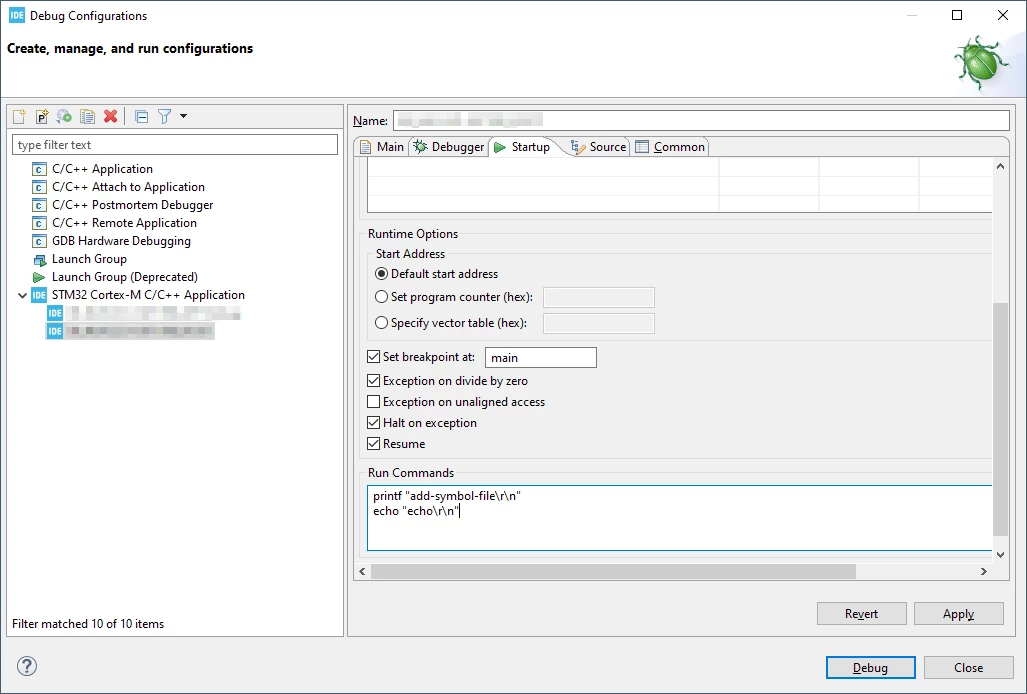
It turns out, that these commands end up in the .launch file of the project:
$ grep -r echo stm32_project_dir/
stm32_project_dir/PROJECTNAME.launch: <stringAttribute key="org.eclipse.cdt.debug.gdbjtag.core.runCommands" value="printf "add-symbol-file\r\n" echo "echo\r\n""/>
...That leads me to my first question:
- When following the above workshop page and reconstructing the projects there, for me, the APP project resulted with a "(PROJECTNAME) Debug.launch" file, and the BOOT project with just a "(PROJECTNAME).launch" file. What causes this difference in the naming of the autogenerated .launch files?
However, when I click Run > Debug, and I finally get a connection to the debugger, I cannot see these printouts anywhere -- at least not in the Debugger Console, where I'd have expected they would appear:
 So my main question is:
- Is it possible to use gdb commands like echo and printf in the gdb script in Debug Configurations' Run Commands -- and if so, how? (is there some additional setup; is the Debugger Console the right place to look for these output printouts?)