

luke514
Associate III
January 3, 2024
Solved

Folder in Project Explorer

  • January 3, 2024
  • 5 replies
  • 5074 views

Is there a possibility to create folders in which to place projects in order to better visually organize all those in the workspace?

For example in the picture below there is only a small part of the long list of my projects in "Project Explorer" ... can I create folders visible in the "Project Explorer" in which to place/categorize projects?
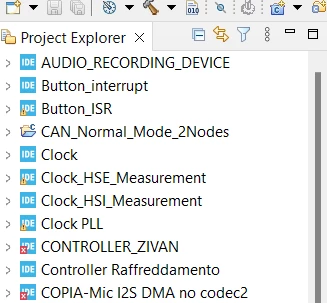
luke514_0-1704312407070.png

I kindly ask is there anyone can guide me step by step because in the past I made some mistakes that cost me the loss of some projects I don't know in what remote parts of the computer

    This topic has been closed for replies.
    Best answer by TDK

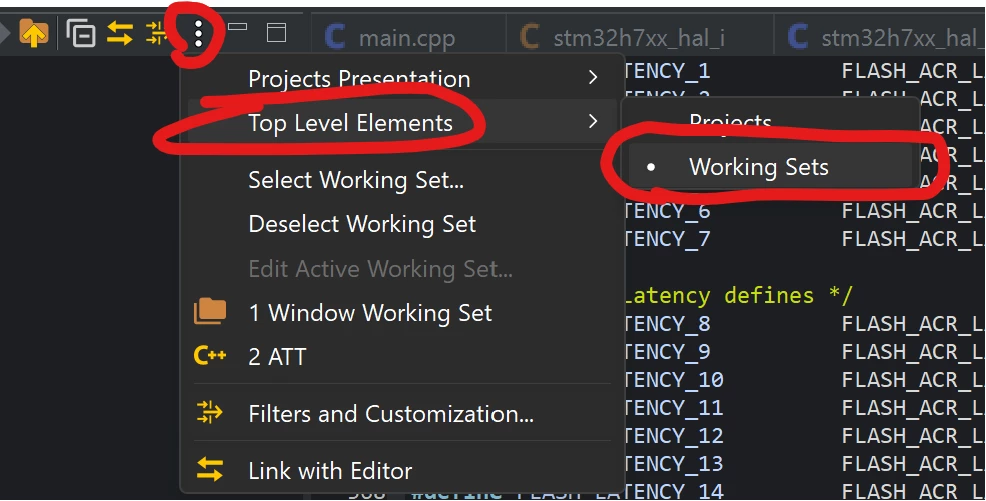
    You can't create folders, but you can organize your workspace into working sets, which is effectively the same thing.

    Set up your workspace to show working sets at the top-level instead of projects:

    TDK_0-1704315146540.png

    Then create working sets and add your projects to them within Select Working Set... -> New -> C/C++ -> (select projects)


    5 replies

    TDK
    TDKBest answer
    January 3, 2024

    You can't create folders, but you can organize your workspace into working sets, which is effectively the same thing.

    Set up your workspace to show working sets at the top-level instead of projects:

    TDK_0-1704315146540.png

    Then create working sets and add your projects to them within Select Working Set... -> New -> C/C++ -> (select projects)


    "If you feel a post has answered your question, please click ""Accept as Solution""."
    luke514
    luke514Author
    Associate III
    January 4, 2024

    Thank you.

    It should appear like this, right?

    luke514_1-1704386637407.png


    TDK
    January 4, 2024

    You got it. It's a little more organized that way, right?

    "If you feel a post has answered your question, please click ""Accept as Solution""."