


RHerm.3
Associate III
Jun 30, 2022 4:01 PM UTC
Solved

Error updating to STM32CubeIde 1.10.0

When I attempts to update STM32CubeIde 1.9.0 to 1.10.0 I get the following errors

An error occurred while collecting items to be installed

session context was:(profile=STM32CubeIDE, phase=org.eclipse.equinox.internal.p2.engine.phases.Collect, operand=, action=).

No repository found containing: osgi.bundle,com.google.gson,2.8.9.v20220111-1409

No repository found containing: osgi.bundle,com.st.stm32cube.common.ecosystemintegration,2.0.100.202204251147

No repository found containing: osgi.bundle,com.st.stm32cube.common.ecosystemintegration.stinsider,2.0.100.202204251147

These are the first three errors - many similar errors follow.

It appears that it can't find osgi.bundle.com.

Available Software Sites settings shown below.
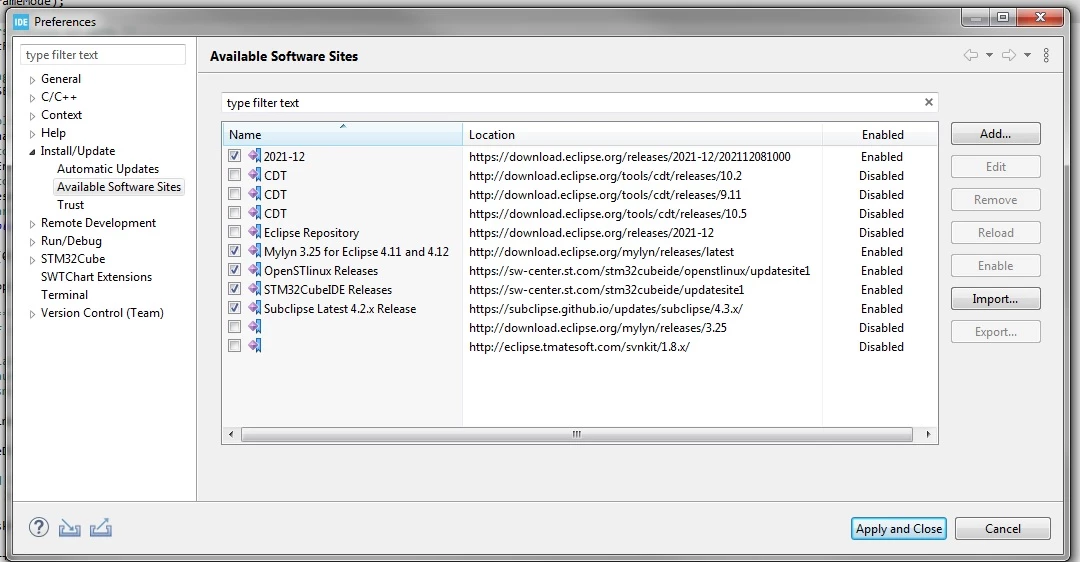
0693W00000QKCwpQAH.jpgOther updates have worked fine from 1.6.00 to 1.9.00.

Any suggestions would be appreciated.

This topic has been closed for replies.
RHerm.3
RHerm.3Best answer
Associate III
Jul 6, 2022 3:27 PM UTC

Uninstalled Cube, reinstalled v1.9.0, was able to upgrade to v1.10.0.

Issue was my PC, not sure why but it works fine now.

Problem solved. Thanks for the help Julian.

7 replies

Julien D
ST Employee
Jul 1, 2022 8:26 AM UTC

You get this error because STM32CubeIDE can't fetch some plugins (com.google.gson and com.st.stm32cube.common.ecosystemintegration*).

Anyway those plugins are well part of sw-center repository:

0693W00000QKGApQAP.pngYou probably had network issues during the fetch, or maybe a corrupted cache in the application.

In Preferences > Install/Update > Available Software Sites, can you press the Reload button on the repository https://sw-center.st.com/stm32cubeide/updatesite1, and try again to update (Help > Check for Updates).

If it fails, stop STM32CubeIDE, delete the following cache folders, and try again to update.

INSTALL_LOC\STM32CubeIDE\p2\org.eclipse.equinox.p2.core\cache

INSTALL_LOC\STM32CubeIDE\p2\org.eclipse.equinox.p2.repository\cache

To give better visibility on the answered topics, please click on Accept as Solution on the reply which solved your issue or answered your question.
RHerm.3
RHerm.3Author
Associate III
Jul 1, 2022 3:35 PM UTC

I tried reloading and deleting cache folder.

Still have the same problem.

I will try from another network this weekend to rule out network issues.

RHerm.3
RHerm.3Author
Associate III
Jul 2, 2022 5:08 PM UTC

Tried to update at home, same errors.

Julien D
ST Employee
Jul 4, 2022 6:29 AM UTC

You could maybe retry by keeping only sw-center URLs into Available Software Sites preference page to eliminated any possible conflict between repos.

If it fails again, can you attach your workspace log file (WORKSPACE_LOC/.metadata/.log) to this thread ?

To give better visibility on the answered topics, please click on Accept as Solution on the reply which solved your issue or answered your question.
RHerm.3
RHerm.3Author
Associate III
Jul 5, 2022 3:38 PM UTC

I tried to update my home PC from 1.9 to 1.10. It worked fine using the same network connection that failed with my work PC. Looks like something missing from my work PC.

I will uninstall STM32CubeIde and re-install.

The log from the last failed upgrade is attached.

Thanks for the help.

Julien D
ST Employee
Jul 5, 2022 3:49 PM UTC

There are many similar errors for all repositories you have defined in Available Software Sites:

No repository found at https://sw-center.st.com/stm32cubeide/openstlinux/updatesite1

No repository found at https://sw-center.st.com/stm32cubeide/updatesite1

No repository found at https://subclipse.github.io/updates/subclipse/4.3.x/

No repository found at http://download.eclipse.org/mylyn/releases/latest

No repository found at https://download.eclipse.org/releases/2021-12

No repository found at https://download.eclipse.org/releases/2021-12/202112081000

Since it works for another non IT-managed PC on the same network I wonder if your work PC could have custom IT policy and rules preventing those connections... That's said I must admit that it would be strange that the Reload works but not the upgrade...

To give better visibility on the answered topics, please click on Accept as Solution on the reply which solved your issue or answered your question.
RHerm.3
RHerm.3AuthorBest answer
Associate III
Jul 6, 2022 3:27 PM UTC

Uninstalled Cube, reinstalled v1.9.0, was able to upgrade to v1.10.0.

Issue was my PC, not sure why but it works fine now.

Problem solved. Thanks for the help Julian.