


EPala.2
Associate III
November 13, 2023
Question

Error Updating STM32Cube IDE to latest version

Hi, I am trying to update my STM32Cube to the latest version using Help > Check for Updates, the update fails with the following error:
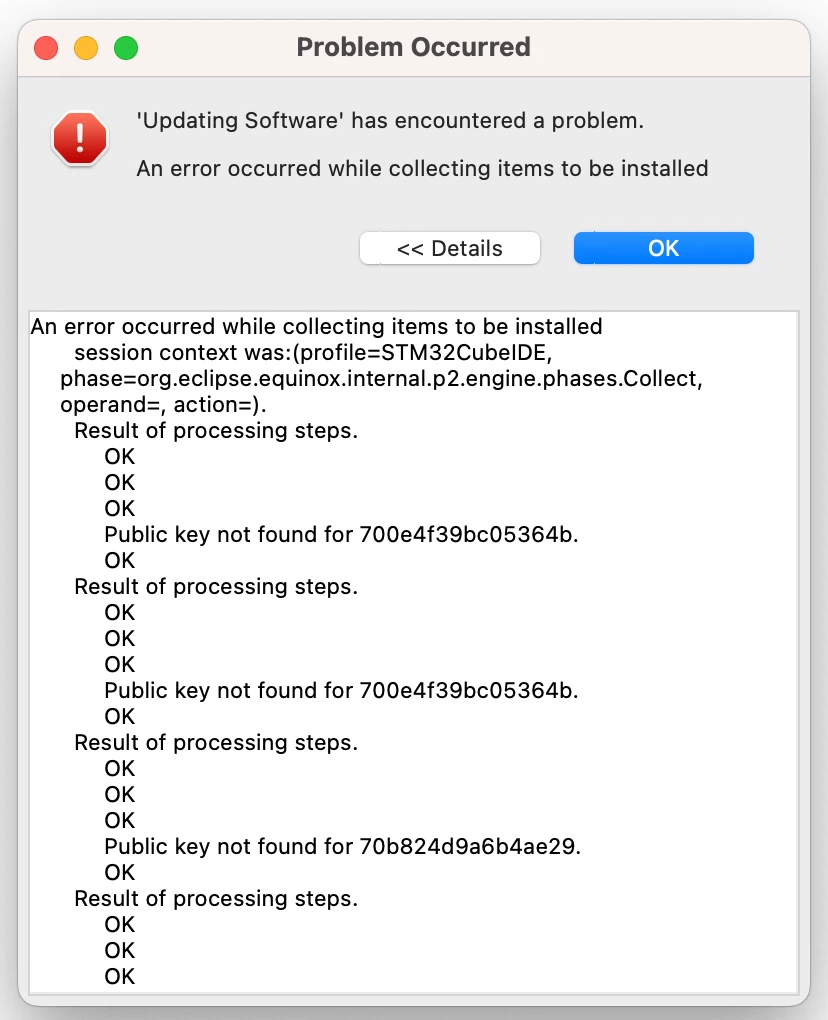
EPala2_0-1699904553713.png

Trying to update Cube V1.9.0 to the latest, running OSX 13.0. How do I fix this?

I found another thread which suggest a complete uinstall / reinstall is the solution, but I really don't want to do that as this is my main work computer and any downtime would have a huge negative impact on the projects I am working on. 

Please advise. 


This topic has been closed for replies.

4 replies

EPala.2
EPala.2Author
Associate III
November 13, 2023

This is the complete text of the error for reference:

An error occurred while collecting items to be installed

session context was:(profile=STM32CubeIDE, phase=org.eclipse.equinox.internal.p2.engine.phases.Collect, operand=, action=).

Result of processing steps.

OK

OK

OK

Public key not found for 700e4f39bc05364b.

OK

Result of processing steps.

OK

OK

OK

Public key not found for 700e4f39bc05364b.

OK

Result of processing steps.

OK

OK

OK

Public key not found for 70b824d9a6b4ae29.

OK

Result of processing steps.

OK

OK

OK

Public key not found for 700e4f39bc05364b.

OK

Result of processing steps.

OK

OK

OK

Public key not found for 700e4f39bc05364b.

OK

Result of processing steps.

OK

OK

OK

Public key not found for 700e4f39bc05364b.

OK

Result of processing steps.

OK

OK

OK

Public key not found for 700e4f39bc05364b.

OK

Result of processing steps.

OK

OK

OK

Public key not found for 700e4f39bc05364b.

OK

Result of processing steps.

OK

OK

OK

Public key not found for 700e4f39bc05364b.

OK

Result of processing steps.

OK

OK

OK

Public key not found for 700e4f39bc05364b.

OK

Result of processing steps.

OK

OK

OK

Public key not found for 700e4f39bc05364b.

OK

Result of processing steps.

OK

OK

OK

Public key not found for 700e4f39bc05364b.

OK

Result of processing steps.

OK

OK

OK

Public key not found for 700e4f39bc05364b.

OK

Result of processing steps.

OK

OK

OK

Public key not found for 700e4f39bc05364b.

OK

Result of processing steps.

OK

OK

OK

Public key not found for 700e4f39bc05364b.

OK

Result of processing steps.

OK

OK

OK

Public key not found for 700e4f39bc05364b.

OK

Result of processing steps.

OK

OK

OK

Public key not found for 700e4f39bc05364b.

OK

Result of processing steps.

OK

OK

OK

Public key not found for 700e4f39bc05364b.

OK

Result of processing steps.

OK

OK

OK

Public key not found for 700e4f39bc05364b.

OK

Result of processing steps.

OK

OK

OK

Public key not found for 700e4f39bc05364b.

OK

Result of processing steps.

OK

OK

OK

Public key not found for 700e4f39bc05364b.

OK

Result of processing steps.

OK

OK

OK

Public key not found for 700e4f39bc05364b.

OK

Result of processing steps.

OK

OK

OK

Public key not found for 700e4f39bc05364b.

OK

Result of processing steps.

OK

OK

OK

Public key not found for 700e4f39bc05364b.

OK

Result of processing steps.

OK

OK

OK

Public key not found for 700e4f39bc05364b.

OK

Result of processing steps.

OK

OK

OK

Public key not found for 700e4f39bc05364b.

OK

Result of processing steps.

OK

OK

OK

Public key not found for 700e4f39bc05364b.

OK

Result of processing steps.

OK

OK

OK

Public key not found for 700e4f39bc05364b.

OK

Result of processing steps.

OK

OK

OK

Public key not found for 700e4f39bc05364b.

OK

Result of processing steps.

OK

OK

OK

Public key not found for 700e4f39bc05364b.

OK

Result of processing steps.

OK

OK

OK

Public key not found for 700e4f39bc05364b.

OK

Result of processing steps.

OK

OK

OK

Public key not found for 700e4f39bc05364b.

OK

Result of processing steps.

OK

OK

OK

Public key not found for 700e4f39bc05364b.

OK

Result of processing steps.

OK

OK

OK

Public key not found for 700e4f39bc05364b.

OK

Result of processing steps.

OK

OK

OK

Public key not found for 700e4f39bc05364b.

OK


Bob S
Super User
November 13, 2023

I do not EVER allow CubeIDE or CubeMX to auto update.  NEVER.  Instead, I install multiple versions along side each other.  For production code you need a well defined and repeatable development environment.  Auto-update interferes with that.

So leave your CubeIDE 1.9.0 install alone.  Download and install 1.13.x into a separate directory and you will be able to run either one.

EPala.2
EPala.2Author
Associate III
November 13, 2023

Seems like a good call, I will try doing it that way

ST Employee
November 14, 2023


Hello @EPala.2, 

When migrating to STM32CubeIDE1.13.x please be aware of the possible migration issue 

To give better visibility on the answered topics, please click on Accept as Solution on the reply which solved your issue or answered your question.