RLarr.1
Associate III
March 21, 2024
Solved

Error in STM32DMA.cpp, L8ClutLoaded not declared

  • March 21, 2024
  • 4 replies
  • 3658 views

Starting a new STM32F4 project I decided it would be a good idea to update all the development tools.  

TouchGFX v 4.23.2

STM32CubeMX v 6.11.0

STMCubeIDE v 1.15.0


A working .ioc file from the previous project release was upgraded using the latest STM32CubeMX. A couple of modes to main.c required to run the application and a compile was attempted.  The following errors are generated:

../TouchGFX/target/generated/STM32DMA.cpp: In function 'void touchgfx::paint::argb8888::lineFromL8ARGB8888(uint8_t*, const uint8_t*, int16_t, uint8_t)':

../TouchGFX/target/generated/STM32DMA.cpp:760:9: error: 'L8ClutLoaded' was not declared in this scope

760 | if (L8ClutLoaded == 0)

| ^~~~~~~~~~~~


../TouchGFX/target/generated/STM32DMA.cpp: In function 'void touchgfx::paint::argb8888::lineFromL8RGB888(uint8_t*, const uint8_t*, int16_t, uint8_t)':

../TouchGFX/target/generated/STM32DMA.cpp:699:62: error: 'L8CLUT' was not declared in this scope

699 | WRITE_REG(DMA2D->FGCMAR, reinterpret_cast<uint32_t>(&L8CLUT->data));

| ^~~~~~

The project the .ioc file was upgraded from does not contain 'L8ClutLoaded'


TouchGFX default image configuration are shown below. All images used the default or ARG8888 or RGB888
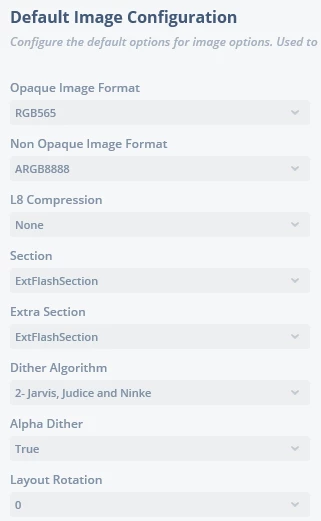
RLarr1_0-1711030381528.png

In CubeMX the DMA2D is set as follows:
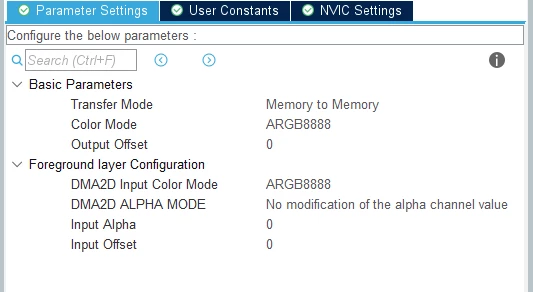
RLarr1_1-1711030506241.png

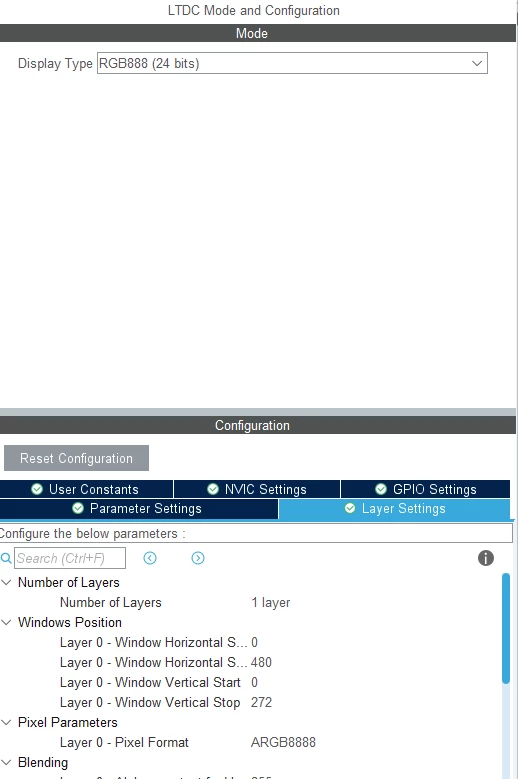
and LTDC settings:

RLarr1_2-1711030558988.png

and finally TouchGFX settings in CubeMX:
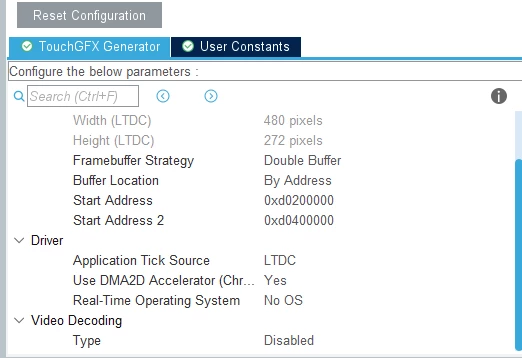
RLarr1_3-1711030650112.png


There are no indicated errors shown when code is generated from TouchGFX or CubeMX.


Did I miss upgrading something or changing a required setting?  


    This topic has been closed for replies.
    Best answer by Imen.D

    Hello @RLarr.1 ,

    Try download and install the X-CUBE-TouchGFX manually into STM32CubeMX. 

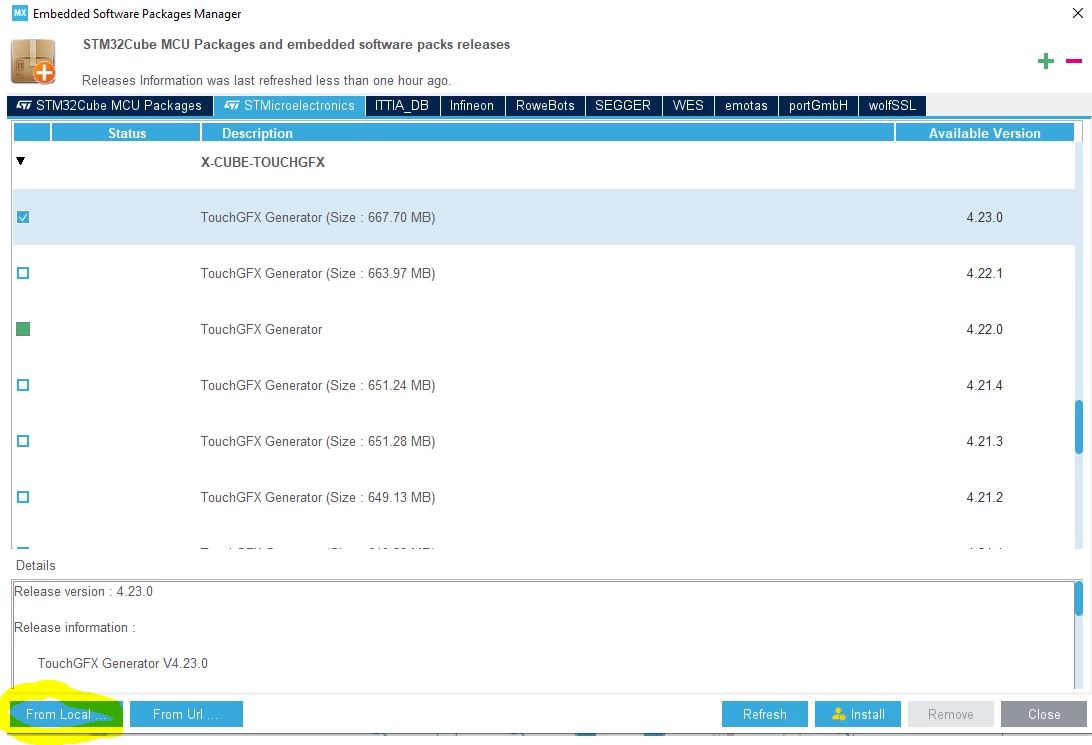
    After download the package, you need to install it by using "From local" option in the Help >> "Manage Embedded Software Packages" option in STM32CubeMX (please see the screenshot below - "From local" option in the bottom left, with yellow color).

    Then, select the X-CUBE-TOUCHGFX package (zip folder).

    ImenD_0-1711499244443.png

    Hope this works for you!


    4 replies

    Technical Moderator
    March 21, 2024

    Hello @RLarr.1 ,

    You need to regenerate the code with STM32CubeMX. 

    Please have a look at this post with same issue.

    In order to give better visibility on the answered topics, please click on 'Best answer' on the reply which solved your issue or answered your question. Thanks
    RLarr.1
    RLarr.1Author
    Associate III
    March 25, 2024

    Thank you for the reply.  I had regenerated code, a few times. At least once after trying each thing I did in an attempt to get it to work.  There are no indicated errors shown when code is generated from TouchGFX or CubeMX.  I will try starting from scratch with the MXCube and see if I have better luck.


    Thanks,

    Raymond

    RLarr.1
    RLarr.1Author
    Associate III
    March 25, 2024

    I uninstalled CubeMX, TouchGFX and CubeIDE and started over.  I got a good compile.  However when I go back into the .ioc file I get the following message:


    RLarr1_0-1711395995386.png

    The embedded software packages manager and Software packs selector has TouchGFX4.23.0 but does not seem to like TouchGFX v 4.23.2 I have installed.  This seems to be the root of the problem.

    RLarr.1
    RLarr.1Author
    Associate III
    March 26, 2024

    For some reason the solution was marked as spam and removed. 


    I removed all the installed software and reinstalled and no difference.  I changed the Framebuffer Pixel Format in the TouchGFX Generator in CubeMX from XRGB8888 to ARGB8888 and the issue with undefined variables went away.

    There is still the issue with CubeMX not recognizing TouchGFX version 40.23.2.  You just cannot go back into CubeMX after generating code in TouchGFX version 4.23.2.

    RLarr.1
    RLarr.1Author
    Associate III
    March 26, 2024

    The above still did not resolve the issue.  So far I have:

    • Deleted all files in the project directory several times to start a new project each time.
    • Generated code just about after every step in both CubeMX and TouchGFX.
    • Uninstalled and reinstalled CubeIDE, CubeMX and TouchGFX.  I currently have TouchGFX version 4.23.0 installed so I could make changes in CubeMX without it complaining about version 4.23.2.
    • Used Embedded Software Packages Manager to remove all TouchGFX Generator versions except 4.23.0
    • Recreated the .ioc from scratch in CubeMX to eliminate the import from older version.
    • Have checked for firmware and software updates in Embedded Software Packages Manager several times.
    • Rebooted the PC.

    STM32DMA.cpp continues to contain the undefined "L8ClutLoaded" and "L8CLUT" variables.


    Turns out the issue with undefined variables is caused by selecting XRGB8888 in the Framebuffer Pixel Format under the TouchGFX Generator in CubeMX.  Selecting ARG8888 fixed the undefined variables issue.


    There is still the issue that CubeMX does not recognize TouchGFX version 4.23.2.  


    Imen.DBest answer
    Technical Moderator
    March 27, 2024

    Hello @RLarr.1 ,

    Try download and install the X-CUBE-TouchGFX manually into STM32CubeMX. 

    After download the package, you need to install it by using "From local" option in the Help >> "Manage Embedded Software Packages" option in STM32CubeMX (please see the screenshot below - "From local" option in the bottom left, with yellow color).

    Then, select the X-CUBE-TOUCHGFX package (zip folder).

    ImenD_0-1711499244443.png

    Hope this works for you!


    In order to give better visibility on the answered topics, please click on 'Best answer' on the reply which solved your issue or answered your question. Thanks
    RLarr.1
    RLarr.1Author
    Associate III
    March 27, 2024


    @Imen.D

    Thank you.  That solved the issue with CubeMX not recognizing TouchGFX version 40.23.2.


    Both issues have been resolved.


    Raymond