


xisco
Senior
August 22, 2026
Solved

Error in cubeide 1.19.0 (Linux) when I try to create a new project from an existing configuration file

  • August 22, 2026
  • 9 replies
  • 8 views

Hello,


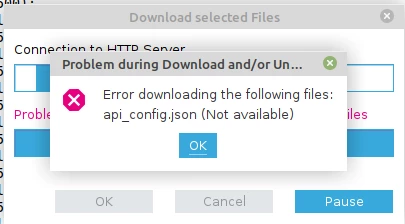
Today, when I try to create a new project from an existing STM32CubeMX configuration file (ioc), I get two errors.

 

479521bc-9e46-b76e-e597-02dae9bf6fea.pngbadd7e21-8b35-7b9e-f698-91a397a9c7cb.png

Clicking Ok, CubeIde show the menu for selecting project, and seems like nothing happened.

Can I trust projects created this way?


IDE: CubeIDE 1.19.0

OS: Linux Mint 21.3 Virginia.


Regards.

Best answer by AScha.3

Are you logged in, in IDE menu... ?

Because if not logged in, I got same error.

9 replies

Andrew Neil
Super User
August 22, 2026

@xisco  wrote:

IDE: CubeIDE 1.19.0


Note that this is quite old - current is v2.1.1.

Also note also that, since v2.0.0, CubeIDE and CubeMX become two entirely separate things:

STM32CubeIDE 2.0.0 New workflow tutorial

(perhaps that's why you're sticking with the out-of-date version?)

A complex system that works is invariably found to have evolved from a simple system that worked.A complex system designed from scratch never works and cannot be patched up to make it work.
xisco
xiscoAuthor
Senior
August 22, 2026

Yes, that's why I use this out-of-date version.

I currently use old MCUs (F103, F446, G030, ...) and I don't think a change is necessary for now.

Regards


Ghofrane GSOURI
ST Technical Moderator
August 22, 2026

Hello  @xisco  

The errors shown are most likely caused by STM32CubeIDE being unable to refresh or download online package metadata.

To resolve them, first make sure CubeIDE can access STs online repositories. Check that your internet connection is working properly, and if you are using a proxy, firewall, VPN, antivirus web filter, or a restricted corporate network, verify that these are not blocking CubeIDEs outbound HTTPS access. If needed, configure the proxy settings correctly in CubeIDE or temporarily disable the network restriction for testing. Once connectivity is confirmed, restart CubeIDE and try creating or regenerating the project again.

THX

Ghofrane

To give better visibility on the answered topics, please click on Accept as Solution on the reply which solved your issue or answered your question.
xisco
xiscoAuthor
Senior
August 22, 2026

Hello  @Ghofrane GSOURI  

I have no restrictions on my network and the problem persists today.

I uninstalled and reinstalled CubeIDE 1.19.0, but the problem persists.

Tomorrow I will go to another town, where I have a computer with the same operating system and the same IDE, and I'll check if I have the same problem there.


THX


xisco
xiscoAuthor
Senior
August 22, 2026

Hello,  @AScha.3  

Please, how you log in CubeIDE. I don't found, and CubeIDE don't ask me.

CubeIDE was running with no errors when I Accepted as solution, but now I have the same the same problem again.

Thanks


xisco
xiscoAuthor
Senior
August 22, 2026

Hello,  @AScha.3  


Yesterday I went to the other town to test it, and I had the same problem.

Now, I'm in my habitual city, and I have no errors.

I've noticed that CubeIDE now doesn't ask me for the password, so the problem is probably what you described.


Thanks


AScha.3
Super User
August 22, 2026

Hi,  @xisco  

Go in IDE menu-> Help -> stm32Cube updates -> connection to stm -> enter account ... (accept cookies...)

is your name/pass as here , then you get access ... try.

Maybe need update the software package for the cpu series you want to use , in IDE Cube ->


18bd891b-5463-f4fb-1caf-1461fbf5ddfc.png

software -> manage ...


If you feel a post has answered your question, please click on " Best Answer ".