
herbert
Associate III
August 17, 2023
Solved

Error in connection to STM32 after upgrading to CubeIDE 1.13.1

  • August 17, 2023
  • 3 replies
  • 2742 views

Hello,

after upgrading from 1.12.1 to 1.13.1 I encounter the following problem when trying to download my (previously working fine) project onto STM32:
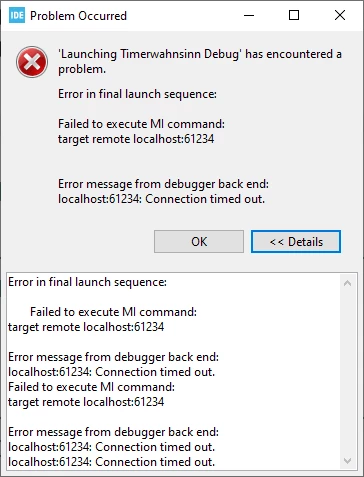
herbert_0-1692275629288.png

Any ideas?

regards
Herbert

This topic has been closed for replies.
Best answer by Rim LANDOLSI

Hello @herbert ,

Thank you for posting this issue.

At first, try to check the proxy settings following these steps:
- Under Window --> Prefenrences--> Network Connexion, activate Native provider
- Under Window --> Prefenrences--> Firmware Updater, click on Check Connection
don't forget Apply and Close, if the connection works.

Could you, also, try to:
- Power off the target board
- Disconnect the ST-LINK JTAG USB cable
- Re-connect it t the ST-LINK JTAG USB cable
- Power on the target board
- Check the debug configuration settings, such as the SWD/JTAG interface
- Start the GDB server with different port number

I hope this will help!


Thanks,
Rim

3 replies

RhSilicon
Lead
August 17, 2023

Try reverting back to version 1.12.1, this problem may be related to the ST-link frequency above 1000kHz.

ST-Link_error_MI_cmd.png

Rim LANDOLSI
Rim LANDOLSIBest answer
ST Employee
August 18, 2023

Hello @herbert ,

Thank you for posting this issue.

At first, try to check the proxy settings following these steps:
- Under Window --> Prefenrences--> Network Connexion, activate Native provider
- Under Window --> Prefenrences--> Firmware Updater, click on Check Connection
don't forget Apply and Close, if the connection works.

Could you, also, try to:
- Power off the target board
- Disconnect the ST-LINK JTAG USB cable
- Re-connect it t the ST-LINK JTAG USB cable
- Power on the target board
- Check the debug configuration settings, such as the SWD/JTAG interface
- Start the GDB server with different port number

I hope this will help!


Thanks,
Rim

herbert
herbertAuthor
Associate III
August 28, 2023

Hello @Rim LANDOLSI,

thanks, your tip to Check Connection with the Firmware Updater did set me to the right direction, as this also suggested to go to Help->Check for Target Selector Device Database Updates, which then did the trick for me and I was again able to connect to my STM32F411 board.

regards Herbert