

ron_w
Associate III
September 22, 2021
Solved

Elf created but STM32CubeIDE cannot find

  • September 22, 2021
  • 3 replies
  • 4714 views

Hello

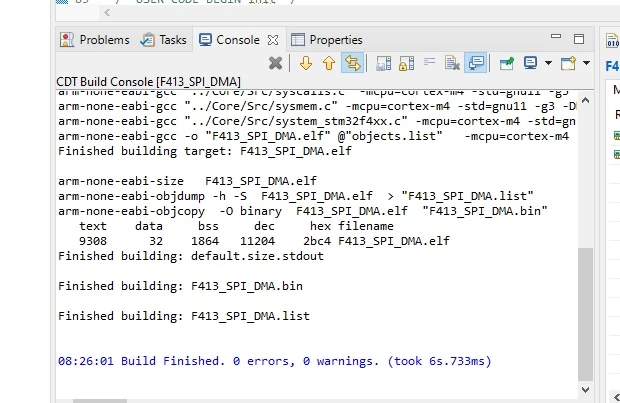
I've created a project that has created an elf file:
0693W00000F9xT5QAJ.jpg 

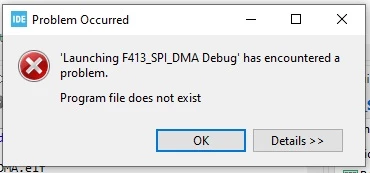
However, when I run debug on STM32CubeIDE I get the following message:
0693W00000F9xTFQAZ.jpg 

Can anyone advise, please? I've not had this problem before with STM32G071, but am trying with STM32F413.

Thanks

This topic has been closed for replies.
Best answer by TDK

Go into Run -> Debug Configurations... and make sure it's pointing to the right ELF in the "C/C++ Application" field. Hit "Search Project" and ensure it exists.

3 replies

Javier1
Principal
September 22, 2021

Are you building in release or in debug mode?

0693W00000F9zDPQAZ.png

hit me up in https://www.linkedin.com/in/javiermuñoz/
TDK
TDKBest answer
Super User
September 22, 2021

Go into Run -> Debug Configurations... and make sure it's pointing to the right ELF in the "C/C++ Application" field. Hit "Search Project" and ensure it exists.

"If you feel a post has answered your question, please click ""Accept as Solution""."
ron_w
ron_wAuthor
Associate III
September 26, 2021

Hello, Thanks Javier and @TDK for your replies.

I'm working in Debug mode and got STM32CubeIDE to accept the ELF.

The first step was indicated by TDK by (Run -> Debug Configurations...) [note: ensure that CubeIDE only has one project open, the one that is requiring this modification].

This showed 'C/C++ Application' being empty:

0693W00000FARYAQA5.jpgPressing 'Search Project...' gave the following:

0693W00000FARYoQAP.jpgDouble clicking on the ELF filled in the missing file:

0693W00000FARYtQAP.jpg
