PSpee.2
Associate II
February 23, 2022
Solved

DEBUG problem on LIVE EXPRESSION

  • February 23, 2022
  • 1 reply
  • 1731 views

Hi all,

I'am new user on the site and I need help for an error I did not find on internet.

I use STM32CUBEIDE 1.8.0

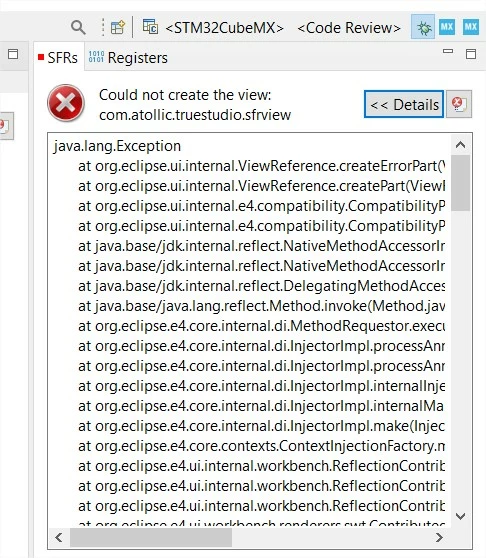
When debugging, if I read LIVE EXPRESSION I have the following windows, alse on SFR windows :
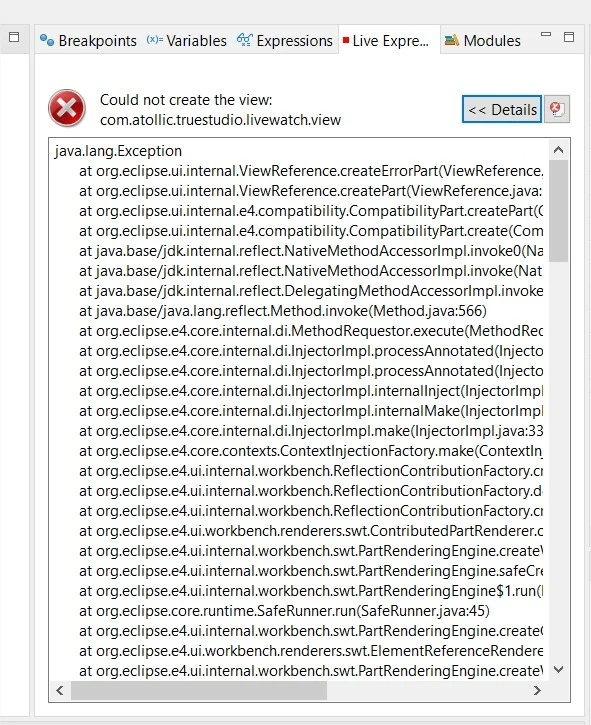
0693W00000KaHmsQAF.jpg0693W00000KaHnWQAV.jpgThe other windows works perfectly

I try to reinstall CUBEIDE after delete the old directories and after a clean register with regedit ........ sill the same error

Thank you for your help

Patrick

This topic has been closed for replies.
Best answer by mattias norlander

What is the origin of the workspace and project you are trying to debug? You have references to com.atollic.truestudio....

To me this suggests that you have an old Atollic TrueSTUDIO workspace that you tried to open in CubeIDE. This is not possible. Or that you imported an old Atollic TrueSTUDIO project in the wrong way.

Do this:

  1. Start a new workspace for CubeIDE
  2. Import you TrueSTUDIO project using: File > Open project from filesystem...

This will give you a clean workspace, and it will import the old TrueSTUDIO project invoking our project format converters to convert the project files into CubeIDE files.

Let me know if that solves the issue.

1 reply

mattias norlander
ST Employee
February 25, 2022

What is the origin of the workspace and project you are trying to debug? You have references to com.atollic.truestudio....

To me this suggests that you have an old Atollic TrueSTUDIO workspace that you tried to open in CubeIDE. This is not possible. Or that you imported an old Atollic TrueSTUDIO project in the wrong way.

Do this:

  1. Start a new workspace for CubeIDE
  2. Import you TrueSTUDIO project using: File > Open project from filesystem...

This will give you a clean workspace, and it will import the old TrueSTUDIO project invoking our project format converters to convert the project files into CubeIDE files.

Let me know if that solves the issue.

PSpee.2
PSpee.2Author
Associate II
February 25, 2022
Le 25-02-22 à 17:08, ST Community a écrit :
Sir,
Thank you for your answer, I tried everything to solve this problem but
I would never have thought of your solution.
It works perfectly, and I will import all my projects into the new
environment.
Thanks very much
patrick