


SLimi.1
Associate III
August 6, 2023
Solved

Debug Error on Dual Core STM34H747I-DISCO Board

Using Application Note AN5361 and a Online ST Video. I have create a project in STM32CubeIDE for the STM32H747I-Disco Board. As a test of the debugging, I have have both cores simply blinking separate LEDs.

I set up the CM7 debug configuration  per AN5361 and did not check "Halt all cores" on Reset.  Debugging with the CM7 project, runs the application on the board without issue. I am able to set a break point in the CM7's main.c and step through the code. If I set a break point in CM4's main.c, nothing happens. The CM4 is not loaded in the debugger at all. 

The online video made the suggestion to check "Halt all cores" on Reset ion the CM7's debug configuration. I created a Launch Group to start debug both projects. Starting debug starts up both projects as expected. The debugger stops at the CM7 main break point. Click continue, and the debugger stops at the CM4 main break point at the line for:

__HAL_RCC_HSEM_CLK_ENABLE();

 If I click continue, the program crashes into an unknown space.
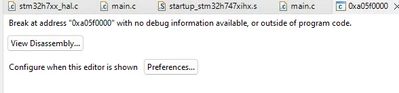
SLimi1_0-1691289197359.png

If I uncheck the "Halt on cores", and attempt to Debug with the Launch Group fails on the CM4 with a "Failed to Launch GDB Server"

What am I missing? What needs to be configured to debug both projects?


    This topic has been closed for replies.
    SLimi.1
    SLimi.1Best answer
    Associate III
    September 20, 2023

    Resolved. The trick is to start the debugger separately for both cores, M7 first and then M4. Then click on both main.c threads in the Debug tree and select continue.

    3 replies

    ST Technical Moderator
    September 4, 2023

    Hello @SLimi.1,

    Which DAP are you using for  CM4? Have you checked the debug access port with CubeProgrammer?


    To give better visibility on the answered topics, please click on "Best answer" on the reply which solved your issue or answered your question.Best regards,FBL
    SLimi.1
    SLimi.1Author
    Associate III
    September 13, 2023

    @FBL thanks for the response

    DAP is the STLINK port. I am assuming that both cores are using the same STLINK with different port numbers.

    I don't see how CubeProgrammer helps to resolve the DAP


    SLimi.1
    SLimi.1AuthorBest answer
    Associate III
    September 20, 2023

    Resolved. The trick is to start the debugger separately for both cores, M7 first and then M4. Then click on both main.c threads in the Debug tree and select continue.