

Associate
March 25, 2024
Question

CubeIDE ignoring include path

  • March 25, 2024
  • 4 replies
  • 2633 views

I having trouble with the include path of the compiler.

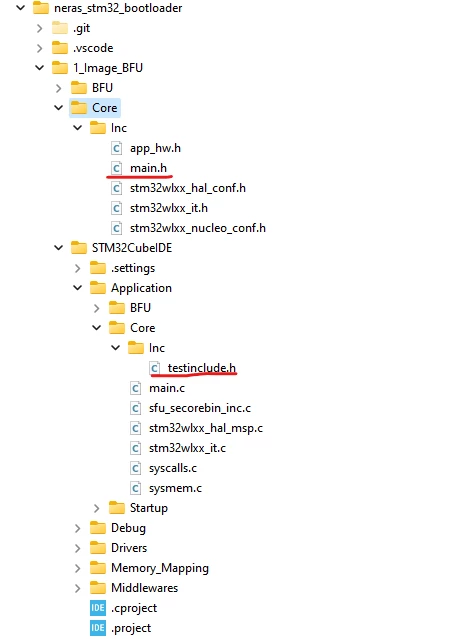
I have a header file that is outside my projecto folder, main.h (this was imported from the 1_Image_BFU example). And the header cannot find the header  inside my project even though I have included in the path.

The structure is as follow:
leandrospte_0-1711388847676.png

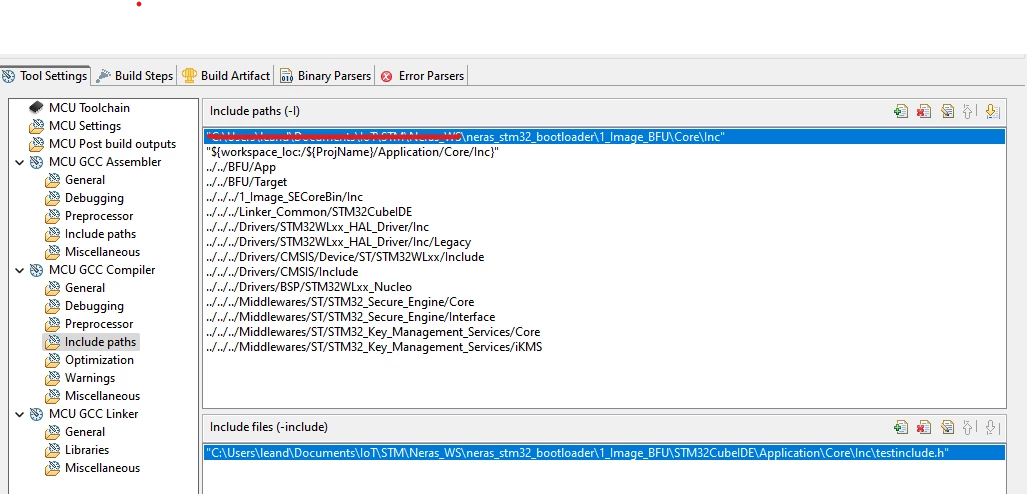
In the main.h I added the #include "testinclude.h", and added the following path in the projcet properties:
leandrospte_1-1711389164641.png


However when I try to compile I get an error that the file cannot be found. 

leandrospte_2-1711389306504.png

I test with the full path in the include

#include "../../STM32CubeIDE/Application/Core/Inc/testinclude.h", and it compile fine.

So it seems that the compiler is ignoring the path configure in properties, I tried moving the file to other location in different folder and change the path accordingly however I get the same result.

Is there another place to configure the path for include files?

Thank you very much,

Best Regards,

Leandro


This topic has been closed for replies.

4 replies

Pavel A.
Super User
March 25, 2024

The include path indeed looks invalid. It should contain 1_Image_BFU/STM32CubeIDE/Application/Core/Inc, not 1_Image_BFU/Core/Inc


Associate
March 25, 2024

Dear @Pavel A. thanks for the reply.


Sorry about my picture before, but actually the include regaring that file was the second line, this one below:

leandrospte_0-1711391488992.png

However just to make sure I added the complete path as below:

leandrospte_1-1711391554548.png

And got the same result, and to avoid error I used the folder explorer from the pop box.

Pavel A.
Super User
March 25, 2024

So now the 1st item likely is good. Note that 2nd and following items have "error" icons on them. This means the IDE cannot find them. Note the warning about avoidance of relative paths displayed at bottom of the incudes dialog. It is not for nothing. 


Rim LANDOLSI
ST Employee
March 26, 2024

Hello @leandrospte ,

To link to the header file outside the project, you can create an advanced link by following these steps:

- Right click to folder that you want to add the file ->New->File.

- Click 'Advanced' button.

- Check 'Link to File in the File System' checkbox.

- Click button 'browse'

Then choose the file you want.

Thanks,
Rim