
thannara123
Associate III
Sep 4, 2024 7:12 AM UTC
Question

CUBE IDE shows some strange character
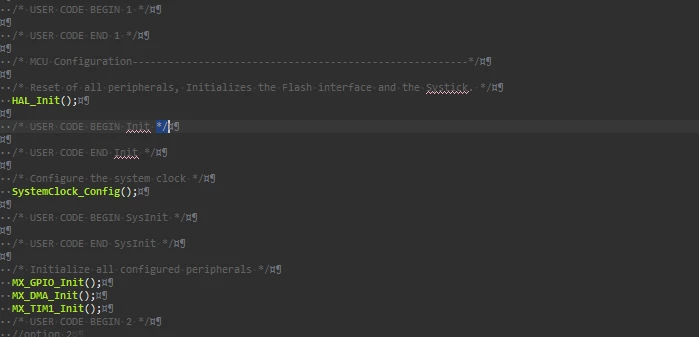
Screenshot 2024-09-04 123950.png

why the ide show these type of values how to hide it ?

This topic has been closed for replies.

4 replies

Radosław
Associate II
Sep 4, 2024 8:00 AM UTC

stm32cubeide_Jwi3uRApI3.png   

TDK
Sep 4, 2024 2:09 PM UTC

The icon that @Radosław showed is a toggle button in the toolbar. Click it to toggle whitespace.

TDK_0-1725458947728.png


"If you feel a post has answered your question, please click ""Accept as Solution""."
Andrew Neil
Super User
Sep 4, 2024 2:21 PM UTC

@thannara123 and if you can't see it on a toolbar, it's under the 'Window' menu:

AndrewNeil_0-1725459607573.png


As the name suggests, it's showing you all the whitespace characters - CR, LF, Space, and TAB.


Note that this is a standard Eclipse feature - not specific to CubeIDE - and common to most IDEs and Programmer's Editors.

https://mcuoneclipse.com/2012/09/30/white-space-or-not-thats-the-question/

A complex system that works is invariably found to have evolved from a simple system that worked.A complex system designed from scratch never works and cannot be patched up to make it work.
Associate II
Sep 4, 2024 2:17 PM UTC

You can configure it in Window>Preferences>Editors>Text Editors then click on the link configure visibility. And select/deselected what you want your IDE to show or not.