Eqqman
Associate III
March 26, 2024
Solved

Cube gives warning to enable non-existent setting on U575 project

  • March 26, 2024
  • 3 replies
  • 2323 views

When compiling code for the U575 from the IOC file a warning pops up that SMPS must be enabled.  However, we cannot find this setting under the PWR tab nor via the A-Z listing of properties.  What must be done to clear this warning?

Best answer by STTwo-32

Hello @marrob @Eqqman 

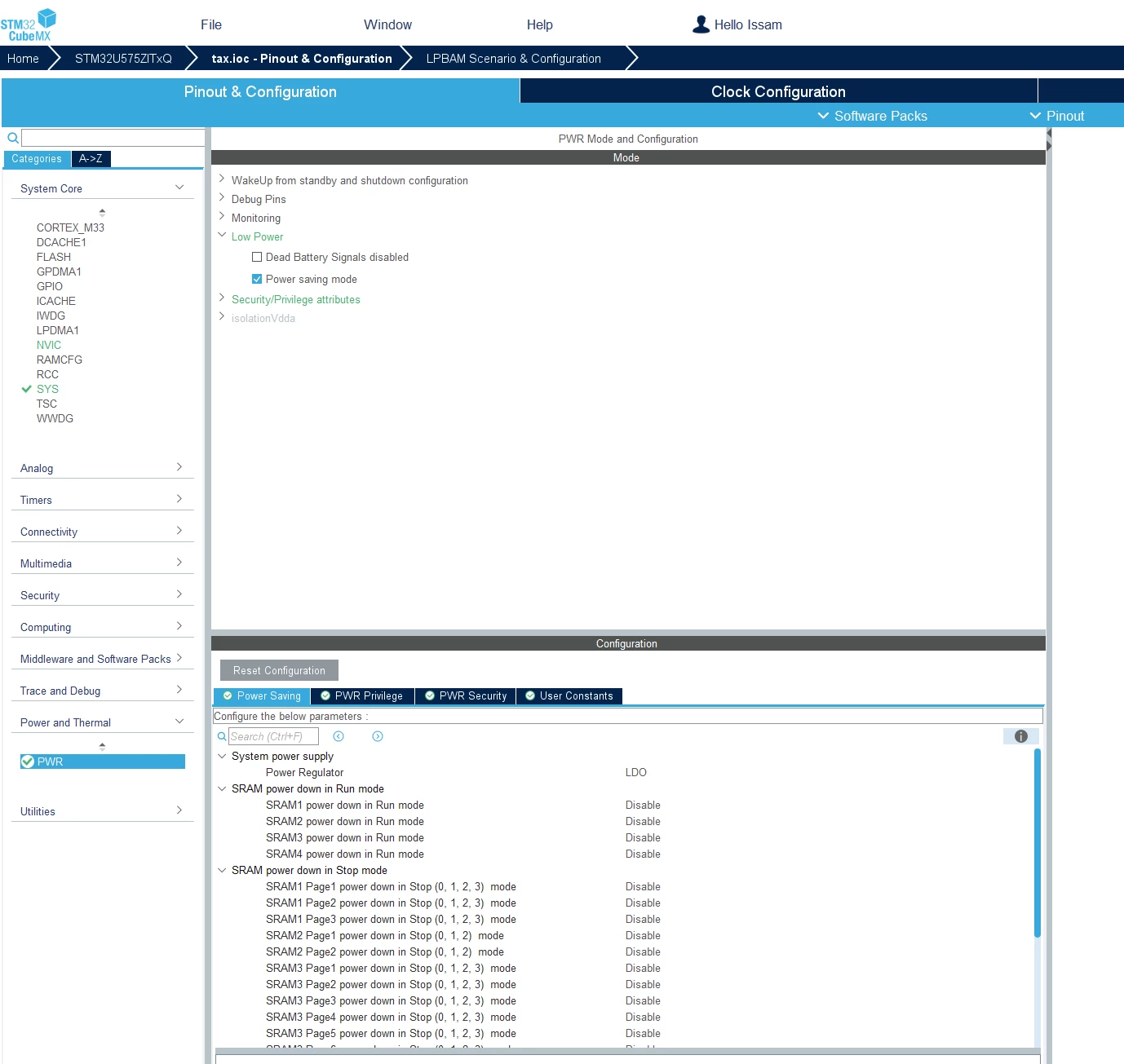
Sorry for my late replay. To enable SMPS on the STM32U575ZIT6Q using the Pinout & Configuration menu on the .ioc file of your project, you have to go to Power and Thermal -> PWR -> Low Power -> check the Case Power saving mode -> on the Power Saving tab under Configuration, change the Power Regulator from LDO to SMPS. for the Pop-up message, you can ignore it clicking on the yes button of the Message. It is just a warning to have better configurations. You can't disable it but you are not obliged to follow it.
STTwo32_0-1721661889452.png

Best Regards.

STTwo-32

3 replies

STTwo-32
Technical Moderator
March 26, 2024

Hello @Eqqman 

Can you add more details (which MCU are you using exactly and which CubeMX version).

Best Regards.

STTwo-32 

To give better visibility on the answered topics, please click on Accept as Solution on the reply which solved your issue or answered your question.

Eqqman
EqqmanAuthor
Associate III
March 27, 2024

STM32CubeIDE


Version: 1.15.0

Build: 20695_20240315_1429 (UTC)


Also happened with the previous version of the software. Chip selected is STM32U575ZITxQ.

Graduate II
July 22, 2024

It is still problem with STM32U575ZIT6Q


STM32CubeIDE

Version: 1.16.0

Build: 21983_20240628_1741 (UTC)


Is there any solution to switch off this warning popup?

STTwo-32
STTwo-32Best answer
Technical Moderator
July 22, 2024

Hello @marrob @Eqqman 

Sorry for my late replay. To enable SMPS on the STM32U575ZIT6Q using the Pinout & Configuration menu on the .ioc file of your project, you have to go to Power and Thermal -> PWR -> Low Power -> check the Case Power saving mode -> on the Power Saving tab under Configuration, change the Power Regulator from LDO to SMPS. for the Pop-up message, you can ignore it clicking on the yes button of the Message. It is just a warning to have better configurations. You can't disable it but you are not obliged to follow it.

STTwo32_0-1721661889452.png

Best Regards.

STTwo-32

To give better visibility on the answered topics, please click on Accept as Solution on the reply which solved your issue or answered your question.