

Lars Beiderbecke
Senior III
August 29, 2021
Solved

Create Run and not Debug configuration

How can I configure a Run configuration for flashing that doesn't also break and throw me into the debugger? 
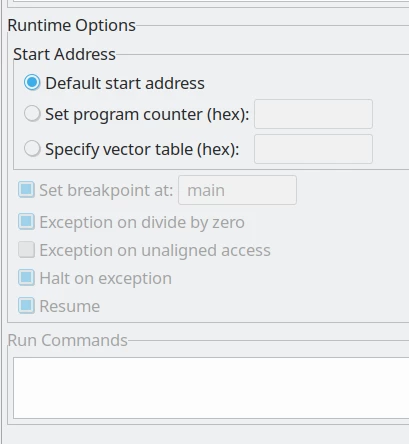
0693W00000DlXCaQAN.pngNote how all the relevant options in my Run configuration are greyed out. How can I enable them?

This topic has been closed for replies.
Lars Beiderbecke
Lars BeiderbeckeBest answer
Senior III
August 29, 2021

I accidentally found it. If you view the configurations via Run Configurations ... then the area above is greyed out. If you view configurations via Debug Configurations ..., then they are editable.

Way to go, STM32CubeIDE.

10 replies

Pavel A.
August 29, 2021

IRC the "default start address" in this context means that debugger resets the target and then lets it run freely, as it normally would after a reset.

Do you want a different behavior?

Lars Beiderbecke
Senior III
August 29, 2021

Thanks Pavel, but I'm talking about the greyed-out area below that. In particular, I want to disable the "Set breakpoint at" option.

Lars Beiderbecke
Lars BeiderbeckeAuthorBest answer
Senior III
August 29, 2021

I accidentally found it. If you view the configurations via Run Configurations ... then the area above is greyed out. If you view configurations via Debug Configurations ..., then they are editable.

Way to go, STM32CubeIDE.

TDK
August 30, 2021

Those options are grayed out because in a Run configuration, the debugger is not connected. If they're not grayed out, it's a Debug configuration.

"If you feel a post has answered your question, please click ""Accept as Solution""."
Lars Beiderbecke
Senior III
August 30, 2021

Yes, I found out. It's just weird, since the page I arrive at is the same in both cases. Also, no matter which way I choose, I see both Run and Debug configs, making the current implementation not really intuitive.

TDK
August 30, 2021

Why is it weird that Debug-only options are grayed out in Run configurations?

"If you feel a post has answered your question, please click ""Accept as Solution""."