Associate
December 9, 2023
Solved

Compilation error

  • December 9, 2023
  • 2 replies
  • 5026 views

Hello,

sorry to ask you, I am not a programming professional, but a user on a particular project. As long as everything goes well it's perfect but when I have a problem it becomes complicated for me.
I'm trying to compile a code after having customized it for my needs, so I loaded the .ioc file into the IDE, everything went well, however when I run DEBUG, I get messages errors that I don't know how to interpret.

My understanding is that the compiler is expecting files but not finding the correct ones. What is strange is that in theory the project is complete.

If you could help me, I would be very grateful.

Thanks.
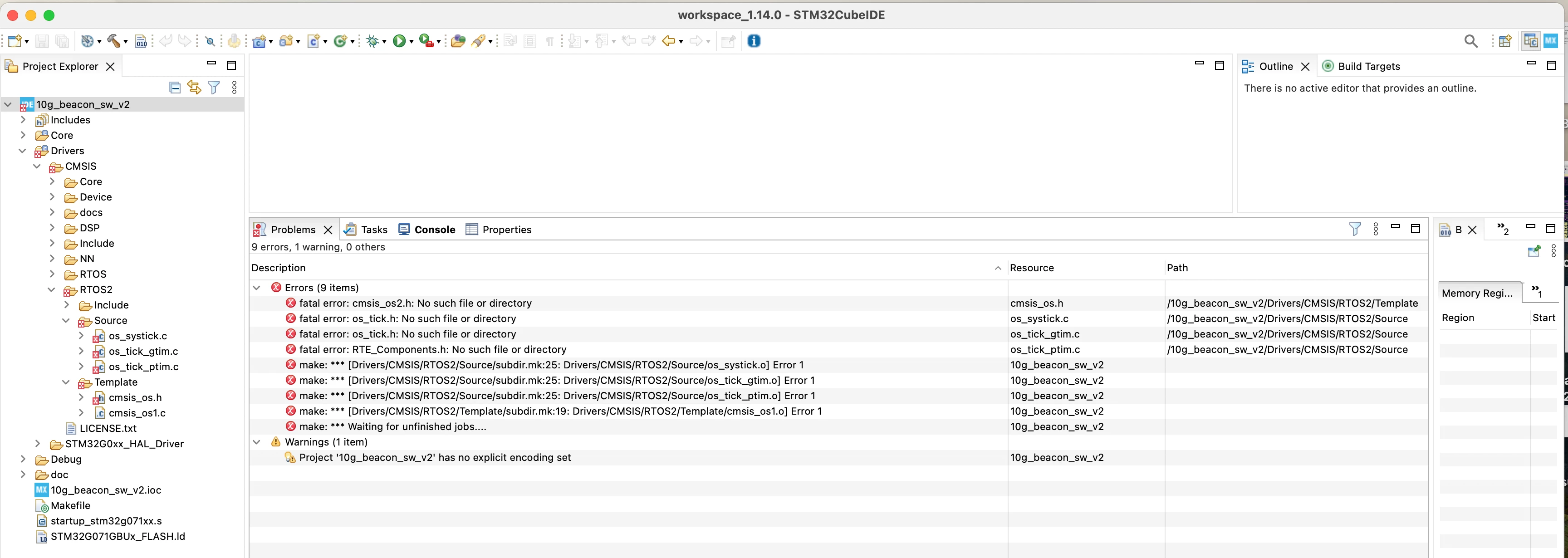
error compil.png


    This topic has been closed for replies.
    Best answer by Andrew Neil

    Note that STM32CubeIDE uses GCC and Make anyhow.

    As @STTwo-32 said, the problem is most likely that your Include Paths are not correct.

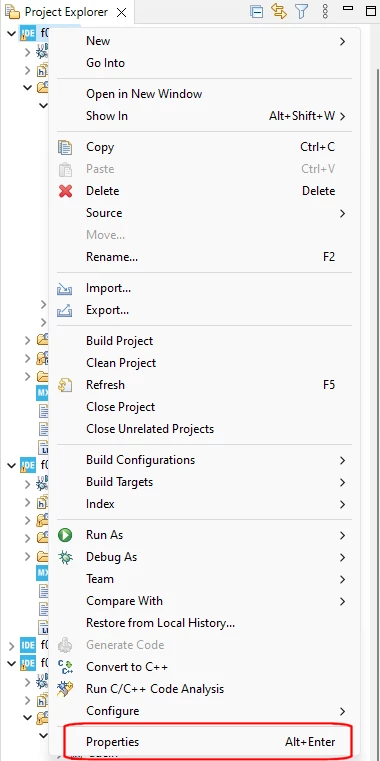
    Check your Include Paths by right-clicking the Project name in the Project Explorer, and then choosing 'Properties':

    AndrewNeil_1-1702393567722.png

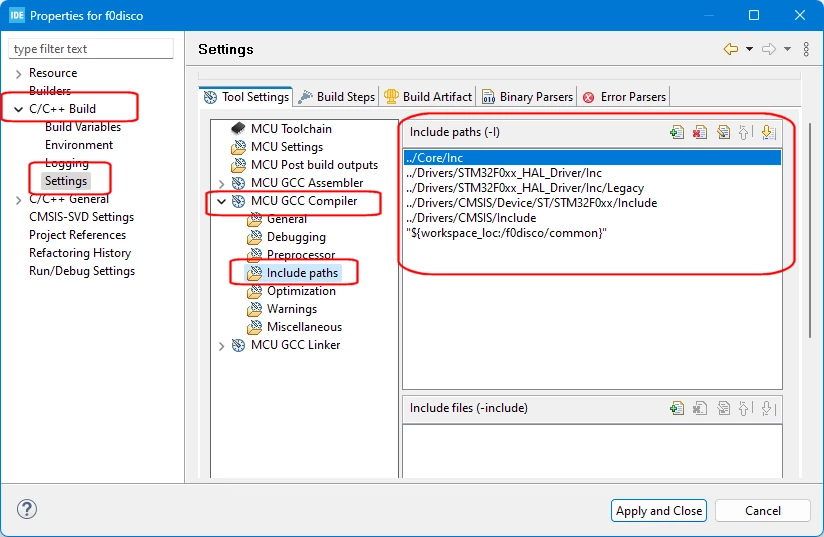
    Then go to C/C++ Build > Settings > MCU GCC Compiler > Include Paths:

    AndrewNeil_2-1702393718794.png

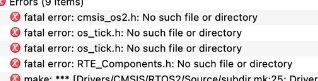
    For each of the four header files listed in your errors:

    AndrewNeil_3-1702393767078.png

    Check that the folder containing that file is in your list of Include Paths.

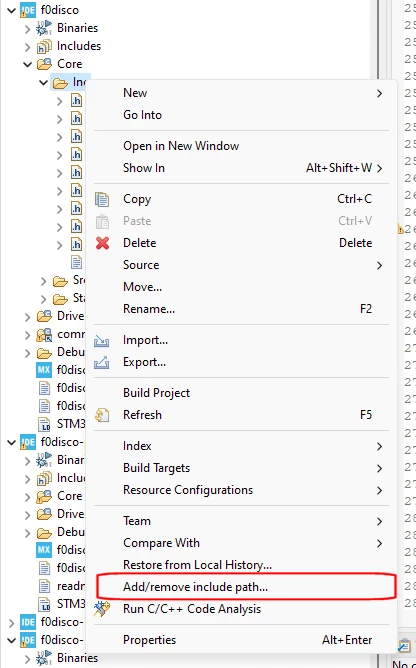
    To add an include path, you can right-click a folder in the Project Explorer, and choose 'Add/Remove Include Path':

    AndrewNeil_0-1702393424408.png


    2 replies

    STTwo-32
    Technical Moderator
    December 9, 2023

    Hello @franck42 and welcome to the ST Community :smiling_face_with_smiling_eyes:.

    It seems the include paths are not properly set up.

    Please make sure to configure the include paths and check the path of the header files. Maybe those folders are not in the include folder list.

    Best Regards.

    STTwo-32 

    To give better visibility on the answered topics, please click on Accept as Solution on the reply which solved your issue or answered your question.
    franck42Author
    Associate
    December 12, 2023

    Hi STTw

    I was not able to resolve my problem, I switched to GCC to try with Make, and everything is ok. My objective has been achieved but without understanding, I will see a little later.

    THANKS


    Andrew Neil
    Andrew NeilBest answer
    Super User
    December 12, 2023

    Note that STM32CubeIDE uses GCC and Make anyhow.

    As @STTwo-32 said, the problem is most likely that your Include Paths are not correct.

    Check your Include Paths by right-clicking the Project name in the Project Explorer, and then choosing 'Properties':

    AndrewNeil_1-1702393567722.png

    Then go to C/C++ Build > Settings > MCU GCC Compiler > Include Paths:

    AndrewNeil_2-1702393718794.png

    For each of the four header files listed in your errors:

    AndrewNeil_3-1702393767078.png

    Check that the folder containing that file is in your list of Include Paths.

    To add an include path, you can right-click a folder in the Project Explorer, and choose 'Add/Remove Include Path':

    AndrewNeil_0-1702393424408.png


    A complex system that works is invariably found to have evolved from a simple system that worked.A complex system designed from scratch never works and cannot be patched up to make it work.
    franck42Author
    Associate
    December 17, 2023

    Hello Andrew

    as I didn't want to die ***, I tested it, it was definitely a problem with the path.

    Thanks for the detail.