

GKlim
Associate II
November 18, 2020
Solved

Cannot start debugging
  • November 18, 2020
  • 5 replies
  • 1729 views

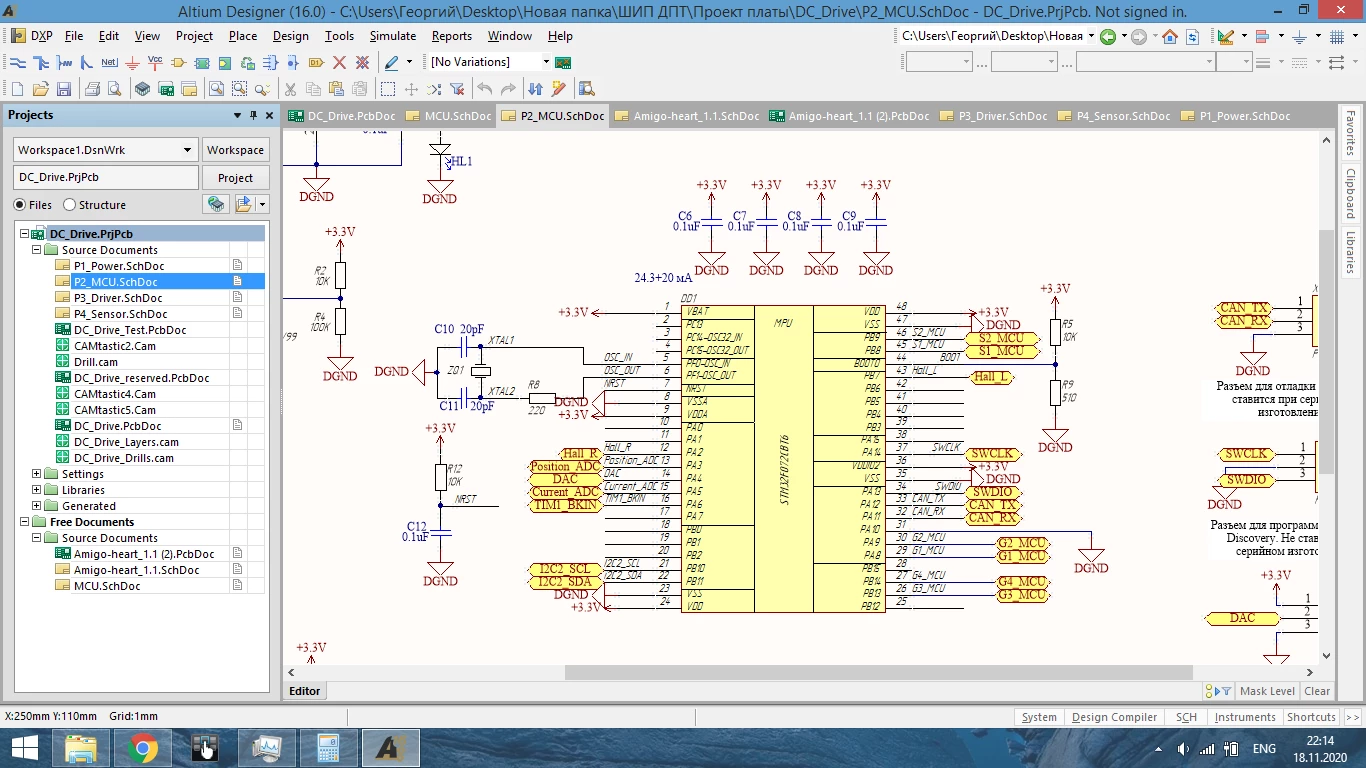
0693W000005BrtkQAC.pngHi everyone! I faced with a problem, when I was trying to start debugin process. I connected my PCB with STM32f072C8T6 to PC, downloaded a programm. It was successfuly done. Then I tryed to start debug mode, but IDE showed the next message: "no source available for " "". MCU has connection showed on the first picture. I think, problem is in hardware part, because I have similar PCB which works fine. Unfortunatly, I can't define what is wrong.

Thanks

This topic has been closed for replies.
Best answer by TDK

Schematic looks good as far as I can tell.

Coocox was abandoned before SW4STM32 was even started, which is now also abandoned. Coocox was also never particular stable. Migrate to a better supported IDE and the problem will likely go away. STM32CubeIDE is the best free option. Of course if it works for one board and not another, could be a hardware issue. Check for good solder connections, stable power rail, no bridges, etc.

5 replies

KnarfB
Super User
November 18, 2020

"no source available ..." could also be a debug settings issue. What debugger/IDE? How is the ST-LINK connected?

Try to connect using STM32CubeProgrammer. The typical message is "Error: No STM32 target found!" when the target does not respond.

GKlim
GKlimAuthor
Associate II
November 18, 2020

I am usign Coocox . ST-LINK is connected trought SWD-connector. Target actually responds (I outputed periodic impulse on a pin and i saw it on oscolloscope)

These are debug settings0693W000005BsFWQA0.png

KnarfB
Super User
November 18, 2020

You could lower the SWD clock significantly to rule out weak connections. I don't know Coocox, sorry. Try the STM32CubeProgrammer for double checking the connection.

TDK
TDKBest answer
Super User
November 18, 2020

Schematic looks good as far as I can tell.

Coocox was abandoned before SW4STM32 was even started, which is now also abandoned. Coocox was also never particular stable. Migrate to a better supported IDE and the problem will likely go away. STM32CubeIDE is the best free option. Of course if it works for one board and not another, could be a hardware issue. Check for good solder connections, stable power rail, no bridges, etc.

"If you feel a post has answered your question, please click ""Accept as Solution""."
GKlim
GKlimAuthor
Associate II
November 19, 2020

I have tried to download and debug empty project created in CubeIDE. Everything works fine. Now I'm thinking how to quickly import my code from Coocox to Cube.