


FTORR
Associate
October 16, 2020
Question

Can´t update STM32CubeIDE to 1.4.2
  • October 16, 2020
  • 6 replies
  • 3045 views

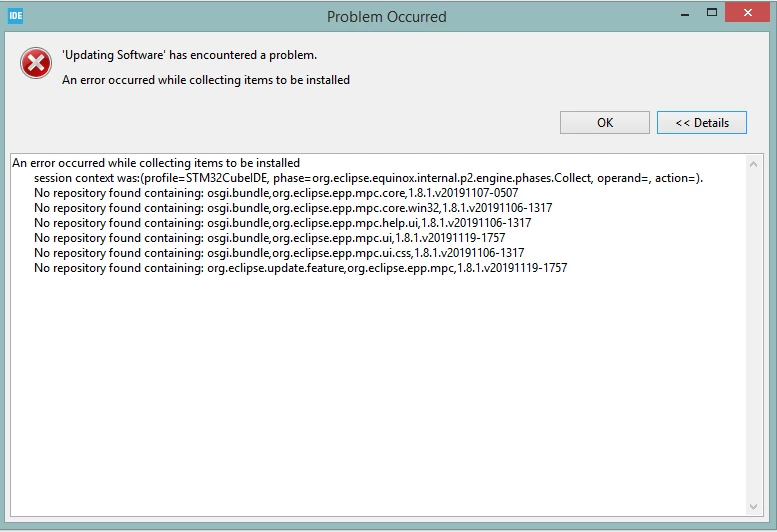
0693W000004JzrvQAC.pngHello,

I am trying to update my current installation (1.1.0) to 4.1.2, but CubeIDE throws this message every time.

I have looked for similar problems in the forum, but seems like no one has had this issue, and I don´t know how to solve it. Anyone could please help?

This topic has been closed for replies.

6 replies

Julien D
ST Employee
October 16, 2020

Hello FTORR,

This has already be treated in another topic: https://community.st.com/s/question/0D50X0000ByuFvZSQU/stm32cubeide-update-not-working

You have to check if the EPP Marketplace Client update-site URL exists in Window > Preferences > Install/Update > Available Software Sites, and if so uncheck or remove it. Then try again.

To give better visibility on the answered topics, please click on Accept as Solution on the reply which solved your issue or answered your question.
FTORR
FTORRAuthor
Associate
October 16, 2020

Hello Julien,

Thank you for your support and sorry but couldn´t find that post before asking. I have done it and that message does not appear anymore, but the update is still failing, now showing this.0693W000004K2bZQAS.pngAny suggestion?

Julien D
ST Employee
October 16, 2020

Looks like the update failed during install phase because of incomplete module, an about.ini file is missing...

Does this issue is reproducible when launching again the update?

If yes, and only if, you could try to rename C:\ST\STM32CubeIDE\plugins\com.st.stm32cube.ide.mcu.externaltools.cubeprogrammer.win32_1.4.0.202007081208 to C:\ST\STM32CubeIDE\plugins\com.st.stm32cube.ide.mcu.externaltools.cubeprogrammer.win32_1.4.0.202007081208.backup.

And relaunch the update to download again this broken module.

Another thing to verify is your free disk space. Better to have more than 2Go to update from 1.1.0 to 1.4.2. At the end it will not use all this space, update just requires more temporary space to fetch and apply stuff safely.

To give better visibility on the answered topics, please click on Accept as Solution on the reply which solved your issue or answered your question.
FTORR
FTORRAuthor
Associate
October 19, 2020

Hi Julien. Yes, it happened even if retrying to update. Now, after renaming that folder, it complains that cannot open it with this new error (even if retrying the update):0693W000004KBdeQAG.png

FTORR
FTORRAuthor
Associate
October 21, 2020

Anyone can help please? I have tried to solve it myself but still I am not able to update. I´d prefer to use an ST microcontroller for the product, but updating CubeIDE is a must now.

FTORR
FTORRAuthor
Associate
October 21, 2020

Looking for a solution, I have found this thread:

https://community.st.com/s/question/0D53W00000FPIt3SAH/bug-stlink-firmware-verification-no-stlink-detected-message-since-14x-update

I will stay on 1.1.0 for some more time, and not update until this issue is resolved in future releases.

Thanks for the support.