


SSmit.13
Senior
August 2, 2023
Question

'Autostart local GDB Server' not working

  • August 2, 2023
  • 2 replies
  • 2676 views

Hi

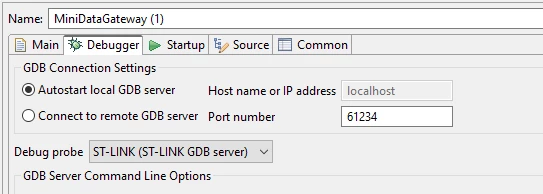
  I have been having issues in my STM32CubeIDE V1.13.1 , where the st-link couldnt be found. I finally found found the issue . In the below,  if I select  'AutoStart local GDB Server' , then I get the message 'st-link not found' . But if I run the GDB server manually, and select 'Connect to remote GDB Server' and set 'IP address' to my machine it works. Can someone let me know how I can get 'Autostart .. ' to work?

Many Thanks

Scott
SSmit13_0-1691007623417.png

Best Regards

Scott

    This topic has been closed for replies.

    2 replies

    Technical Moderator
    August 3, 2023

    Hello @SSmit.1313,

    Thank you for sharing the issue.

    Could you, please, provide :

    • GDB server log file by activating the option log to file as shown in the screenshot.
    • The used MCU

    SouhaibMAZHOUD_0-1691073360985.png

    Thanks,

    Souhaib.


    To give better visibility on the answered topics, please click on 'Best answer' on the reply which solved your issue or answered your question.
    SSmit.13
    SSmit.13Author
    Senior
    August 4, 2023

    Hi ,

     Many thanks for your reply.

    When I tick it, there is no log file created, just a message saying no st-link found, thats when I debug as  IDE, see below.

    SSmit13_0-1691153623876.png

    When I debug as the .elf I get :

    "Error with command: gdb --version
    Cannot run program "gdb": Launching failed"

    Regards

    Scott


    Technical Moderator
    August 8, 2023

    Hi @SSmit.13 

    Please try to update the firmware version and check debugger settings, or re-install ST-LINK server from this link : ST-LINK-SERVER - ST-LINK server software module - STMicroelectronics .

    Regards

    Souhaib

    To give better visibility on the answered topics, please click on 'Best answer' on the reply which solved your issue or answered your question.