Associate II
Nov 26, 2025 3:07 PM UTC
Solved

Autocomplete not working on IDE v2.0.0

Autocomplete is not working on v2.0.0, also didn't work on v1.19.

MacOS 15.5
Macbook Pro 16"
2,3 GHz 8-Core Intel Core i9

Any suggestions?

ST Technical Moderator
Dec 3, 2025 10:13 AM UTC

Hello @diktril 


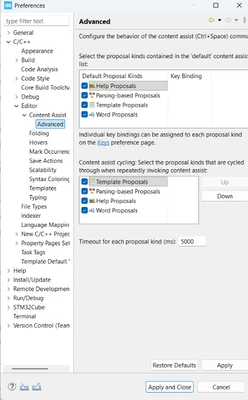
On macOS, Ctrl + Space is NOT handled by STM32CubeIDE — it is intercepted by macOS because it is the default shortcut for “Change Input Source”.

This is why Content Assist does not appear in CubeIDE.

You need to change macOS shortcut:

-   Open System Settings

-  Go to Keyboard → Keyboard Shortcuts

-  Open Input Sources

-  Disable or change the shortcut for: Select the previous input source ; Select the next input source

After disabling it, restart STM32CubeIDE and Ctrl+Space will work normally.
MahmoudBenRomdhane_0-1764756554182.png

I will be waiting for your feedback.


Thanks.

Mahmoud

To give better visibility on the answered topics, please click on Accept as Solution on the reply which solved your issue or answered your question.

6 replies

ST Technical Moderator
Nov 26, 2025 3:16 PM UTC

Hello @diktril 

Let me thank you for posting.

The same topic was reported through this Post.

Thanks.

Mahmoud

To give better visibility on the answered topics, please click on Accept as Solution on the reply which solved your issue or answered your question.
diktrilAuthor
Associate II
Nov 26, 2025 3:21 PM UTC

Hello @Mahmoud Ben Romdhane - same issue with v1.19

TDK
Nov 26, 2025 3:32 PM UTC

Does the project build successfully?

"If you feel a post has answered your question, please click ""Accept as Solution""."
diktrilAuthor
Associate II
Nov 27, 2025 9:47 AM UTC

Builds successfully.

ST Technical Moderator
Dec 3, 2025 10:13 AM UTC

Hello @diktril 


On macOS, Ctrl + Space is NOT handled by STM32CubeIDE — it is intercepted by macOS because it is the default shortcut for “Change Input Source”.

This is why Content Assist does not appear in CubeIDE.

You need to change macOS shortcut:

-   Open System Settings

-  Go to Keyboard → Keyboard Shortcuts

-  Open Input Sources

-  Disable or change the shortcut for: Select the previous input source ; Select the next input source

After disabling it, restart STM32CubeIDE and Ctrl+Space will work normally.

MahmoudBenRomdhane_0-1764756554182.png

I will be waiting for your feedback.


Thanks.

Mahmoud

To give better visibility on the answered topics, please click on Accept as Solution on the reply which solved your issue or answered your question.
diktrilAuthor
Associate II
Dec 4, 2025 11:24 AM UTC

Don't know what caused this setting to change. Working. Thanks.
