JBee.1
Associate II
October 17, 2020
Solved

Anyone know how to resolve a "fail to get required stm32cube firmware package" error when importing a new project?

  • October 17, 2020
  • 10 replies
  • 5825 views

I tried importing a project using STM32CubeIDE V1.4 and got the following error:

I tried doing package updates and everything I could think of but I wasn't able to figure out how to resolve this (tried googling/forum searching it but no luck). Anyway, if anyone has any suggestions, that would be awesome. Thanks!

This topic has been closed for replies.
Best answer by Cartu38 OpenDev

@JBee.1​ correct me if I' wrong but sounds here you're not importing one of your project but a STM32Cube example project.

Assuming such is correct ... I'm facing same as you.

Weird stuff is selecting a WB example 1.9.0 pack is required:
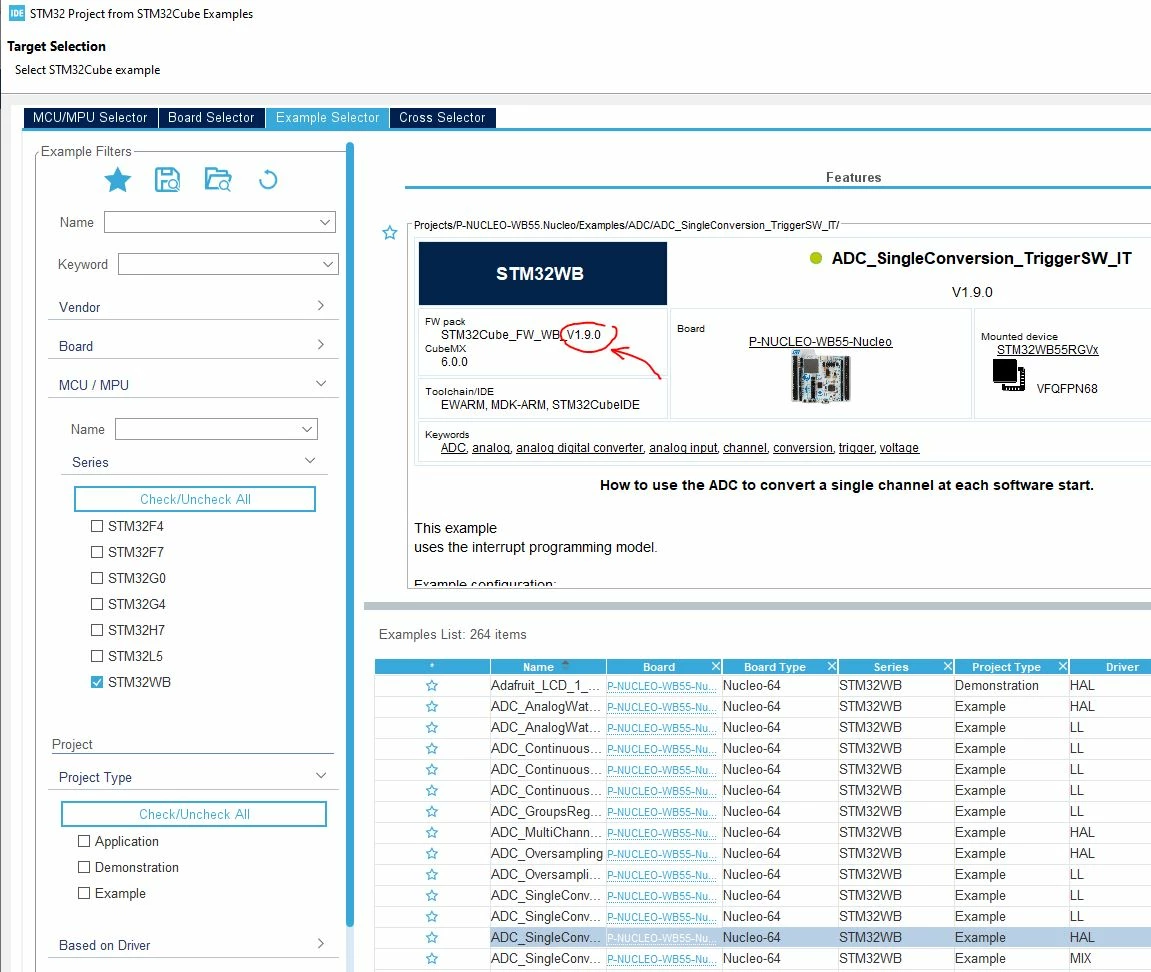
0693W00000598lOQAQ.jpg 

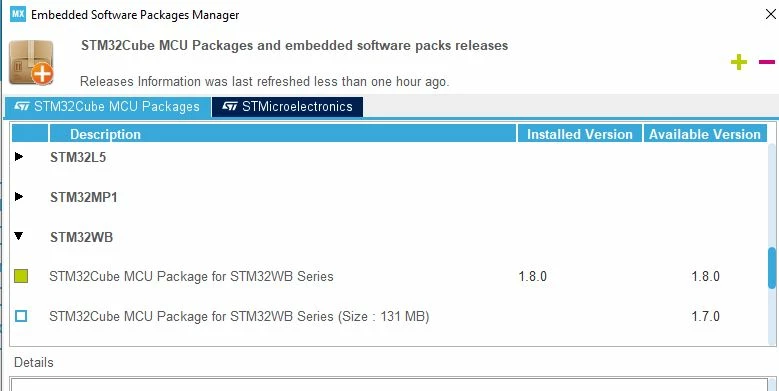
But such 1.9.0 pack sounds unknown

0693W00000598n4QAA.jpg 

I guess @ST has to get a look at ...

In the meantime I may promote a work around to you. Please login to www.st.com. Then move to https://my.st.com/content/my_st_com/en/products/embedded-software/mcu-mpu-embedded-software/stm32-embedded-software/stm32cube-mcu-mpu-packages/stm32cubewb.html

Here you will be able to get back 1.9.0 WB pack .zip file. Extract it within our <user home>/STM32Cube/Repository folder.

Have a we try then to import your example relying on 'File > Open Project From File System' pointing to related STM32CubeIDE folder.

EARLY WARNING: moving this way you're able to play with your example project but takes care importing following such process is not promoting you same service as ST's example import feature.

Here your example project will remain local to your WB pack. ST's example import feature is doing a local copy of for you under the hood what's much better according to me. PS: Don't have a try to use Eclipse native project copy here ... as will not work considering ST's example are heaviy relying on hyperlinks usage what Eclipse is not so good about.


10 replies

KnarfB
Super User
October 18, 2020

Thats probably due to a broken download / bad internet connection. Use the firmware updates to manually delete and re-install the package. There are also options to download manually and install the package later. If everything else fails, you find the downloaded packages under STMCube in your home (%USERPROFILE%) folder.

JBee.1
JBee.1Author
Associate II
October 23, 2020

@KnarfB​ 

So, I originally installed V1.4 of STM32CubeIDE and ran into the above problem. I tried installing V1.3 as I've used that in the past on another computer and didn't have issues. Went to "check for updates" and updated to V1.4.2. I then tried to "check for target selector" and refresh and download all the files. Unfortunately, some things are failing (see screenshot below):

It's odd as I've installed the program on another computer without issue, not sure what changed here. Even tried installing as administrator to see if that made a difference but no luck.

How do I download the packages manually to install? I'm definitely interested in trying this but can't seem to find the files you're referring to to manually install them. Any information you can give would be greatly appreciated! Thanks!

And sorry for the delayed response, trying to fit personal projects on the weekend since I'm usually swamped with work during the week. Thanks for your help!

Cartu38 OpenDev
Cartu38 OpenDevBest answer
Graduate II
October 23, 2020

@JBee.1​ correct me if I' wrong but sounds here you're not importing one of your project but a STM32Cube example project.

Assuming such is correct ... I'm facing same as you.

Weird stuff is selecting a WB example 1.9.0 pack is required:

0693W00000598lOQAQ.jpg 

But such 1.9.0 pack sounds unknown

0693W00000598n4QAA.jpg 

I guess @ST has to get a look at ...

In the meantime I may promote a work around to you. Please login to www.st.com. Then move to https://my.st.com/content/my_st_com/en/products/embedded-software/mcu-mpu-embedded-software/stm32-embedded-software/stm32cube-mcu-mpu-packages/stm32cubewb.html

Here you will be able to get back 1.9.0 WB pack .zip file. Extract it within our <user home>/STM32Cube/Repository folder.

Have a we try then to import your example relying on 'File > Open Project From File System' pointing to related STM32CubeIDE folder.

EARLY WARNING: moving this way you're able to play with your example project but takes care importing following such process is not promoting you same service as ST's example import feature.

Here your example project will remain local to your WB pack. ST's example import feature is doing a local copy of for you under the hood what's much better according to me. PS: Don't have a try to use Eclipse native project copy here ... as will not work considering ST's example are heaviy relying on hyperlinks usage what Eclipse is not so good about.

burn_
Associate III
October 23, 2020

I think this may have something to do with the STM32WB packages.

I've encountered the exact same issue. I just tried refreshing the Embedded Software Packages and V1.9.0 finally showed up and can be installed (Help -> Manage Embedded Software Packages -> Refresh).

I can now import examples again. I suspect this was indeed something ST had to fix on their side.

Cartu38 OpenDev
Graduate II
October 23, 2020

Sounds ST's servers have ended their sync. I confirm I'm able too to enjoy back example import feature if WB.

@JBee.1​ ... have a new try ! ... and please tag such post as answered if ok to you ... will help community.

Extra good news is 1.9.0 pack is promoting much more examples than previous one :thumbs_up:

VReme.1
Visitor II
January 14, 2021

I had to manually create the destination directory to make it working

Cartu38 OpenDev
Graduate II
January 15, 2021

Good if solving issue. Myself I've got a try on my running environment. If destination directory does not exist STM32CubeIDE is creating it for me prior adding FW material. Any destination repository write permission issue ? Be aware there is some default but you can update by yourself destination directory.

0693W000007BNQvQAO.jpg

JSchn.4
Associate II
February 22, 2021

A new download of the installation files for CUBEMX and a new installation fixed the problem.