RHerm.3
Associate III
May 25, 2021
Solved

Adding existing source files to project

  • May 25, 2021
  • 3 replies
  • 2359 views

We are porting an existing vxWorks project to STM32. I am able to import the existing source files into a STM project, but I cannot get it to compile any of the files.

I have tried a variety of project types and always refresh the project after adding the files.

Please provide or point me to instructions for doing this.

BTW - I can successfully import examples, build and run them on a eval board.
This topic has been closed for replies.
Best answer by Cartu38 OpenDev

@TDK​ is right.

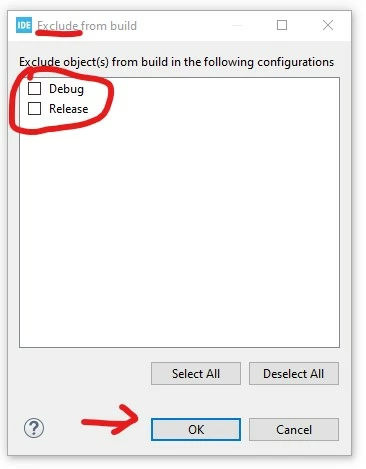
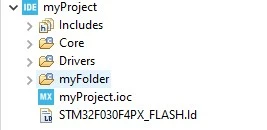
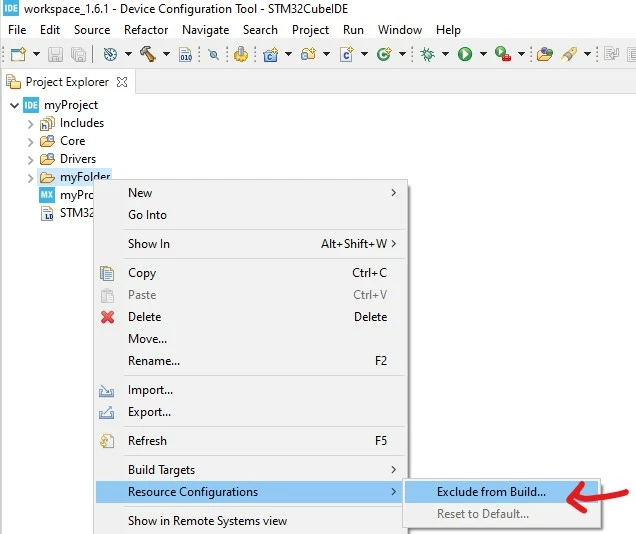
@RHerm.3​ If aiming to add your own folder instead Core/.... let's rely on project contextual menu to add source entry(ies)

0693W00000APoB4QAL.jpg 

0693W00000APoBOQA1.jpg Small "C" green overlay icon should appear as your new included folder decoration

0693W00000APoBnQAL.jpg

3 replies

TDK
Super User
May 26, 2021

Put them in a folder where other source files are. Typically, this is in Core/Src.

You can put them in a separate folder, but then you need to mark it as a source folder so they get compiled.

Header files can go anywhere in the include path. Typically, this is in Core/Inc.

"If you feel a post has answered your question, please click ""Accept as Solution""."
Cartu38 OpenDev
Cartu38 OpenDevBest answer
Graduate II
May 26, 2021

@TDK​ is right.

@RHerm.3​ If aiming to add your own folder instead Core/.... let's rely on project contextual menu to add source entry(ies)

0693W00000APoB4QAL.jpg 

0693W00000APoBOQA1.jpg Small "C" green overlay icon should appear as your new included folder decoration

0693W00000APoBnQAL.jpg

RHerm.3
RHerm.3Author
Associate III
May 26, 2021

Thank you TDK & Cartu38 - now I can import existing C files into the project and build them.