
Associate II
July 3, 2024
Solved

ADC won't start after Cube upgrade

  • July 3, 2024
  • 8 replies
  • 3824 views

Hi,

I have a project on Nucleo board with STM32U575ZIT6Q. I'm using STM32CubeIDE.

My ADC worked fine until i did this:
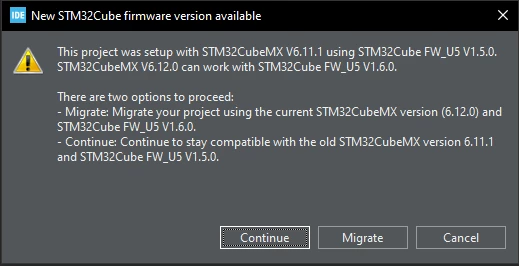
migration.PNG

After migration HAL_ADC_Start function returns error.

When I generate code I use this setting:
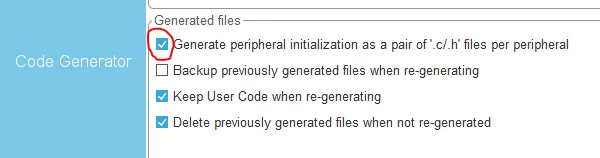
code gen.PNG

What is wierd, is that if I unselect this box, and generate code then ADC starts to work again!

Since I need to have those files separate I have to use previous Cube version.

Is there something I need to do or this is a SW bug?

Thanks.

    This topic has been closed for replies.
    Best answer by unsigned_char_array

    Found the differences:

    main() is the same and calls all functions in same order
    both projects generate a warning about the SMPS when clicking generate, instructions unclear how to solve this
    MMTAppRegionsCount differers, the "ok" has 0 regions enabled and the "nok" version has 3 regions enabled in the ioc file, but I see no difference in generated code
    ProjectManager.CoupleFile=false in the ok version, true in not ok
    MX_ADC4_Init() is the same
    MX_GPIO_Init() is the same
    MX_ICACHE_Init() is the same
    HAL_ADC_MspInit() is the same
    HAL_ADC_MspDeInit() is the same
    HAL_MspInit() DIFFERS!
    Line "HAL_PWREx_EnableVddA();" is not generated!

    To me this is a bug. You can add HAL_PWREx_EnableVddA() in the user code section and that should fix it. Please let me know if that works.

    ST needs to be aware of this. Please add bug-report tag to your start post.

    8 replies

    Ghofrane GSOURI
    ST Technical Moderator
    July 3, 2024

    Hello @S-E 

    First let me thank you for posting.

    I would appreciate it if you could share your IOC, as this will help me investigate the issue.

    THX

    Ghofrane

    To give better visibility on the answered topics, please click on Accept as Solution on the reply which solved your issue or answered your question.
    S-EAuthor
    Associate II
    July 3, 2024

    Hi,

    IOC file is here.

    Only ADC is set.

    unsigned_char_array
    Lead III
    July 3, 2024

    Compare the generated code with a diff tool (git, diffmerge, winmerge, etc.) and tell us the difference. Do you have any user code sections or is your generated code unmodified?

    "Kudo posts if you have the same problem and kudo replies if the solution works.Click ""Accept as Solution"" if a reply solved your problem. If no solution was posted please answer with your own."
    unsigned_char_array
    Lead III
    July 5, 2024

    Please upload both ioc files. I cannot compare one ioc file with itself and I cannot open the one you uploaded in V6.11.1. Upload the working one (V6.11.1) and the nonworking one (V6.12.0).

    "Kudo posts if you have the same problem and kudo replies if the solution works.Click ""Accept as Solution"" if a reply solved your problem. If no solution was posted please answer with your own."
    S-EAuthor
    Associate II
    July 7, 2024

    Hi,

    Files are here.

    Both should be V6.12.0.

    unsigned_char_array
    Lead III
    July 8, 2024

    Found the differences:

    main() is the same and calls all functions in same order
    both projects generate a warning about the SMPS when clicking generate, instructions unclear how to solve this
    MMTAppRegionsCount differers, the "ok" has 0 regions enabled and the "nok" version has 3 regions enabled in the ioc file, but I see no difference in generated code
    ProjectManager.CoupleFile=false in the ok version, true in not ok
    MX_ADC4_Init() is the same
    MX_GPIO_Init() is the same
    MX_ICACHE_Init() is the same
    HAL_ADC_MspInit() is the same
    HAL_ADC_MspDeInit() is the same
    HAL_MspInit() DIFFERS!
    Line "HAL_PWREx_EnableVddA();" is not generated!

    To me this is a bug. You can add HAL_PWREx_EnableVddA() in the user code section and that should fix it. Please let me know if that works.

    ST needs to be aware of this. Please add bug-report tag to your start post.

    "Kudo posts if you have the same problem and kudo replies if the solution works.Click ""Accept as Solution"" if a reply solved your problem. If no solution was posted please answer with your own."
