

ST-LINK GDB server never starts from VS Code extension: bundled config.txt ships with -cp placeholder
Summary: With the STM32Cube VS Code extension (3.9.0, bundle-based), launching a default stlinkgdbtarget debug configuration fails with a GDB timeout and no visible server error. Root cause found: the extension does not pass the CubeProgrammer path when spawning the bundled ST-LINK_gdbserver, which then dies parsing its factory config.txt (the -cp line still contains the literal placeholder). Two workarounds verified below. Question: is the automatic path resolution expected to work for classic CubeMX CMake projects, or is this a bug?
[Part Number] STM32H753ZITx (NUCLEO-H753ZI, on-board STLINK-V3)
[Environment]
- STM32CubeIDE for VS Code extension 3.9.0 (bundle-manager based), Windows
- Project: classic STM32CubeMX 6.16 generated CMake project (not CubeMX2)
- Bundles under
%LOCALAPPDATA%\stm32cube\bundles: stlink-gdbserver 7.12.0+st.2 and 7.13.0+st.3; programmer 2.21.0 and 2.22.0+st.1
[Details — symptoms]
F5 on the default configuration fails with:
bound doStepConnectToTarget Failed: Remote replied unexceptedly to 'vMustReplyEmpty': timeout
With serverRtos enabled, additionally: RTOS proxy: cube has exited with code 4294967295. No GDB-server error appears anywhere in VS Code. In the "STM32Cube Debug Core" output channel, probe discovery at startup succeeds (1 Device, OPEN_DEVICE, STLINKV3 v3J15M7), but after the debugging <elf> line no further OPEN_DEVICE ever appears — the GDB server never comes up.
Running the bundled server manually exposes the actual error, which the extension swallows:

Note --help -cp <valid path> produces the same error — the server dies on config parsing before honoring the command line.
[Expected behavior]
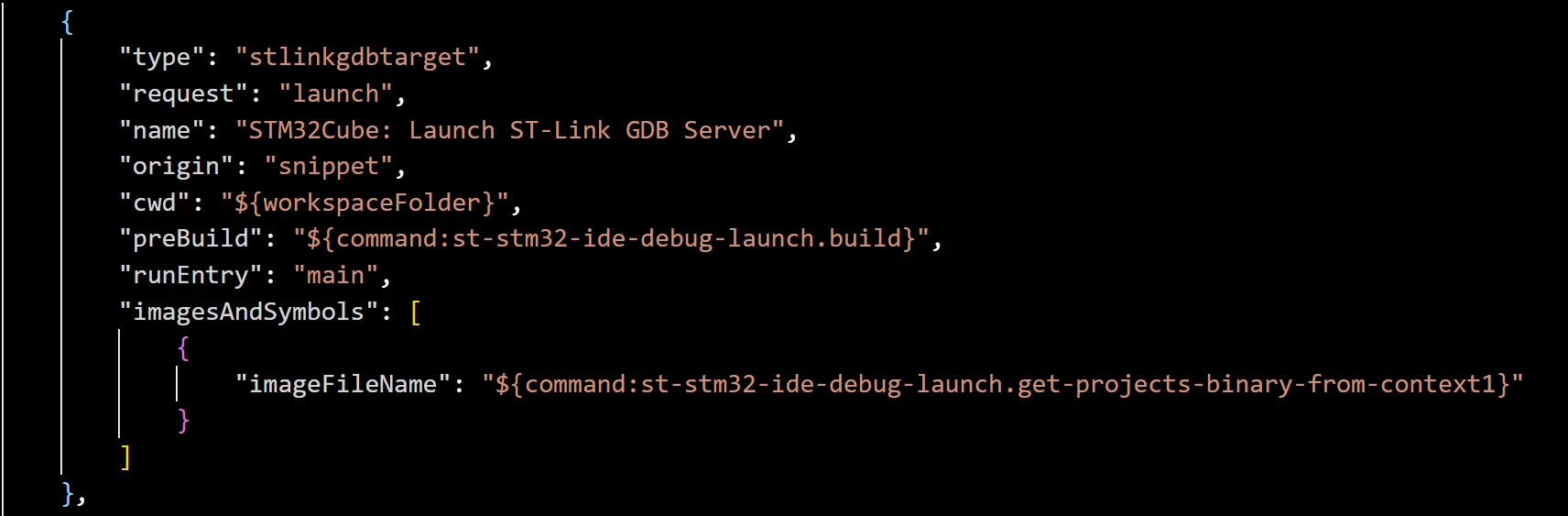
The default snippet generated by "Add Configuration… → STM32Cube: Launch ST-Link GDB Server" contains no programmer-path field, so the extension is expected to resolve and pass the CubeProgrammer path automatically when spawning the server.
[How to reproduce]
- Classic CubeMX CMake project, extension 3.9.0, bundles as above
- Add Configuration… → "STM32Cube: Launch ST-Link GDB Server" (unmodified default snippet)
- F5 → timeout as above; Debug Core log shows no OPEN_DEVICE after "debugging …elf"
- Run
ST-LINK_gdbserver.batmanually from the bundle bin → placeholder error
[Occurrence] Systematic (every launch), until either workaround is applied.
[Sanity checks / already verified]
- Probe, USB, firmware and target are healthy
- ST-LINK firmware upgraded to the version required by gdbserver 7.13 (it refuses older firmware with a clear message — unrelated to this issue, mentioned for completeness)
- No competing process holding the probe (stlinkserver checked/killed, all ST GUIs closed)
- Workaround 1 (verified): add
"serverCubeProgPath": "${command:st-stm32-ide-debug-launch.get-programmer-path}"to the launch configuration → debugging works, including RTOS-aware viaserverRtos. Notably this command variable resolves correctly when written explicitly. - Workaround 2 (verified): edit the bundle's
config.txt, replacing the placeholder with correct path to directory containing STM32_Programmer_CLI executable
[Questions]
- Since
get-programmer-pathresolves when explicit, why is the implicit resolution not applied for the default snippet? Is a classic (non-CubeMX2) CMake project fully supported by this flow? - Suggestion: ship the bundle with a resolved
config.txt, or addserverCubeProgPathto the default snippet, or have the server emit a distinct error for placeholder paths. - Suggestion: forward the GDB server's startup stderr to the DEBUG CONSOLE — the diagnostic was clear but invisible; users only see downstream protocol timeouts.