This topic has been closed for replies.
mattias norlander
ST Technical Moderator
Jan 7, 2025 8:17 AM UTC

Hi @Kilian Nötzold ,

Currently the closest match in VS Code world is the "Peripheral view". It is an open-source view which reads an CMSIS svd-file and displays the content. It is a bit primitive. And it can only load one svd-file at a time.

The various registers in an STM32 MCU is split into two categories: 

  • Arm core IPs
  • STM32 peripheral IPs

Normally we load the:

C:\ST\STM32CubeCLT_1.16.0\STMicroelectronics_CMSIS_SVD\STM32F407.svd

If you want to see the Arm core IPs like NVIC, then instead load the:

C:\ST\STM32CubeCLT_1.16.0\STMicroelectronics_CMSIS_SVD\Core\Cortex-M4.svd

Which file that is loaded is part of the MyProject\.vscode\launch.json.


This is a limitation in the VS Code debug support for now. We will try to fix this later on the roadmap.

In order to give better visibility on the answered topics, please click on 'Best answer' on the reply which solved your issue or answered your question.

4 replies

Nawres GHARBI
ST Technical Moderator
Jan 6, 2025 10:58 AM UTC

Hi @Kilian Nötzold  

This view is available on STM32CubeMX, not possible to GUI edit the project config in the extension

Kilian Nötzold
Associate III
Jan 6, 2025 11:54 AM UTC


Hi @Nawres GHARBI

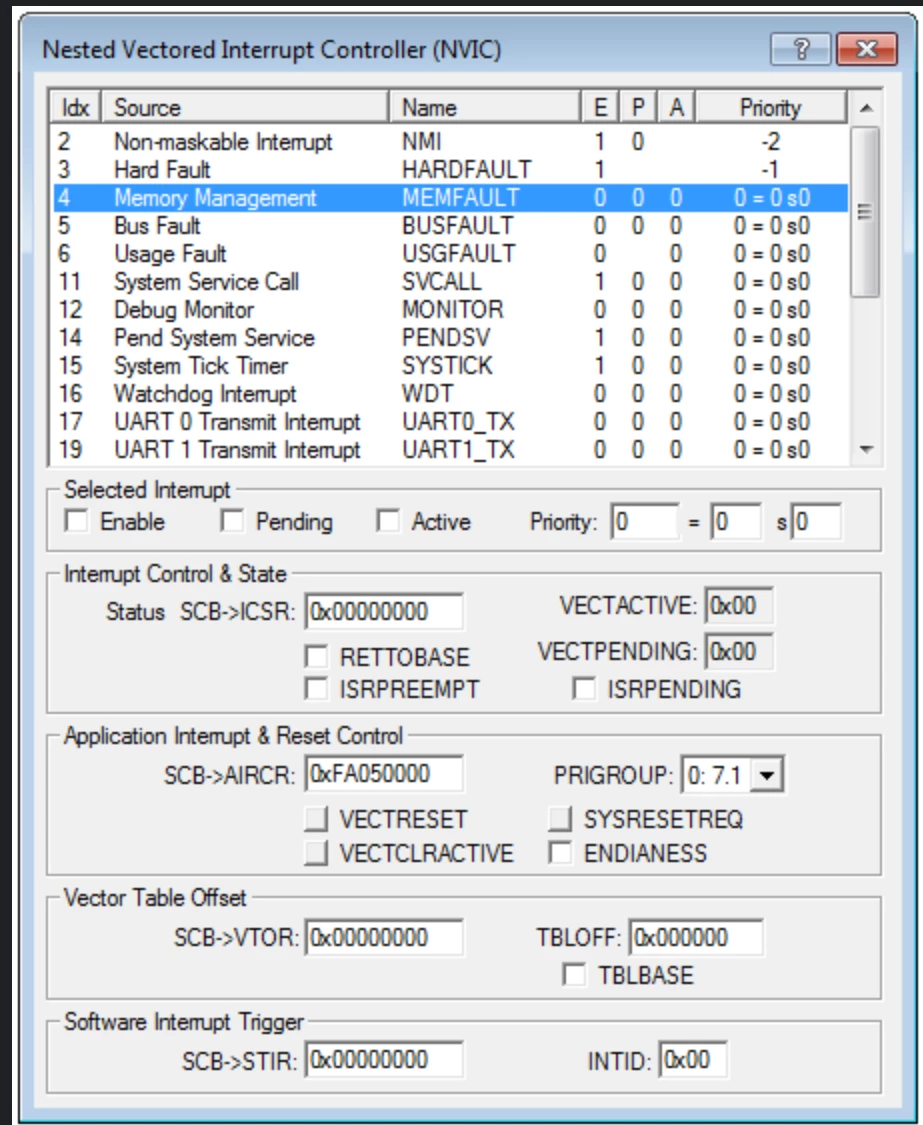
Thanks for looking into this. The view is a debug view available during dubbugging. To see the active/pending IRQs. It is not used for configuring the NVIC, I think STM32CubeMX is only used for offline register configuartion, not while debugging.

The register view in the debugger only shows the peripheral registers as the SVD files supplied by ST do not contain the core registers.

mattias norlander
ST Technical Moderator
Jan 7, 2025 8:17 AM UTC

Hi @Kilian Nötzold ,

Currently the closest match in VS Code world is the "Peripheral view". It is an open-source view which reads an CMSIS svd-file and displays the content. It is a bit primitive. And it can only load one svd-file at a time.

The various registers in an STM32 MCU is split into two categories: 

  • Arm core IPs
  • STM32 peripheral IPs

Normally we load the:

C:\ST\STM32CubeCLT_1.16.0\STMicroelectronics_CMSIS_SVD\STM32F407.svd

If you want to see the Arm core IPs like NVIC, then instead load the:

C:\ST\STM32CubeCLT_1.16.0\STMicroelectronics_CMSIS_SVD\Core\Cortex-M4.svd

Which file that is loaded is part of the MyProject\.vscode\launch.json.


This is a limitation in the VS Code debug support for now. We will try to fix this later on the roadmap.

In order to give better visibility on the answered topics, please click on 'Best answer' on the reply which solved your issue or answered your question.
Kilian Nötzold
Associate III
Jan 7, 2025 3:47 PM UTC

Thanks for pointing out the core SVD files. I had no idea they existed. Maybe I will develop a specific NVIC view.