Hi Visques,
The attribute serverJtagCfg will be available in the next delivery (planned for the end of November).
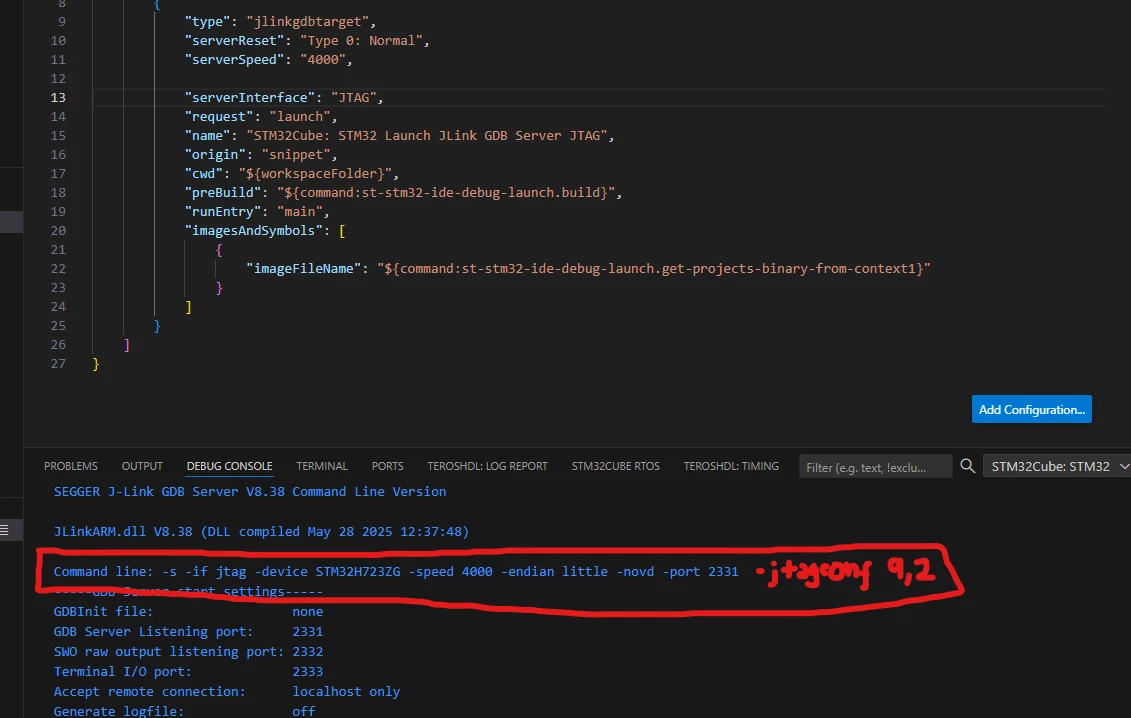
In the meantime, you can use the generic debug configuration to pass the -jtagconf argument in the serverParameters attribute.
Ex:
 {
 "type": "stgdbtarget",
 "request": "launch",
 "name": "STM32Cube: STM32 Launch Generic GDB Server",
 "origin": "snippet",
 "cwd": "${workspaceFolder}",
 "preBuild": "${command:st-stm32-ide-debug-launch.build}",
 "program": "${command:st-stm32-ide-debug-launch.get-projects-binary-from-context1}",
 "gdb": "${command:st-stm32-ide-debug-launch.get-gdb-executable}",
 "serverExe": "JLinkGDBServerCL",
 "serverParameters": ["-s", "-if", "jtag", "-device", "STM32H723ZG", "-speed", "4000", "-endian", "little", "-novd", "-jtagconf", "9,2"],
 "serverHost": "localhost",
 "serverPort": "2331",
 "serverCwd": "<Path to your JLink installation>",
 "runEntry": "main",
 "imagesAndSymbols": [
 {
 "imageFileName": "${command:st-stm32-ide-debug-launch.get-projects-binary-from-context1}",
 "imageOffset": "",
 "symbolFileName": "${command:st-stm32-ide-debug-launch.get-projects-binary-from-context1}",
 "symbolOffset": ""
 }
 ],
 "verbose": true
 },
(Note: Update the serverCwd attribute with your path)
Best Regards,
Flo
To give better visibility on the answered topics, please click on Accept as Solution on the reply which solved your issue or answered your question.