

Associate III
June 10, 2026
Solved

Cannot debug JTAG device with address 45,10

  • June 10, 2026
  • 6 replies
  • 108 views

Hi,

I have a system with 11 STM32 in a single JTAG chain. I’m trying to debug device with JTAG address 10,45 (JTAG device position 10, IR -pre-length of 45) and I’m getting this error message when running my launch configuration:
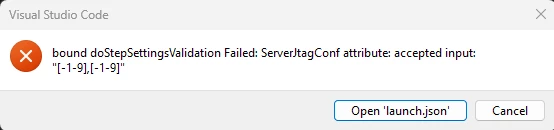
This is my entry in launch.json, my probe is a J-link:

{
            "type": "jlinkgdbtarget",
            "request": "launch",
            "name": "JTAG Launch Dev 10",
            "origin": "snippet",
            "cwd": "${workspaceFolder}",
            "preBuild": "${command:st-stm32-ide-debug-launch.build}",
            "runEntry": "main",
            "serverInterface": "JTAG",
            "serverJtagCfg": "45,10",
            "imagesAndSymbols": [
                {
                    "imageFileName": "${command:st-stm32-ide-debug-launch.get-projects-binary-from-context1}"
                }
               
            ]
        },
 
Debugging device 0,0 on the same chain works (has similar firmware written on STM32Cube extension for VSCode) from STM32CubeIDE extension for VSCode.
 
With the exception of 0,0 and 10,45, all other devices have been programmed and debugged from STM32CubeIDE 1.18 and they work. J-link commander can also correctly connect to all devices. This makes me suspect that the problem is within the STM32CubeIDE extension (maybe just limiting the numbers too much?).
 
Maybe I’m doing something wrong? I’ll be happy to provide extra information.
 
Thanks

Best answer by Florent V

Hi ​@Visques,


Indeed, the error is on our side.

Our step for validating the attributes is too aggressive and does not allow values above 10.

In the meantime, the simplest workaround is to launch J-Link from the command line and use the "attach" request to connect to the server.
Sorry for the inconvenience.


The attach debug configuration should look like this :

        {
"type": "jlinkgdbtarget",
"request": "attach",
"name": "STM32Cube: Launch JLink GDB Server",
"origin": "snippet",
"cwd": "${workspaceFolder}",
"preBuild": "${command:st-stm32-ide-debug-launch.build}",
"runEntry": "main",
"imagesAndSymbols": [
{
"imageFileName": "${command:st-stm32-ide-debug-launch.get-projects-binary-from-context1}"
}
],
"serverHost": "localhost",
"serverPort": "2331"
},

 Kind Regards,

/Flo

6 replies

Florent V
Florent VBest answer
ST Employee
June 11, 2026

Hi ​@Visques,


Indeed, the error is on our side.

Our step for validating the attributes is too aggressive and does not allow values above 10.

In the meantime, the simplest workaround is to launch J-Link from the command line and use the "attach" request to connect to the server.
Sorry for the inconvenience.


The attach debug configuration should look like this :

        {
"type": "jlinkgdbtarget",
"request": "attach",
"name": "STM32Cube: Launch JLink GDB Server",
"origin": "snippet",
"cwd": "${workspaceFolder}",
"preBuild": "${command:st-stm32-ide-debug-launch.build}",
"runEntry": "main",
"imagesAndSymbols": [
{
"imageFileName": "${command:st-stm32-ide-debug-launch.get-projects-binary-from-context1}"
}
],
"serverHost": "localhost",
"serverPort": "2331"
},

 Kind Regards,

/Flo

To give better visibility on the answered topics, please click on Accept as Solution on the reply which solved your issue or answered your question.
VisquesAuthor
Associate III
June 11, 2026

Thanks a lot for the quick reply. In the end I found a hardware workaround with minimal rework. Would this be fixed in a future update?

Florent V
ST Employee
June 12, 2026

Yes,
an internal ticket has been created, the fix is in progress and will be available in the next release.

BR,
/Flo

To give better visibility on the answered topics, please click on Accept as Solution on the reply which solved your issue or answered your question.
VisquesAuthor
Associate III
June 12, 2026

Great, thanks so much!

ST Employee
July 21, 2026

@Visques 
The July update of STM32CubeIDE for Microsoft Visual Studio Code resolves this issue. Update the local setup to benefit from this improvement.

To give better visibility on the answered topics, please click on Accept as Solution on the reply which solved your issue or answered your question.
VisquesAuthor
Associate III
July 21, 2026

Working great, thanks so much for the quick turnaround.