


t_j_l
Associate II
March 11, 2026
Solved

After upgrading to version 3.8.0, the code formatting function is no longer usable.

After upgrading STM32CubeIDE for Visual Studio Code to version 3.8.0, the code formatting function is no longer available. Currently, while writing the code and entering ";", the formatting feature is not functioning. When saving the code, the code will not be automatically formatted; both "Format on Save" and "Format On Type" in the settings have been checked.
r8l8pinipBest answer
Visitor II
March 11, 2026

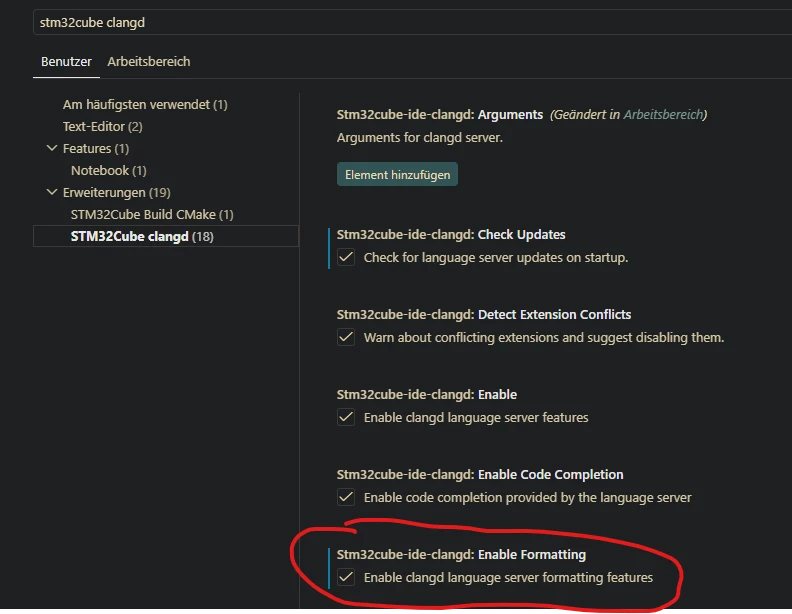
It seems they've introduced a new setting for the clangd extension that controls formatting. It's disabled by default. After enabling the option, automatic formatting started working again.

Screenshot 2026-03-11 084648.png

4 replies

r8l8pinipBest answer
Visitor II
March 11, 2026

It seems they've introduced a new setting for the clangd extension that controls formatting. It's disabled by default. After enabling the option, automatic formatting started working again.

Screenshot 2026-03-11 084648.png

t_j_l
t_j_lAuthor
Associate II
March 12, 2026

That's exactly the case.

Associate III
March 14, 2026

It tripped me up too as it wasn't very explicit in the release notes.

Thankfully, I stumbled onto this and updated our project's ".vscode/settings.json" to handle this auto-magically.


Cartu38 OpenDev
Graduate II
March 16, 2026

@t_j_l @Suess @r8l8pinip 
Related to https://community.st.com/t5/stm32cubeide-for-visual-studio/code-formatting-style/m-p/853625#M1407

Some were complaining about formating being applied ... now you're part of the ones complaining nothing happens anymore :-).
Myself I would recommend you to setup your own formatting. VS Code marketplace is promoting collection of facilities for. Have you got a try about as example of https://marketplace.visualstudio.com/items?itemName=xaver.clang-format