Associate
August 22, 2026
Solved

how to to flash stm32mp257-DK in baremetal with cube ide ?

  • August 22, 2026
  • 3 replies
  • 47 views

STM32CubeIDE


Version: 2.1.1

Build: 28236_20260312_0043 (UTC)


How can I make sense of this ?
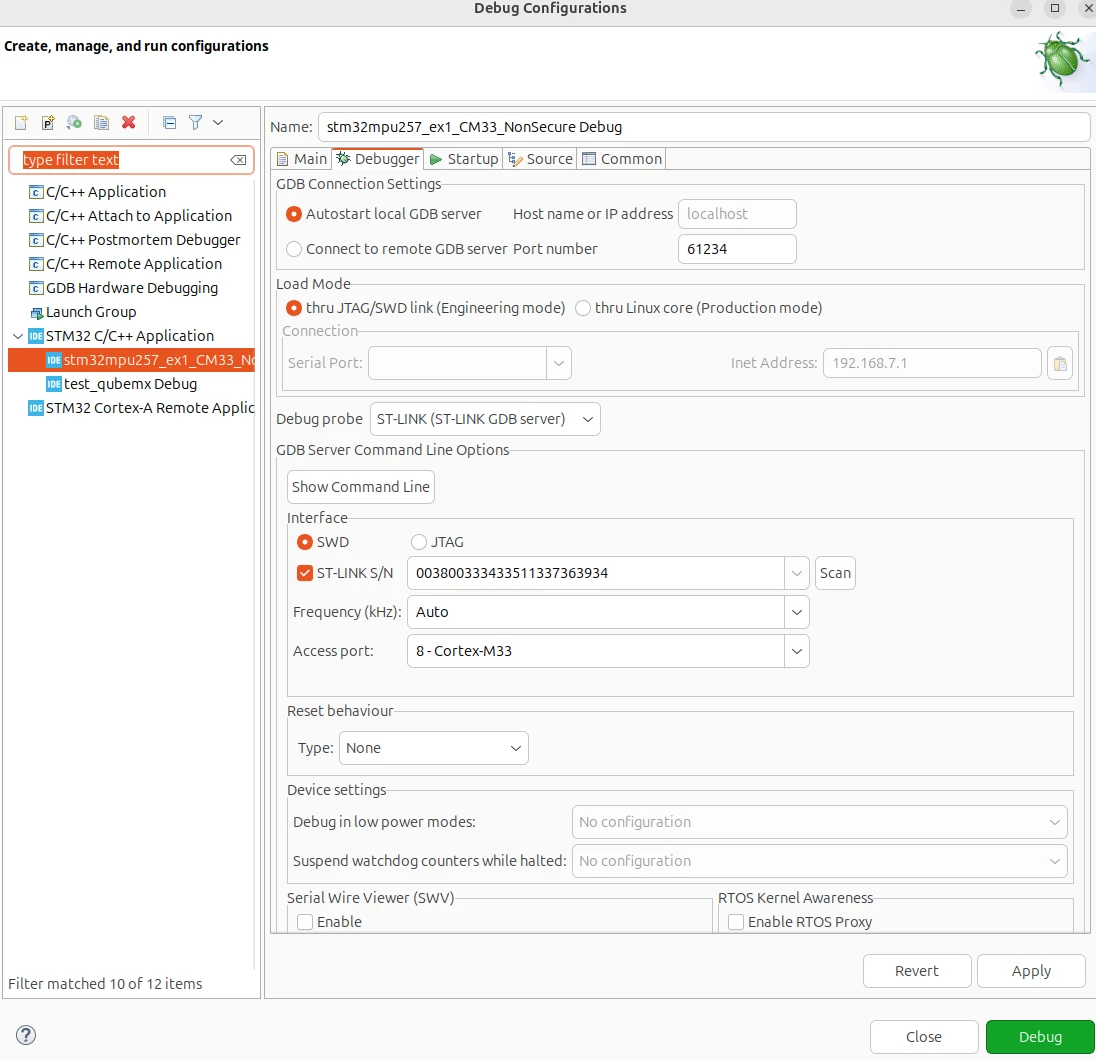
d15d4528-c856-4e43-38c0-83cde60365c9.png7dc9c675-f471-fe75-e386-114e2064fbc8.png


TMicroelectronics ST-LINK GDB server. Version 7.13.0 Copyright (c) 2026, STMicroelectronics. All rights reserved.  Starting server with the following options:
Persistent Mode
: Disabled
Logging Level
: 1
Listen Port Number
: 61234
Status Refresh Delay
: 15s
Verbose Mode
: Disabled
SWD Debug
: Enabled  Waiting for debugger connection... Debugger connected Waiting for debugger connection... Debugger connected Waiting for debugger connection...
-------------------------------------------------------------------
STM32CubeProgrammer v2.22.0
-------------------------------------------------------------------
Log output file:
/tmp/STM32CubeProgrammer_Xj0e11.log Error: Unable to connect to the target device, Access port is not valid. Encountered Error when opening /home/soham/st/stm32cubeide_2.1.1/plugins/com.st.stm32cube.ide.mcu.externaltools.cubeprogrammer.linux64_2.2.400.202601091506/tools/bin/STM32_Programmer_CLI Shutting down... Exit.


I have added the "monitor flash mass_erase" to starter as explained in this thread, 

I have set the boot switches into dev mode 0011:
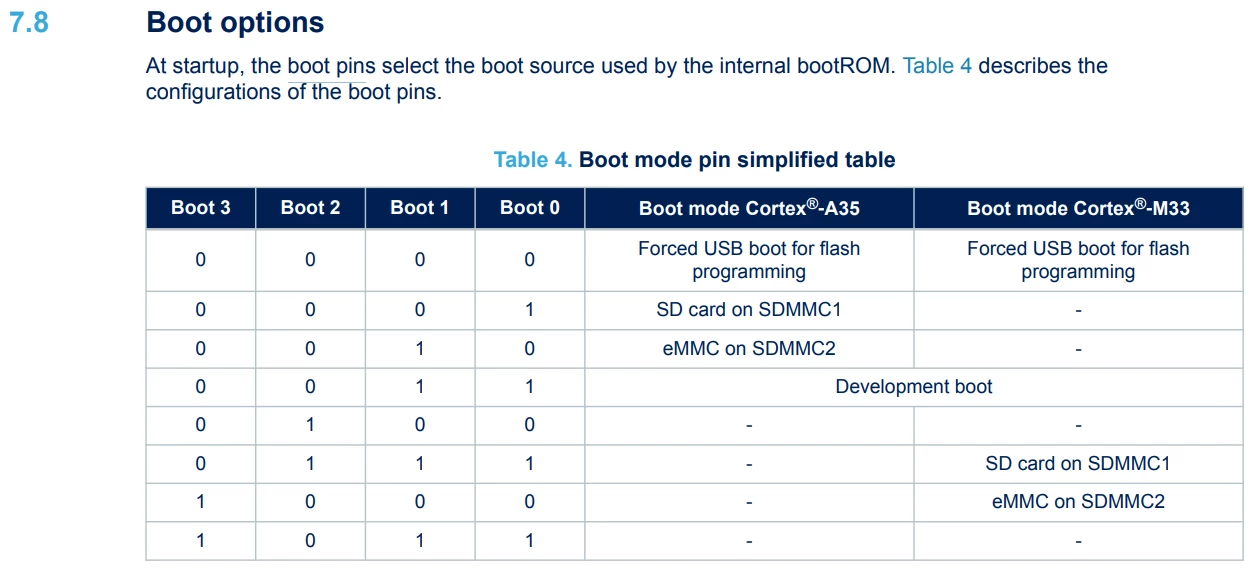
34d3ad60-0f60-72f0-40bd-defb1c26ec90.png


Best answer by PatrickF

HI  @maths  

bare-metal on cortex-A35 for STM32MP25 is not supported. It is not planned, but maybe it will come this year bare-metal support for Cortex-A35 on STM32MP21.


In any case, unlike STM32 MCUs, on STM32MP platforms, it is NOT possible to Flash (external Flash) using JTAG/SWD.


For Cortex-M33 SW, STM32MP products external Flash could be up with SSH (RJ45 or ETHoverUSB) which need to have Linux running on the platform or using USB with CubeProgrammer.

https://wiki.st.com/stm32mpu/wiki/Getting_started/STM32MP2_boards/STM32MP257x-DK/Develop_on_Arm_Cortex-M33/Modify,_rebuild_and_reload_the_firmware


Otherwise, OpenSTLinux image build with Yocto is flashed with CubeProgrammer using USB (no involvement of CubeIDE).

https://wiki.st.com/stm32mpu/wiki/Getting_started/STM32MP2_boards/STM32MP257x-DK/Let%27s_start/Populate_the_target_and_boot_the_image 


Regards.

3 replies

Duc
Senior
August 22, 2026

Hi  @maths  ,

Have you followed this tutorial: Modify, rebuild and reload the firmware - stm32mpu ?

mathsAuthor
Associate
August 22, 2026

yes, But

"STM32CubeIDE requires a connection to Linux running on an STM32MP2 device though a serial connection."

WHy is linux needed to write into flash ? isn't there an easier way of writing into flash ?

 It can't reach the board : " [Debugger]: The inet address '192.168.7.1' is not reachable."

The board does not have a default IP configured for its ethernet interface, I configured it but couldn't connect either.

I tried configuring the IP tables, I still can't ping the board.


PatrickF
PatrickFBest answer
ST Employee
August 22, 2026

HI  @maths  

bare-metal on cortex-A35 for STM32MP25 is not supported. It is not planned, but maybe it will come this year bare-metal support for Cortex-A35 on STM32MP21.


In any case, unlike STM32 MCUs, on STM32MP platforms, it is NOT possible to Flash (external Flash) using JTAG/SWD.


For Cortex-M33 SW, STM32MP products external Flash could be up with SSH (RJ45 or ETHoverUSB) which need to have Linux running on the platform or using USB with CubeProgrammer.

https://wiki.st.com/stm32mpu/wiki/Getting_started/STM32MP2_boards/STM32MP257x-DK/Develop_on_Arm_Cortex-M33/Modify,_rebuild_and_reload_the_firmware


Otherwise, OpenSTLinux image build with Yocto is flashed with CubeProgrammer using USB (no involvement of CubeIDE).

https://wiki.st.com/stm32mpu/wiki/Getting_started/STM32MP2_boards/STM32MP257x-DK/Let%27s_start/Populate_the_target_and_boot_the_image 


Regards.

In order to give better visibility on the answered topics, please click on 'Best Answer' on the reply which solved your issue or answered your question.Tip of the day: Try Sidekick STM32 AI agent